GS_Interaction
Entity interaction systems — physics-based pulse events, targeting and cursor management, and extensible world trigger actions.
GS_Interaction is the gem that connects entities to each other and to the player. It provides three distinct systems: a physics-based pulse emitter/reactor pair for broadcasting typed events through trigger volumes, a targeting subsystem that tracks and selects interact candidates relative to a cursor, and a world trigger framework that composes trigger conditions with discrete world-state actions. All three systems are designed to be extended — custom pulse types, reactor types, trigger actions, and world trigger behaviors can be registered without modifying the gem.
For usage guides and setup examples, see The Basics: GS_Interaction.
Contents
Pulsors
A physics-based event broadcast system. A PulsorComponent emits a typed pulse event when its physics trigger volume fires. PulseReactorComponents on nearby entities receive the pulse and execute their registered reactor logic. Pulse and reactor types are extensible, so any gem can contribute new pulse/reactor pairs.
Pulsors API
Targeting
A targeting and cursor management system. The Targeting Handler selects the best available interact target from registered candidates detected through proximity trigger volumes. The cursor components manage visual cursor representation on a LyShine canvas. An input reader component bridges raw player input into interaction events.
Targeting API
World Triggers
A composable trigger-action framework for world-state changes. Trigger Sensor components define the condition that fires the trigger (player interact, physics collision, save record state). World Trigger components define the effect (log a message, set a record, toggle entity activation, change stage). Any number of trigger actions can drive any number of world triggers on the same entity.
World Triggers API
Installation
GS_Interaction requires GS_Core, LmbrCentral, LyShine, and CommonFeaturesAtom to be active in your project.
- Enable GS_Interaction in Project Manager or
project.json. - Add a GS_TargetingHandlerComponent to the player entity and configure its proximity trigger.
- Add GS_CursorComponent and GS_CursorCanvasComponent to the cursor entity and link them together.
- Place TriggerSensorComponent and WorldTriggerComponent variants on any entity that should react to the world.
- Refer to the Interaction Set Up Guide for a full walkthrough.
See Also
For conceptual overviews and usage guides:
For related resources:
Get GS_Interaction
GS_Interaction — Explore this gem on the product page and add it to your project.
1 - Pulsors
Physics-based pulse emitter and reactor system — extensible typed interactions via polymorphic PulseType and ReactorType classes.
The Pulsor system is a physics-driven interaction layer. A PulsorComponent emits typed pulses when its physics trigger fires. PulseReactorComponents on other entities receive and process those pulses based on their type. The system is fully extensible — new pulse and reactor types are discovered automatically through O3DE serialization, so new interaction types can be added from any gem without modifying GS_Interaction.
For usage guides and setup examples, see The Basics: GS_Interaction.
Contents
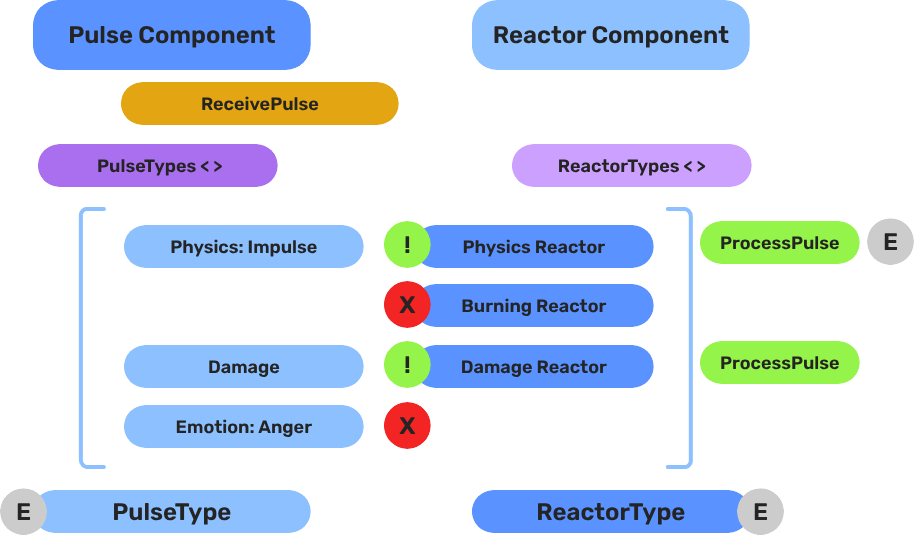
Architecture
Breakdown
When an entity enters a Pulsor’s trigger volume, the Pulsor emits its configured pulse type to all Reactors on the entering entity:
| Step | What It Means |
|---|
| 1 — Collider overlap | Physics detects an entity entering the Pulsor’s trigger volume. |
| 2 — Pulse emit | PulsorComponent reads its configured PulseType and prepares the event. |
| 3 — Reactor query | Each PulseReactorComponent on the entering entity is checked with IsReactor(). |
| 4 — Reaction | Reactors returning true have ReceivePulses() called and execute their response. |
Pulse types are polymorphic — new types are discovered automatically at startup via EnumerateDerived. Any gem can define custom interaction semantics without modifying GS_Interaction.
E Indicates extensible classes and methods.
Patterns - Complete list of system patterns used in GS_Play.
Components
PulsorComponent
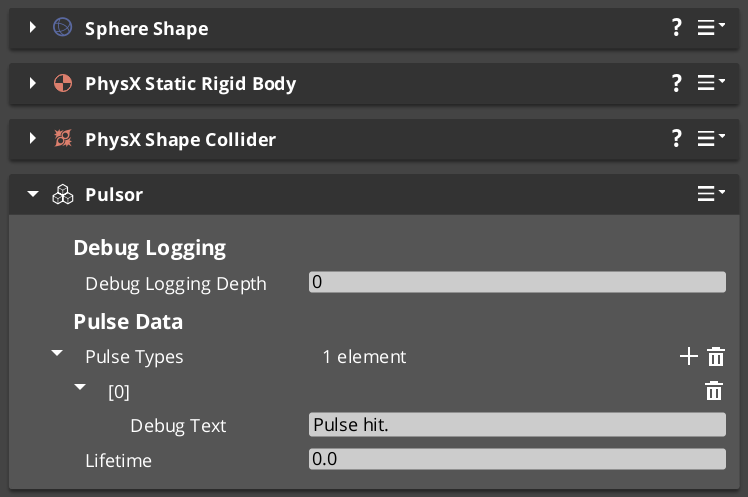
Emits typed pulses when its physics trigger fires. Extends AZ::Component and PhysicsTriggeringVolume.
| Property | Type | Description |
|---|
| Pulse Types | vector<PulseType*> | The pulse types this pulsor emits on trigger. |
The pulsor fires all configured pulse types simultaneously when an entity enters its trigger volume.
PulseReactorComponent
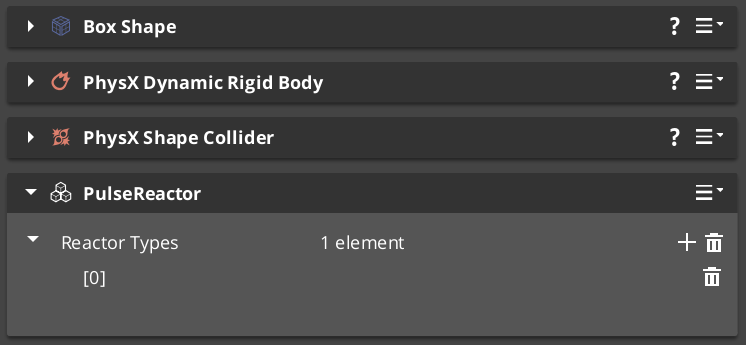
Receives and processes typed pulses from pulsors.
Bus: PulseReactorRequestBus (ById, Multiple)
| Method | Parameters | Returns | Description |
|---|
ReceivePulses | — | void | Process incoming pulse events. |
IsReactor | — | bool | Returns whether this component is an active reactor. |
Pulse Types
Pulse types define what kind of interaction a pulsor emits. All types extend the abstract PulseType base class.
| Type | TypeId | Description |
|---|
| PulseType (base) | {8A1B2C3D-4E5F-6A7B-8C9D-0E1F2A3B4C5D} | Abstract base class for all pulse types. |
| Debug_Pulse | {123D83FD-027C-4DA4-B44B-3E0520420E44} | Test and debug pulse for development. |
| Destruct_Pulse | {98EC44DA-C838-4A44-A37A-FA1A502A506B} | Destruction pulse — triggers destructible reactions. |
Pulse Types API
Reactor Types
Reactor types define how an entity responds to incoming pulses. All types extend the abstract ReactorType base class.
| Type | TypeId | Description |
|---|
| ReactorType (base) | {9B2C3D4E-5F6A-7B8C-9D0E-1F2A3B4C5D6E} | Abstract base class for all reactor types. |
| Debug_Reactor | {38CC0EA0-0975-497A-B2E5-299F5B4222F7} | Test and debug reactor for development. |
| Destructable_Reactor | {47C9B959-2A9F-4E06-8187-E32DDA3449EC} | Handles destruction responses to Destruct_Pulse. |
Reactor Types API
Extension Guide
Use the ClassWizard templates to generate new pulse and reactor classes with boilerplate already in place — see GS_Interaction Templates:
PulsorPulse — generates a new PulseType subclass with a named channel and payload stub. Supply type_display_name and type_category input vars to control how it appears in the editor dropdown.PulsorReactor — generates a new ReactorType subclass. Supply the required pulse_channel var — the channel string is baked into the header at generation time.
To create a custom pulse or reactor type manually:
- Create a class extending
PulseType (or ReactorType) with a unique RTTI TypeId. - Reflect the class using O3DE’s
SerializeContext and EditContext. The system discovers the new type automatically.
Channels are string-matched at runtime — keep the channel string consistent between the Pulse and the Reactor that receives it.
See Also
For related resources:
Get GS_Interaction
GS_Interaction — Explore this gem on the product page and add it to your project.
1.1 - Pulse Types
Built-in pulse types for the Pulsor interaction system.
Pulse types define what kind of interaction a PulsorComponent emits. Each pulse type is a data class extending the abstract PulseType base. The PulsorComponent holds an array of pulse types and emits all of them simultaneously when its physics trigger fires.
For usage guides and setup examples, see The Basics: GS_Interaction.
Component
PulsorComponent
Emits configured pulse types when its physics trigger fires. Extends AZ::Component and PhysicsTriggeringVolume.
| Field | Type | Description |
|---|
pulseTypes | vector<PulseType*> | Pulse types emitted to all PulseReactorComponent instances on any entering entity. |
All pulse types in the array fire simultaneously on a single trigger event. Configure multiple pulse types to target reactors on different channels in one emission.
Base Class
PulseType
Abstract base class for all pulse types. Not a component — discovered automatically at startup via EnumerateDerived and reflected into the editor dropdown.
| Field / Virtual | Type | Description |
|---|
TypeId | {8A1B2C3D-4E5F-6A7B-8C9D-0E1F2A3B4C5D} | RTTI identifier. Each subclass must define its own unique TypeId. |
GetChannel() | AZStd::string | Returns the channel string this pulse is sent on. Matched against reactor channel strings at runtime. |
Subclass PulseType to define custom pulse data (damage values, force vectors, status effect references) and a unique channel name.
Built-in Types
Debug_Pulse
Test and debug pulse for verifying pulsor setups during development.
| Field | TypeId |
|---|
| TypeId | {123D83FD-027C-4DA4-B44B-3E0520420E44} |
Use Debug_Reactor on the receiving entity to verify the pulse is arriving correctly.
Destruct_Pulse
Destruction pulse — triggers destructible reactions on receiving entities.
| Field | TypeId |
|---|
| TypeId | {98EC44DA-C838-4A44-A37A-FA1A502A506B} |
Pair with Destructable_Reactor on entities that should respond to destruction events.
Creating Custom Pulse Types
Use the ClassWizard PulsorPulse template to scaffold a new PulseType subclass with boilerplate already in place — see GS_Interaction Templates. Supply type_display_name and type_category input vars to control how the type appears in the editor dropdown.
To create a custom pulse type manually:
- Create a class extending
PulseType with a unique RTTI TypeId. - Override
GetChannel() to return a unique channel name string. - Add any data fields your pulse carries (damage values, force vectors, status effect references).
- Reflect the class using O3DE’s
SerializeContext and EditContext. The system discovers the type automatically via EnumerateDerived — no registration step required. - Configure
PulsorComponent instances to emit your custom pulse type.
Keep the channel string consistent between your pulse type and the reactor types that should receive it.
See Also
Get GS_Interaction
GS_Interaction — Explore this gem on the product page and add it to your project.
1.2 - Reactor Types
Built-in reactor types for the Pulsor interaction system.
Reactor types define how a PulseReactorComponent responds to incoming pulses. Each reactor type is a data class extending the abstract ReactorType base. The PulseReactorComponent holds an array of reactor types and processes all of them when a matching pulse arrives.
For usage guides and setup examples, see The Basics: GS_Interaction.
Component
PulseReactorComponent
Owns and processes reactor types when pulses arrive from PulsorComponent instances. Extends AZ::Component.
Bus: PulseReactorRequestBus (ById, Multiple)
| Field | Type | Description |
|---|
reactorTypes | vector<ReactorType*> | Reactor types evaluated and executed when a pulse is received. |
| Method | Returns | Description |
|---|
IsReactor | bool | Returns true if this component has active reactor types. The PulsorComponent checks this before calling ReceivePulses. |
ReceivePulses | void | Processes incoming pulse events. Iterates all reactor types and calls React() on types whose channel matches the incoming pulse. |
The PulsorComponent queries IsReactor() first — only components that return true have ReceivePulses() called. This allows entities with no reactor types to be skipped without iterating all types.
Base Class
ReactorType
Abstract base class for all reactor types. Not a component — discovered automatically at startup via EnumerateDerived and reflected into the editor dropdown.
| Field / Virtual | Type | Description |
|---|
TypeId | {9B2C3D4E-5F6A-7B8C-9D0E-1F2A3B4C5D6E} | RTTI identifier. Each subclass must define its own unique TypeId. |
GetChannel() | AZStd::string | Returns the channel string this reactor listens on. Matched against incoming pulse channel strings at runtime. |
React(pulse, sourceEntity) | void | Override to implement the reaction behavior when a matching pulse is received. |
Subclass ReactorType to define custom reaction behavior for a specific channel. The channel string must match the emitting PulseType’s channel exactly.
Built-in Types
Debug_Reactor
Test and debug reactor for verifying reactor setups during development. Logs a message when it receives a Debug_Pulse.
| Field | TypeId |
|---|
| TypeId | {38CC0EA0-0975-497A-B2E5-299F5B4222F7} |
Destructable_Reactor
Handles destruction responses — processes Destruct_Pulse events on the receiving entity.
| Field | TypeId |
|---|
| TypeId | {47C9B959-2A9F-4E06-8187-E32DDA3449EC} |
Add this to any entity that should respond to destruction pulses — props, breakables, or enemy characters.
Creating Custom Reactor Types
Use the ClassWizard PulsorReactor template to scaffold a new ReactorType subclass with boilerplate already in place — see GS_Interaction Templates. Supply the pulse_channel input var — the channel string is baked into the generated header at generation time.
To create a custom reactor type manually:
- Create a class extending
ReactorType with a unique RTTI TypeId. - Override
GetChannel() to return the channel name this reactor listens on. - Override
React(pulse, sourceEntity) to implement the reaction logic. - Reflect the class using O3DE’s
SerializeContext and EditContext. The system discovers the type automatically via EnumerateDerived — no registration step required. - Add the custom reactor type to
PulseReactorComponent instances on entities that should respond.
The channel string in GetChannel() must exactly match the GetChannel() return value of the PulseType you want to receive.
See Also
Get GS_Interaction
GS_Interaction — Explore this gem on the product page and add it to your project.
2 - Targeting
Target detection, selection, and cursor management — scanning, filtering, and selecting entities based on proximity and sensory fields.
The targeting system provides spatial awareness and entity selection for units and other entities. A TargetingHandler component serves as the central processor — it receives target registrations from sensory fields, maintains categorized target lists, and selects the best interact target based on proximity and type filtering. The system supports a cursor overlay for visual feedback and an input reader for triggering interactions.
For usage guides and setup examples, see The Basics: GS_Interaction.
Contents
Components
EBus Summary
Request Buses
| Bus | Address | Handler | Key Methods |
|---|
| GS_TargetingHandlerRequestBus | ById | Multiple | RegisterTarget, UnregisterTarget, RegisterInteractionRangeTarget, UnregisterInteractionRangeTarget, GetInteractTarget |
| GS_TargetRequestBus | ById | Multiple | GetTargetSize, GetTargetOffset, GetTargetColour, GetTargetSprite |
| GS_CursorRequestBus | Single | Multiple | RegisterCursorCanvas, HideCursor, SetCursorOffset, SetCursorVisuals, SetCursorPosition |
| GS_CursorCanvasRequestBus | ById | Multiple | HideSprite, SetCursorSprite |
Notification Buses
| Bus | Address | Handler | Key Events |
|---|
| GS_TargetingHandlerNotificationBus | ById | Multiple | OnUpdateInteractTarget, OnEnterStandby, OnExitStandby |
See Also
For component references:
For related resources:
Get GS_Interaction
GS_Interaction — Explore this gem on the product page and add it to your project.
2.1 - Targeting Handler
Central targeting processor — receives target registrations from sensory fields, selects best interact target, and manages cursor feedback.
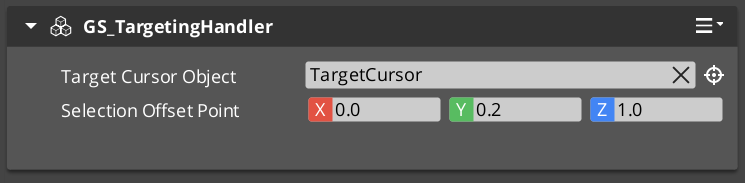
The GS_TargetingHandlerComponent is the central processor for the targeting system. It receives target registrations from sensory fields, maintains categorized lists of detected targets, and selects the best interact target based on proximity and type. It also manages cursor feedback and interaction range tracking.
For usage guides and setup examples, see The Basics: GS_Interaction.
The Targeting Handler sits on the same entity as the unit it serves (typically the player or an AI character). Sensory fields register and unregister targets as they enter and exit detection volumes. The handler evaluates all registered targets each tick to determine the closest interactable, which becomes the active interact target.
Contents
How It Works
Target Selection
Each tick, the handler runs ProcessClosestInteractable to evaluate all registered targets. It filters by type, checks interaction range, and selects the closest valid target. The result is broadcast via OnUpdateInteractTarget.
Interaction Range
A separate interaction range field provides a close-proximity subset of targets. Targets within this range are prioritized for interact selection. The range is driven by a dedicated GS_TargetingInteractionFieldComponent trigger volume.
Cursor Tracking
The handler updates the cursor position to follow the active interact target. Cursor visuals change based on target type (interact, item, unit, etc.).
API Reference
GS_TargetingHandlerRequestBus
Bus policy: ById, Multiple
| Method | Parameters | Returns | Description |
|---|
RegisterTarget | AZ::EntityId entity | bool | Registers a target entity detected by a sensory field. |
UnregisterTarget | AZ::EntityId entity | bool | Removes a target entity from the detection list. |
RegisterInteractionRangeTarget | AZ::EntityId entity | bool | Registers a target within the close interaction range. |
UnregisterInteractionRangeTarget | AZ::EntityId entity | bool | Removes a target from the interaction range list. |
GetInteractTarget | — | AZ::EntityId | Returns the current best interact target. |
GS_TargetingHandlerNotificationBus
Bus policy: ById, Multiple
| Event | Parameters | Description |
|---|
OnUpdateInteractTarget | AZ::EntityId target | Fired when the active interact target changes. |
OnEnterStandby | — | Fired when the system enters standby mode. |
OnExitStandby | — | Fired when the system exits standby mode. |
Virtual Methods
| Method | Parameters | Returns | Description |
|---|
CheckForTick | — | void | Called each tick to evaluate whether target processing should run. |
ProcessClosestInteractable | — | void | Determines the closest interactable target and sets it as the active interact target. |
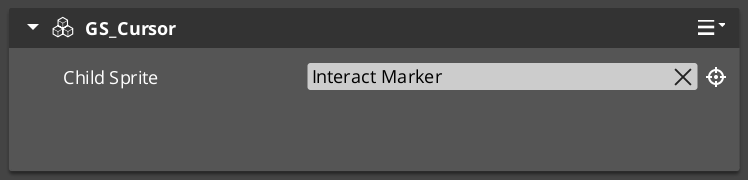
GS_CursorComponent
Manages cursor display and positioning for targeting feedback.
GS_CursorRequestBus
Bus policy: Single, Multiple
| Method | Parameters | Returns | Description |
|---|
RegisterCursorCanvas | AZ::EntityId canvas | void | Registers the UI canvas for cursor rendering. |
HideCursor | bool hide | void | Shows or hides the cursor. |
SetCursorOffset | AZ::Vector2 offset | void | Sets the screen-space offset for cursor positioning. |
SetCursorVisuals | visual data | void | Configures cursor appearance. |
SetCursorPosition | AZ::Vector2 pos | void | Sets the cursor screen position directly. |
GS_CursorCanvasComponent
UI canvas layer that renders the cursor sprite.
GS_CursorCanvasRequestBus
Bus policy: ById, Multiple
| Method | Parameters | Returns | Description |
|---|
HideSprite | bool hide | void | Shows or hides the cursor sprite element. |
SetCursorSprite | sprite data | void | Sets the cursor sprite image. |
Extension Guide
The Targeting Handler is designed for extension via companion components. Add custom targeting logic by creating components that listen to GS_TargetingHandlerNotificationBus on the same entity. Override ProcessClosestInteractable for custom target selection algorithms.
Script Canvas Examples
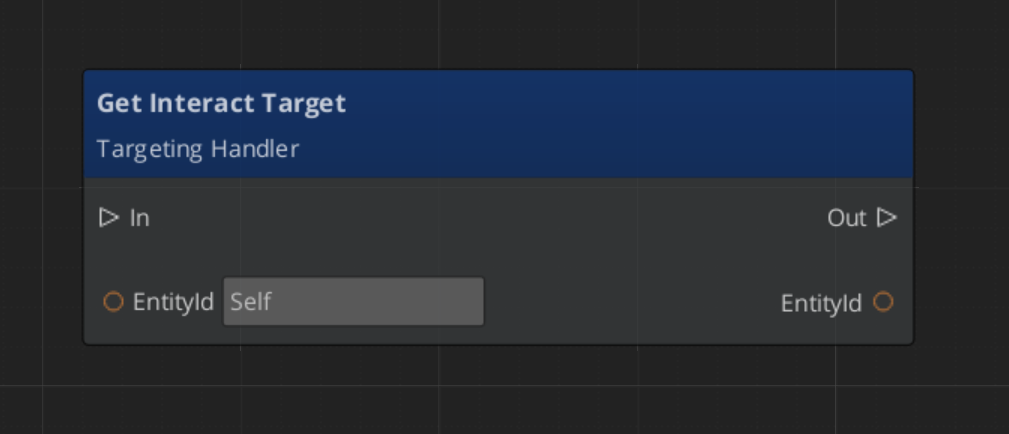
Getting the current interact target:
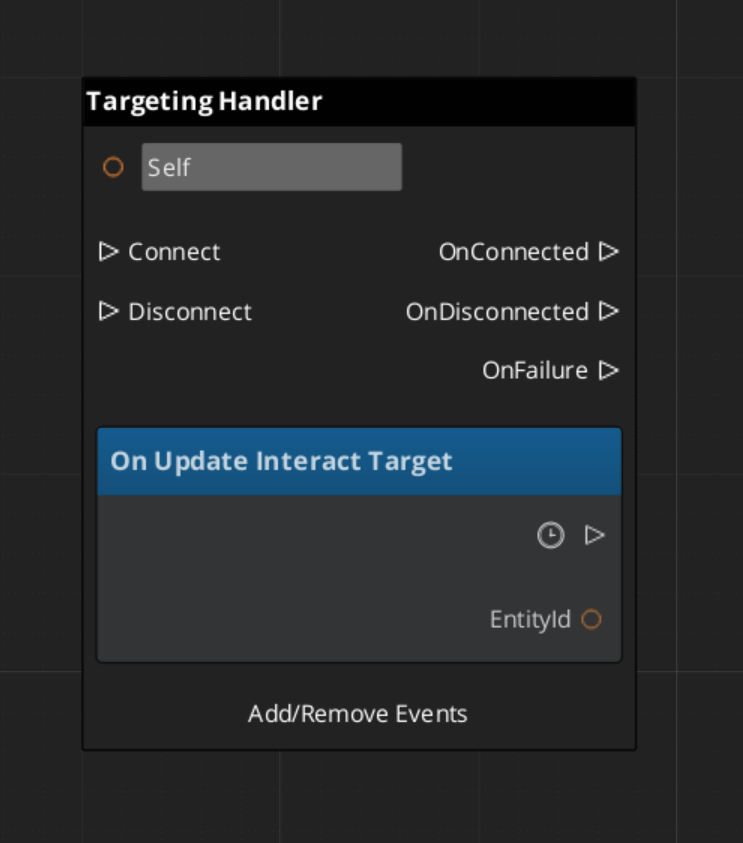
Reacting to interact target changes:
See Also
For conceptual overviews and usage guides:
For component references:
Get GS_Interaction
GS_Interaction — Explore this gem on the product page and add it to your project.
2.2 - Senses & Targeting Fields
Physics-based detection volumes for the targeting system — interaction fields and sensory detection.
Targeting fields are physics-based detection volumes that feed target registrations into the Targeting Handler. The GS_TargetingInteractionFieldComponent provides proximity detection for interact-range targets. Fields use their own collision layers and should be placed on child entities rather than the main unit capsule.
For usage guides and setup examples, see The Basics: GS_Interaction.
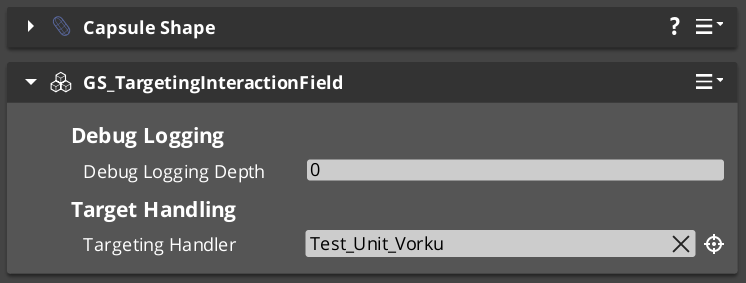
GS_TargetingInteractionFieldComponent
A physics trigger volume that detects targets entering and exiting the interaction range. Extends AZ::Component and PhysicsTriggeringVolume. Registers detected entities with the parent Targeting Handler.
API
| Method | Parameters | Returns | Description |
|---|
TriggerEnter | AZ::EntityId entity | bool | Called when an entity enters the field. Registers the entity as an interaction-range target. |
TriggerExit | AZ::EntityId entity | bool | Called when an entity exits the field. Unregisters the entity from the interaction-range list. |
Setup
- Create a child entity under the unit entity that owns the Targeting Handler.
- Add a PhysX collider configured as a trigger shape.
- Add the GS_TargetingInteractionFieldComponent.
- Set the collider to use a dedicated interaction collision layer — do not share the unit’s physics layer.
- Point the field to the parent Targeting Handler entity.
Extension Guide
Custom sensory fields can be created by extending the base field pattern:
- Create a component that extends
AZ::Component and PhysicsTriggeringVolume. - On trigger enter/exit, call
RegisterTarget / UnregisterTarget on the Targeting Handler via GS_TargetingHandlerRequestBus. - Add custom filtering logic (line of sight, tag filtering, team affiliation) in your trigger callbacks.
See Also
Get GS_Interaction
GS_Interaction — Explore this gem on the product page and add it to your project.
2.3 - Targets
Target component types — base target markers and specialized interact targets that make entities detectable by the targeting system.
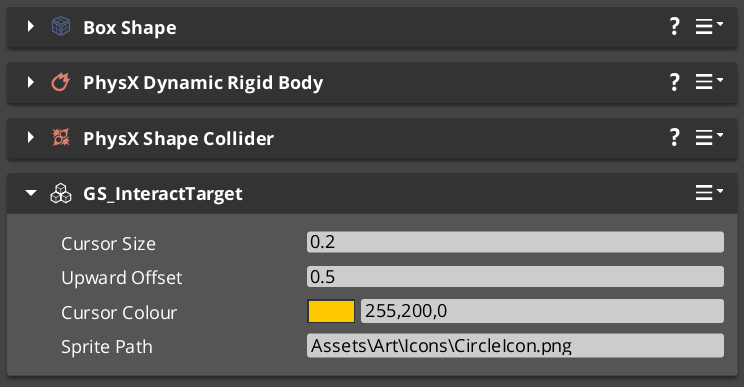
Target components mark entities as detectable by the targeting system. The base GS_TargetComponent provides core target data (size, offset, visual properties). Specialized variants like GS_InteractTargetComponent add interaction-specific behavior.
For usage guides and setup examples, see The Basics: GS_Interaction.
GS_TargetComponent
Base target component. Makes an entity visible to the targeting system with configurable visual properties for cursor feedback.
GS_TargetRequestBus
Bus policy: ById, Multiple
| Method | Parameters | Returns | Description |
|---|
GetTargetSize | — | float | Returns the target’s visual size for cursor scaling. |
GetTargetOffset | — | AZ::Vector3 | Returns the world-space offset for cursor positioning above the target. |
GetTargetColour | — | AZ::Color | Returns the target’s highlight colour. |
GetTargetSprite | — | sprite ref | Returns the target’s cursor sprite override, if any. |
GS_InteractTargetComponent
Extends GS_TargetComponent with interact-specific properties. Entities with this component can be selected as interact targets by the Targeting Handler and triggered via the Interact Input system.
Cross-Gem Target Types
Additional target types are conditionally compiled when GS_Interaction is available alongside other gems:
| Type | Source Gem | Condition | Description |
|---|
| ItemTarget | GS_Item | #IF GS_INTERACTION | Makes item entities targetable for pickup and inspection. |
| UnitTarget | GS_Unit | #IF GS_INTERACTION | Makes unit entities targetable for interaction and AI awareness. |
Extension Guide
Create custom target types by extending GS_TargetComponent:
- Create a new component class extending
GS_TargetComponent. - Override the target data methods (
GetTargetSize, GetTargetOffset, etc.) to return your custom values. - Add any additional data fields specific to your target type.
- The targeting system will automatically detect and categorize your custom targets when they enter sensory fields.
See Also
Get GS_Interaction
GS_Interaction — Explore this gem on the product page and add it to your project.
2.4 - Interact Input Reader
For usage guides and setup examples, see The Basics: GS_Interaction.

Image showing the InteractInputReader component, as seen in the Entity Inspector.
Extends Input Reader.
This component is a standalone input detector utility to enable Interact Input firing outside of the GS_Unit Gem.
It intakes the Event Name for your chosen interaction input, as defined in your Input Profile and ignores all other input.
Functionality
Interact Input Reader needs to be put in the same entity as the Targeting Handler.
After firing the correct Input Event, the Interact Input Reader requests the current InteractTarget from the Targeting Handler. It then sends a DoInteractAction event, with a reference to its EntityId as caller, to the InteractTriggerSensor component that should be present on the Interact Target.
The World Trigger and Trigger Sensor system takes care of the rest.
Assure that the component is placed on the same Entity as the Targeting Handler.

Image showing the Interact Input Reader Component alongside the Targeting Handler Component.
Fill the Interact Event Name with the Event Name for your chosen interaction input, as defined in your Input Profile.
So long as the Input Profile that’s set in your GS_OptionsManager has that event set. The rest should work as is.
API
// OptionsManagerNotificationBus
void HandleStartup() override;

// Local Methods (Parent Input Reader Component Class)
void HandleFireInput(AZStd::string eventName, float value) override;
Get GS_Interaction
GS_Interaction — Explore this gem on the product page and add it to your project.
3 - World Triggers
Trigger sensor and world trigger system — event-driven world state changes via composable polymorphic type objects on two container components.
The World Trigger system pairs a TriggerSensorComponent (condition side) with a WorldTriggerComponent (response side) to create event-driven world state changes. Each component owns an array of polymorphic type objects — sensor types define what conditions to evaluate, trigger types define what happens when the condition passes. Any combination of types can be composed on a single entity without scripting.
For usage guides and setup examples, see The Basics: GS_Interaction.
Contents
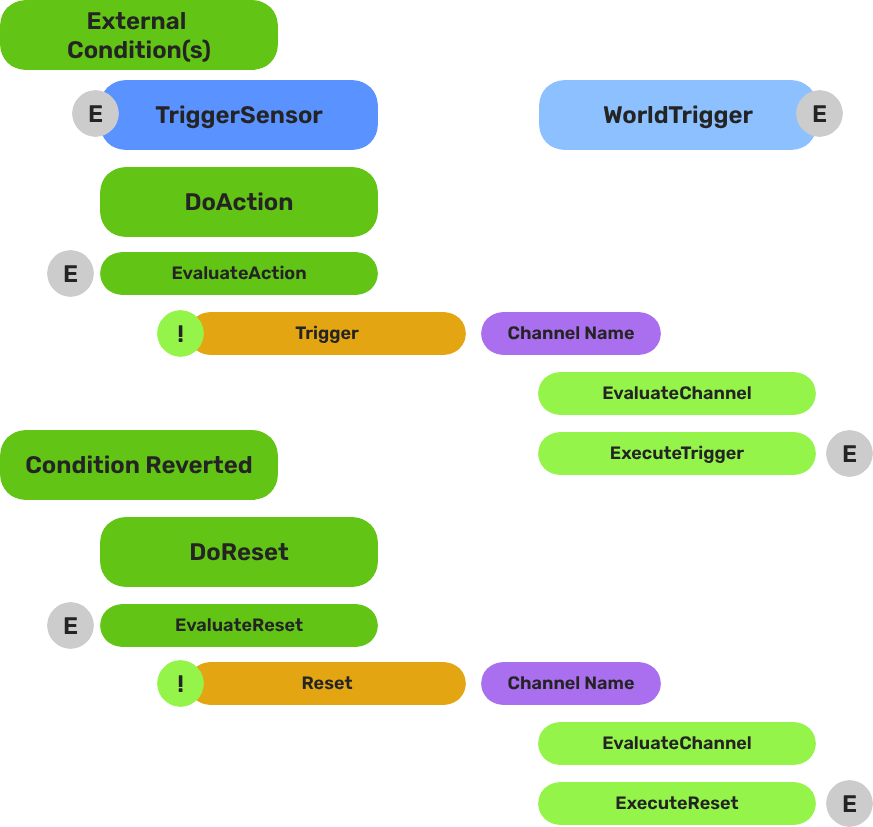
Architecture
Breakdown
World Triggers split conditions from responses using a polymorphic type/component pattern. The two container components sit on the entity; logic lives in the type objects they own.
| Part | What It Does |
|---|
| TriggerSensorComponent | Owns arrays of TriggerSensorType objects (andConditions, orConditions). Evaluates all conditions and fires WorldTriggerRequestBus::Trigger on success. Automatically activates a PhysicsTriggerComponent if any sensor type requires it. |
| WorldTriggerComponent | Owns an array of WorldTriggerType objects (triggerTypes). On Trigger(), calls Execute() on every type. On Reset(), calls OnReset(). On Activate(), calls OnComponentActivate() for startup initialization. |
No scripting is required for standard patterns. Compose sensor types and trigger types in the editor to cover the majority of interactive world objects.
E Indicates extensible classes and methods.
Patterns - Complete list of system patterns used in GS_Play.
Trigger Sensors
The sensory side. TriggerSensorComponent holds arrays of TriggerSensorType objects that define evaluation logic — collisions, interactions, record conditions. Supports AND conditions (all must pass) and OR conditions (any must pass).
Trigger Sensors API
World Triggers
The response side. WorldTriggerComponent holds an array of WorldTriggerType objects that execute when triggered — toggling entities, setting records, changing stages, logging messages.
World Triggers API
Extension Guide
Use the ClassWizard templates to generate new sensor and trigger type classes — see GS_Interaction Templates:
TriggerSensorType — generates a new TriggerSensorType subclass with EvaluateAction(), EvaluateResetAction(), and lifecycle stubs.WorldTriggerType — generates a new WorldTriggerType subclass with Execute(), OnReset(), and OnComponentActivate() stubs.
Custom Sensor Types
- Create a class extending
TriggerSensorType. - Override
EvaluateAction() to define your condition logic. - Override
EvaluateResetAction() if your type supports reset evaluation. - Override
Activate(entityId) / Deactivate() for lifecycle setup. - If your type needs a physics trigger volume, return
true from NeedsPhysicsTrigger(). - For event-driven types, listen on a bus and call
TriggerSensorRequestBus::DoAction() or DoResetAction() when the event fires. - Reflect the class manually in
GS_InteractionSystemComponent::Reflect().
Custom Trigger Types
- Create a class extending
WorldTriggerType. - Override
Execute(entityId) — implement the world state change here. - Override
OnReset(entityId) to reverse or re-arm the effect. - Override
OnComponentActivate(entityId) for any initial state that must be set at startup. - Reflect the class manually in
GS_InteractionSystemComponent::Reflect().
See Also
For component references:
For related resources:
Get GS_Interaction
GS_Interaction — Explore this gem on the product page and add it to your project.
3.1 - Trigger Sensors
Trigger sensor component and sensor types — condition evaluation objects for physics, interact, and record-based world trigger activation.
TriggerSensorComponent is the condition container of the World Trigger system. It owns arrays of TriggerSensorType objects that define evaluation logic — collisions, interactions, record checks. When conditions pass, it fires WorldTriggerRequestBus::Trigger on the same entity.
For usage guides and setup examples, see The Basics: GS_Interaction.
Container Component
TriggerSensorComponent
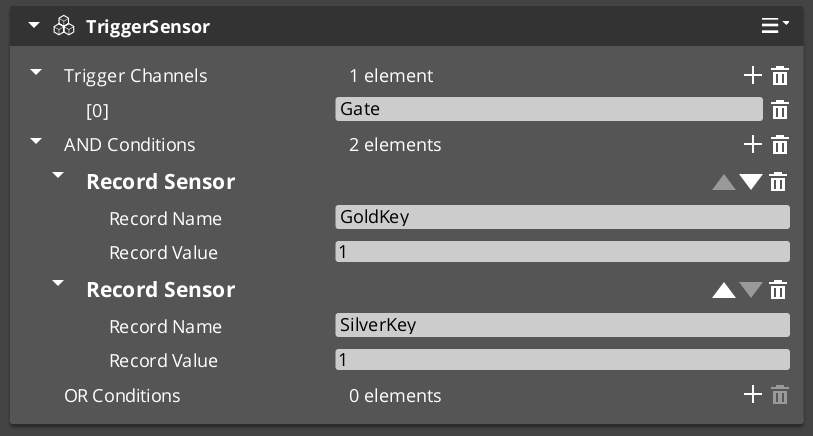
Owns and evaluates all sensor type objects. Not subclassed — extended by adding TriggerSensorType objects to its arrays.
Bus: TriggerSensorRequestBus (ById, Single)
| Field | Type | Description |
|---|
andConditions | vector<TriggerSensorType*> | All types must pass for the trigger to fire. |
orConditions | vector<TriggerSensorType*> | Any type passing is sufficient to fire. |
| Method | Returns | Description |
|---|
DoAction | void | Evaluates all conditions. On pass, fires WorldTriggerRequestBus::Trigger and TriggerSensorNotificationBus::OnTriggered. |
DoResetAction | void | Evaluates reset conditions and fires reset if they pass. |
On Activate, automatically activates a PhysicsTriggerComponent on the entity if any sensor type returns true from NeedsPhysicsTrigger().
Base Type Class
TriggerSensorType
Abstract base for all sensor evaluation logic. Not a component — reflected manually in GS_InteractionSystemComponent::Reflect(). Subclass this to add new condition types.
| Virtual | Returns | Description |
|---|
Activate(entityId) | void | Called when the owning component activates. Connect to buses here. |
Deactivate() | void | Called when the owning component deactivates. Disconnect from buses here. |
EvaluateAction() | bool | Returns true if the condition is currently satisfied. |
EvaluateResetAction() | bool | Returns true if the reset condition is satisfied. Returns true by default. |
NeedsPhysicsTrigger() | bool | Return true to signal that a PhysicsTriggerComponent should be activated. Returns false by default. |
OnTriggerEnter(entity) | void | Called by the physics trigger when an entity enters the volume. |
OnTriggerExit(entity) | void | Called by the physics trigger when an entity exits the volume. |
Stores m_ownerEntityId for calling back to TriggerSensorRequestBus::DoAction() or DoResetAction() from event-driven types.
Built-in Sensor Types
SensorType_Collider
Physics overlap sensor. Returns NeedsPhysicsTrigger() = true, causing the owning component to activate a PhysicsTriggerComponent.
OnTriggerEnter stores the entering entity.OnTriggerExit clears the stored entity.EvaluateAction() returns true while a valid entity is present.EvaluateResetAction() returns true when no entity is present.
SensorType_Record
Fires when a named save record changes to a configured value. Extends RecordKeeperNotificationBus — connects on Activate and fires DoAction automatically when the matching record changes.
EvaluateAction() calls GetRecord and compares against recordValue.
→ Record Sensor Type Reference
| Field | Description |
|---|
recordName | Name of the record to watch. |
recordValue | Value the record must reach to fire. |
SensorType_Interact
Fires when any unit interacts with this entity via the targeting system. Extends InteractTriggerSensorRequestBus.
- On interact: stores
lastCaller and calls DoAction. EvaluateAction() returns true while lastCaller is a valid entity.
SensorType_PlayerInteract
Player-only variant of SensorType_Interact. Extends SensorType_Interact and adds a tag check — lastCaller must have the "Player" tag for the condition to pass.
Extension Guide
To create a custom sensor type:
- Create a class extending
TriggerSensorType. - Override
EvaluateAction() to define when your condition is satisfied. - Override
Activate(entityId) / Deactivate() to connect and disconnect from any buses. - For event-driven evaluation, listen on a bus and call
TriggerSensorRequestBus::DoAction(m_ownerEntityId) when the event fires — the component will run the full evaluation pipeline. - Return
true from NeedsPhysicsTrigger() if your type needs a physics volume. - Reflect the class in
GS_InteractionSystemComponent::Reflect() — types are not components and are not registered via CreateDescriptor().
See Also
Get GS_Interaction
GS_Interaction — Explore this gem on the product page and add it to your project.
3.1.1 - SensorType_Record
Record-based sensor type — fires when a named RecordKeeper entry reaches a configured value.
For usage guides and setup examples, see The Basics: GS_Interaction.
Overview
SensorType_Record is a TriggerSensorType that fires when a named save record is changed to a configured value. Add it to the andConditions or orConditions array on a TriggerSensorComponent.
Inherits from RecordKeeperNotificationBus — connects automatically on Activate and listens for record changes without polling. When a matching record change arrives, it calls TriggerSensorRequestBus::DoAction on the owning component, which runs the full condition evaluation pipeline.
Fields
| Field | Type | Description |
|---|
recordName | string | Name of the record to watch in the RecordKeeper. |
recordValue | int | Value the record must reach for the condition to pass. |
Evaluation
EvaluateAction() calls RecordKeeperRequestBus::GetRecord(recordName) and compares the result to recordValue. Returns true if they match.
The type self-triggers on record change events — you do not need to poll or script a check manually.
Setup
- Add a
TriggerSensorComponent to your entity. - Add a
SensorType_Record entry to the andConditions or orConditions array. - Set
recordName to the record you want to watch. - Set
recordValue to the value that should fire the trigger. - Add a
WorldTriggerComponent with the desired WorldTriggerType objects to the same entity.
API
From TriggerSensorType:
//! Returns true if the watched record currently matches recordValue.
virtual bool EvaluateAction();

//! Connects to RecordKeeperNotificationBus on component activate.
virtual void Activate(AZ::EntityId entityId);

//! Disconnects from RecordKeeperNotificationBus on component deactivate.
virtual void Deactivate();
From RecordKeeperNotificationBus:
//! Called when any record changes. Fires DoAction if recordName and recordValue match.
virtual void RecordChanged(const AZStd::string& name, int value);
Get GS_Interaction
GS_Interaction — Explore this gem on the product page and add it to your project.
3.2 - World Triggers
World trigger component and trigger types — response execution objects that change world state when a trigger sensor fires.
WorldTriggerComponent is the response container of the World Trigger system. It owns an array of WorldTriggerType objects that execute when triggered — toggling entities, setting records, changing stages, logging messages.
For usage guides and setup examples, see The Basics: GS_Interaction.
Container Component
WorldTriggerComponent
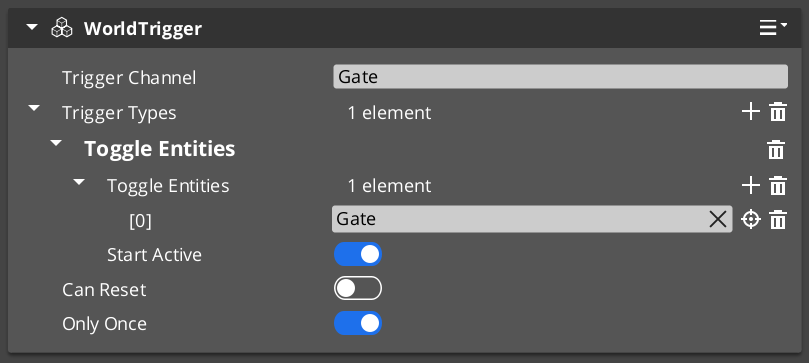
Owns and drives all trigger type objects. Not subclassed — extended by adding WorldTriggerType objects to triggerTypes.
Bus: WorldTriggerRequestBus (ById)
| Field | Type | Description |
|---|
triggerTypes | vector<WorldTriggerType*> | All types are executed on each trigger or reset event. |
| Method | Description |
|---|
Trigger() | Calls Execute(entityId) on every type in triggerTypes. |
Reset() | Calls OnReset(entityId) on every type in triggerTypes. |
On Activate(), calls OnComponentActivate(entityId) on every type — use this for initial state seeding (e.g. entity visibility setup before any trigger fires).
Base Type Class
WorldTriggerType
Abstract base for all trigger response logic. Not a component — reflected manually in GS_InteractionSystemComponent::Reflect(). Subclass this to add new response types.
| Virtual | Parameters | Description |
|---|
OnComponentActivate(entityId) | AZ::EntityId | Called at component activation for startup initialization. |
Execute(entityId) | AZ::EntityId | Called on Trigger(). Implement the world state change here. |
OnReset(entityId) | AZ::EntityId | Called on Reset(). Reverse or re-arm the effect here. |
Built-in Trigger Types
| Type Class | Response |
|---|
| TriggerType_PrintLog | Prints logMessage to the development log on Execute. |
| TriggerType_SetRecord | Sets recordName to recordProgress via the RecordKeeper on Execute. |
| TriggerType_ToggleEntities | Toggles toggleEntities[] active/inactive. OnComponentActivate seeds initial state from startActive. Execute and OnReset invert the state each call. |
| TriggerType_ChangeStage | Queues StageManagerRequestBus::ChangeStageRequest(targetStageName, targetExitPoint) on the next tick via Execute. |
Extension Guide
To create a custom trigger type:
- Create a class extending
WorldTriggerType. - Override
Execute(entityId) — implement your world state change here. - Override
OnReset(entityId) for reversible or re-armable effects. - Override
OnComponentActivate(entityId) if your type needs to set up initial state at startup (e.g. TriggerType_ToggleEntities uses this to seed entity visibility). - Reflect the class in
GS_InteractionSystemComponent::Reflect() — types are not components and are not registered via CreateDescriptor().
See Also
Get GS_Interaction
GS_Interaction — Explore this gem on the product page and add it to your project.
4 - Templates
ClassWizard templates for GS_Interaction — Pulsor pulses, reactors, world triggers, and trigger sensors.
All GS_Interaction extension types are generated through the ClassWizard CLI. The wizard handles UUID generation, cmake file-list registration, and reflection automatically.
For usage guides and setup examples, see The Basics: GS_Interaction.
python ClassWizard.py \
    --template <TemplateName> \
    --gem <GemPath> \
    --name <SymbolName> \
    [--input-var key=value ...]
Contents
Pulsor Pulse
Template: PulsorPulse
Creates a Pulse — the sender side of the Pulsor system. A Pulse fires on a named channel and carries a typed payload. Any PulsorReactor on the same entity listening to the same channel will receive it.
Generated files:
Source/${Name}_Pulse.h/.cpp
CLI:
python ClassWizard.py --template PulsorPulse --gem <GemPath> --name <Name> \
    --input-var type_display_name="My Pulse" \
    --input-var type_category="Input"
Input vars:
| Var | Type | Default | Description |
|---|
type_display_name | text | ${Name} | Label shown in the Pulse type dropdown in the editor |
type_category | text | (empty) | Grouping category in the dropdown (e.g. Input, Physics, Timer) |
Post-generation: Implement Fire() with the data payload your channel requires. Match the channel string to the Reactor that will receive it. Each Pulse/Reactor pair is one interaction channel — channels are string-matched.
See also: Pulsors — full pulsor architecture, built-in pulse types, and extension guide.
Pulsor Reactor
Template: PulsorReactor
Creates a Reactor — the receiver side of the Pulsor system. Listens on a specific named channel and executes a response when a matching Pulse fires on the same entity.
Generated files:
Source/${Name}_Reactor.h/.cpp
CLI:
python ClassWizard.py --template PulsorReactor --gem <GemPath> --name <Name> \
    --input-var pulse_channel=MyChannel \
    --input-var type_display_name="My Reactor" \
    --input-var type_category="Input"
Input vars:
| Var | Type | Required | Description |
|---|
pulse_channel | text | yes | The channel name this reactor subscribes to — must match the Pulse’s channel |
type_display_name | text | no | Label shown in the Reactor type dropdown |
type_category | text | no | Grouping category in the dropdown |
Important: pulse_channel is required. The channel string is baked into the header at generation time. If you need to change it later, edit the m_channel field directly in the generated header.
Post-generation: Implement OnPulse(...) with the response logic. Multiple Reactor instances of different types can coexist on one entity, each listening to a different channel.
See also: Pulsors — full pulsor architecture, built-in reactor types, and extension guide.
World Trigger
Template: WorldTrigger
Creates a WorldTrigger component — a logical trigger in the world that fires a named event when activated. Used to start dialogue sequences, cutscenes, or other scripted events from gameplay code or Script Canvas.
Generated files:
Source/${Name}_WorldTrigger.h/.cpp
CLI:
python ClassWizard.py --template WorldTrigger --gem <GemPath> --name <Name>
Post-generation: Wire the trigger activation to whatever condition suits the design (physics overlap, input event, distance check, etc.). Override Trigger() — call the parent first to check channels and conditions. Override Reset() for reversible triggers.
See also: World Triggers — full world trigger architecture and extension guide.
Trigger Sensor
Template: TriggerSensor
Creates a TriggerSensor — the listening side of a trigger pair. Registers to receive named trigger events from a WorldTrigger and executes a response action.
Generated files:
Source/${Name}_TriggerSensor.h/.cpp
CLI:
python ClassWizard.py --template TriggerSensor --gem <GemPath> --name <Name>
Post-generation: Subscribe to the matching trigger event name in Activate(). Override EvaluateAction() to define your trigger condition. Override DoAction() — call the parent first, then add custom behavior if it succeeds. Stack sensors to react to the same trigger in different ways.
See also: Trigger Sensors — full trigger sensor reference.
See Also
For the full API, component properties, and C++ extension guide:
For all ClassWizard templates across GS_Play gems:
Get GS_Interaction
GS_Interaction — Explore this gem on the product page and add it to your project.
5 - 3rd Party Implementations
For usage guides and setup examples, see The Basics: GS_Interaction.
Get GS_Interaction
GS_Interaction — Explore this gem on the product page and add it to your project.