Utilities
A collection of utility libraries — easing curves, spring dampers, physics trigger volumes, gradients, and entity helpers.
GS_Core includes a rich set of utility libraries for common game development patterns. These are header-only (or lightweight) utilities that any component or system can use without additional setup.
For usage guides and setup examples, see The Basics: GS_Core.
Contents
Physics Trigger Volume
PhysicsTriggeringVolume is a non-component base class that manages the full lifecycle of a physics trigger or collision volume — entity tracking, enter/exit/hold callbacks, and collision contact events. Inherit from it to create interactive volumes without boilerplate physics code. PhysicsTriggerComponent is the concrete O3DE component that wraps this base and adds game-lifecycle awareness (standby handling).
Physics Trigger Volume API
Easing Curves
The Curves namespace provides 40+ easing functions and a CurveType enum for data-driven curve selection. All functions take a normalized t (0 → 1) input. The dispatch function EvaluateCurve(CurveType, t) routes to the correct function at runtime. Curve families: Linear, Quadratic, Cubic, Quartic, Quintic, Sine, Exponential, Circular, Back, Elastic, and Bounce.
Easing Curves API
Spring Dampers
The Springs namespace provides 6 spring-damper types for physics-based animation and smoothing — each available in float, Vector2, and Vector3 overloads (plus a Quaternion variant). All springs use a halflife parameter (seconds to reach 50% of goal) rather than raw stiffness/damping constants.
Spring Dampers API
Gradients
Multi-stop gradient types (FloatGradient, Vector2Gradient, ColorGradient) for sampling values over a normalized [0,1] range. Used throughout the motion system and feedback effects for curve-based value animation. ColorGradient exposes independent EvaluateColor(t) and EvaluateAlpha(t) channels.
Gradients API
Entity Utilities
The EntityUtility namespace provides helper functions for entity lookup by name — returning either an AZ::Entity* or AZ::EntityId.
Entity Utilities API
Weighted Random
RandomUtils::GetRandomWeighted<T> selects a key from an AZStd::unordered_map<T, float> with probability proportional to each entry’s float weight. Requires a caller-provided AZ::SimpleLcgRandom instance.
Weighted Random API
Angle Helpers
The Orientation namespace maps angles to discrete sector indices for directional gameplay — facing directions, animation sectors, compass queries. Includes the SectionConfig enum (x4 through x24 presets), RotationDirection, hysteresis support, and yaw/quaternion helpers.
Angle Helpers API
Spline Utilities
The SplineUtility namespace provides helper functions for O3DE spline queries — closest world point, closest local point, and normalized fraction along a spline — taking an entity ID and world/local position.
Spline Utilities API
Serialization Helpers
Three helpers that reduce reflection boilerplate: GS_ReflectionIncludes.h (single-include for all reflection headers), and GS_AssetReflectionIncludes.h (extends with asset serialization).
Serialization Helpers API
Common Enums
Shared enum types used across the framework: CurveType (maps to all easing functions for serialized curve selection) and BooleanConditions (condition evaluation for dialogue and record-keeping systems).
Common Enums API
See Also
For conceptual overviews and usage guides:
For related resources:
Get GS_Core
GS_Core — Explore this gem on the product page and add it to your project.
1 - Common Enums
Shared enumeration types used across the GS_Play framework — CurveType for easing curve selection and BooleanConditions for condition evaluation.
Common Enums provides shared enumeration types registered with O3DE’s SerializeContext. They can be used in component properties, asset fields, and ScriptCanvas nodes across any gem in the framework. The two primary enums are CurveType (curve selection for motion and gradient systems) and BooleanConditions (condition evaluation for dialogue and record-keeping systems).
Reflect functions: GS_Core::ReflectCommonEnums(context), GS_Core::ReflectCurveType(context)
For usage guides and setup examples, see The Basics: GS_Core.
Contents
BooleanConditions
Used by condition-evaluation logic in the dialogue and record-keeping systems to compare numeric or string values.
Used by: DialogueCondition, Record_DialogueCondition, RecordKeeperComponent
| Value | Description |
|---|
Equals | Exact equality check |
NotEquals | Inequality check |
GreaterThan | Strict greater-than |
GreaterOrEquals | Greater-than or equal |
LessThan | Strict less-than |
LessOrEquals | Less-than or equal |
CurveType
Maps to all easing curve functions in the Curves utility. Used by GS_Motion tracks, blend profiles, gradient markers, and any system that needs designer-selectable easing.
Used by: GS_MotionTrack, UiMotionTrack, FeedbackMotionTrack, gradient markers, GS_PhantomCamBlendProfile
| Family | Values |
|---|
| Linear | Linear |
| Quadratic | EaseInQuadratic, EaseOutQuadratic, EaseInOutQuadratic |
| Cubic | EaseInCubic, EaseOutCubic, EaseInOutCubic |
| Quartic | EaseInQuartic, EaseOutQuartic, EaseInOutQuartic |
| Quintic | EaseInQuintic, EaseOutQuintic, EaseInOutQuintic |
| Sine | EaseInSine, EaseOutSine, EaseInOutSine |
| Exponential | EaseInExpo, EaseOutExpo, EaseInOutExpo |
| Circular | EaseInCirc, EaseOutCirc, EaseInOutCirc |
| Back | EaseInBack, EaseOutBack, EaseInOutBack |
| Elastic | EaseInElastic, EaseOutElastic, EaseInOutElastic |
| Bounce | EaseInBounce, EaseOutBounce, EaseInOutBounce |
Evaluating a CurveType in C++
#include <GS_Core/Utility/Math/CurvesUtility.h>

// Dispatch to the correct curve function via enum
float result = GS_Core::Curves::EvaluateCurve(GS_Core::CurveType::EaseInOutCubic, t);
Using Enums in Components
Use EnumAttribute on a DataElement with UIHandlers::ComboBox to expose enum selection as an Inspector dropdown.
#include <GS_Core/Utility/Math/CurvesUtility.h>
#include <GS_Core/Utility/CommonEnums.h>

// In your component's Reflect() method:
editContext->Class<MyComponent>("My Component", "Description")
    ->DataElement(AZ::Edit::UIHandlers::ComboBox,
        &MyComponent::m_curveType, "Curve Type",
        "The easing curve applied to this animation.")
        ->EnumAttribute(GS_Core::CurveType::Linear,             "Linear")
        ->EnumAttribute(GS_Core::CurveType::EaseInQuadratic,    "Ease In Quadratic")
        ->EnumAttribute(GS_Core::CurveType::EaseOutQuadratic,   "Ease Out Quadratic")
        ->EnumAttribute(GS_Core::CurveType::EaseInOutQuadratic, "Ease InOut Quadratic")
        ->EnumAttribute(GS_Core::CurveType::EaseInCubic,        "Ease In Cubic")
        ->EnumAttribute(GS_Core::CurveType::EaseOutCubic,       "Ease Out Cubic")
        ->EnumAttribute(GS_Core::CurveType::EaseInOutCubic,     "Ease InOut Cubic")
        // ... continue for all desired variants
    ;
This creates an Inspector dropdown where designers select a curve by name without touching code.
See Also
For related resources:
Get GS_Core
GS_Core — Explore this gem on the product page and add it to your project.
2 - Serialization Helpers
Three reflection helpers — single-include headers for common and asset serialization, and a generic asset handler template for custom asset types.
Three helpers that eliminate serialization boilerplate: a single-include header for common reflection, an extension for asset fields, and a ready-made O3DE asset handler template for any custom AssetData subclass.
For usage guides and setup examples, see The Basics: GS_Core.
Contents
GS_ReflectionIncludes.h
A single-include header that brings in all O3DE reflection headers needed for any class with an inline Reflect() method.
Includes:
AzCore/RTTI/RTTI.hAzCore/Memory/SystemAllocator.hAzCore/Serialization/SerializeContext.hAzCore/Serialization/EditContext.hAzCore/std/string/string.h
Use this in any header declaring a reflected struct, class, or enum. Does not handle AZ::Data::Asset<T> fields.
#include <GS_Core/Utility/Reflection/GS_ReflectionIncludes.h>

namespace MyProject
{
    struct MyData
    {
        AZ_TYPE_INFO(MyData, "{YOUR-UUID-HERE}");
        static void Reflect(AZ::ReflectContext* context);

        float m_value = 0.0f;
    };
}
GS_AssetReflectionIncludes.h
Extends GS_ReflectionIncludes.h with asset serialization headers.
Adds:
AzCore/Asset/AssetCommon.hAzCore/Asset/AssetSerializer.h
Use this in any header declaring a class with AZ::Data::Asset<T> fields. Ensures SerializeGenericTypeInfo<Asset<T>> is visible and prevents silent failures in Unity builds.
#include <GS_Core/Utility/Reflection/GS_AssetReflectionIncludes.h>

namespace MyProject
{
    struct MyComponent : public AZ::Component
    {
        AZ_COMPONENT_DECL(MyComponent);
        static void Reflect(AZ::ReflectContext* context);

        AZ::Data::Asset<MyAssetType> m_asset;
    };
}
See Also
For related resources:
Get GS_Core
GS_Core — Explore this gem on the product page and add it to your project.
3 - Curves
40+ easing curve functions for smooth animation and interpolation — organized by family with a CurveType enum for data-driven selection.
The Curves namespace (GS_Core::Curves) provides 40+ easing functions for smooth animation and interpolation. All functions take a normalized t value in [0,1] and return a remapped [0,1] value. The dispatch function EvaluateCurve routes to the correct function by CurveType enum value, making curve selection fully data-driven from the Inspector or asset editor.
Used by every GS_Motion track, all gradient evaluate calls, and the blend profile system.
For usage guides and setup examples, see The Basics: GS_Core.
Contents
Curve Families
| Family | Functions | Character |
|---|
| Linear | Linear | Constant speed |
| Quadratic | EaseInQuadratic, EaseOutQuadratic, EaseInOutQuadratic | Gentle acceleration |
| Cubic | EaseInCubic, EaseOutCubic, EaseInOutCubic | Moderate acceleration |
| Quartic | EaseInQuartic, EaseOutQuartic, EaseInOutQuartic | Strong acceleration |
| Quintic | EaseInQuintic, EaseOutQuintic, EaseInOutQuintic | Very strong acceleration |
| Sine | EaseInSine, EaseOutSine, EaseInOutSine | Gentle, natural feel |
| Exponential | EaseInExpo, EaseOutExpo, EaseInOutExpo | Dramatic speed change |
| Circular | EaseInCirc, EaseOutCirc, EaseInOutCirc | Quarter-circle shape |
| Back | EaseInBack, EaseOutBack, EaseInOutBack | Overshoot and return |
| Elastic | EaseInElastic, EaseOutElastic, EaseInOutElastic | Spring-like oscillation |
| Bounce | EaseInBounce, EaseOutBounce, EaseInOutBounce | Bouncing ball effect |
Variant naming: EaseIn = slow start, EaseOut = slow end, EaseInOut = slow start and end.
API Reference
Dispatch Function
float EvaluateCurve(CurveType curveType, float t);
Dispatches to the correct curve function based on the CurveType enum value. This is the primary call site for all motion and gradient systems. t must be in [0,1].
Individual Functions
One free function per CurveType value, all sharing the signature float <Name>(float t). Examples:
| Function | Description |
|---|
GS_Core::Curves::Linear(t) | Linear — no easing |
GS_Core::Curves::EaseInQuadratic(t) | Quadratic ease-in |
GS_Core::Curves::EaseOutBounce(t) | Bounce ease-out |
GS_Core::Curves::EaseInOutBack(t) | Back ease-in-out (overshoot both ends) |
All functions follow the same naming pattern as the CurveType enum values.
Usage Examples
Dispatch via enum (data-driven)
#include <GS_Core/Utility/Math/CurvesUtility.h>

// Evaluate at normalized progress t (0 → 1)
float eased = GS_Core::Curves::EvaluateCurve(GS_Core::CurveType::EaseInOutCubic, t);

// Interpolate between two values
float result = start + (end - start) * GS_Core::Curves::EvaluateCurve(curveType, t);
Direct function call
// Call the function directly for a known curve
float eased = GS_Core::Curves::EaseOutBack(t);
See Also
For related resources:
Get GS_Core
GS_Core — Explore this gem on the product page and add it to your project.
4 - Springs
Spring-damper functions for physically-grounded value interpolation — smooth following, overshoot, and settling for floats, vectors, and quaternions.
The Springs namespace (GS_Core::Springs) provides six spring-damper types for physics-based animation and smoothing. Springs produce natural-feeling motion that reacts to velocity — ideal for camera follow, UI motion, and any value that should settle rather than snap.
All springs use a halflife parameter: the number of seconds to cover 50% of the remaining distance to the goal. This is more intuitive than raw stiffness/damping constants. Each spring type is available in float, AZ::Vector2, and AZ::Vector3 overloads where applicable.
Used by: gs_phantomcam (camera smoothing), gs_unit (character movement), gs_juice (feedback motions)
For usage guides and setup examples, see The Basics: GS_Core.
Contents
Spring Types
| Type | Character | Best For |
|---|
SimpleSpringDamperExact | Fast start, ease-out arrival | Simple follow, snap behaviors |
AccelerationSpringDamper | Tracks target velocity, smoother on input changes | Character movement, camera motion |
DoubleSpringDamper | S-curve — slow start AND slow arrival | UI transitions, polished cuts |
TimedSpringDamper | Reaches target by a specified time | Choreographed, loosely timed movements |
VelocitySpringDamper | Predictive — leads the target’s direction | Camera following a moving target |
QuaternionSpringDamper | Rotational spring (angular velocity) | Smooth orientation changes |
SimpleSpringDamperExact
A critically-damped spring that moves toward a target position. Fast start, ease-out arrival. Computed exactly (no approximation). The most common spring for follow and snap behaviors.
| Parameter | Type | Description |
|---|
position | T (in/out) | Current position, updated in-place each frame |
velocity | T (in/out) | Current velocity — must be cached between frames |
targetPosition | T | Goal position to move toward |
halflife | float | Seconds to cover 50% of remaining distance |
deltaTime | float | Frame delta time |
AccelerationSpringDamper
Tracks a target velocity rather than a position. Adds an acceleration memory term for smoother response to sudden direction changes (e.g. thumbstick flicks). Suited for character movement and camera motion where input can change abruptly.
| Parameter | Type | Description |
|---|
position | T (in/out) | Accumulated position |
velocity | T (in/out) | Current velocity — must be cached between frames |
acceleration | T (in/out) | Acceleration memory — must be cached between frames |
targetVelocity | T | The desired velocity to spring toward |
halflife | float | Settling time |
deltaTime | float | Frame delta time |
DoubleSpringDamper
Two springs chained together, producing an S-curve (ease-in AND ease-out). Slower to start and slower to arrive than the simple spring. Gives a more polished feel for UI transitions or cinematic camera cuts.
| Parameter | Type | Description |
|---|
position | T (in/out) | Current position |
velocity | T (in/out) | Current velocity — must be cached between frames |
previousPosition | T (in/out) | Internal state — must be cached between frames |
previousVelocity | T (in/out) | Internal state — must be cached between frames |
targetPosition | T | Goal position |
halflife | float | Settling time |
deltaTime | float | Frame delta time |
TimedSpringDamper
Attempts to reach the target by a specific time. Adjusts halflife internally so the spring arrives near the target time rather than asymptotically. Useful for choreographed movements with loose time targets.
| Parameter | Type | Description |
|---|
position | T (in/out) | Current position |
velocity | T (in/out) | Current velocity — must be cached between frames |
previousTarget | T (in/out) | Last known target — must be cached between frames |
targetPosition | T | Destination |
targetTime | float | Time (in seconds) at which the spring should arrive |
halflife | float | Base settling time |
deltaTime | float | Frame delta time |
VelocitySpringDamper
Tracks a moving target by incorporating the target’s own velocity for predictive lead. The follower anticipates the direction of movement, reducing lag on fast-moving targets. Suited for camera following a character at speed.
| Parameter | Type | Description |
|---|
position | T (in/out) | Follower position |
velocity | T (in/out) | Follower velocity — must be cached between frames |
previousPosition | T (in/out) | Internal state — must be cached between frames |
targetPosition | T | Current target position |
targetVelocity | T | Target’s velocity (used for predictive lead) |
halflife | float | Settling time |
deltaTime | float | Frame delta time |
QuaternionSpringDamper
Rotation spring that operates on angular velocity. Includes a flip option to reverse the rotation direction.
Note: The rotation output jumps to the goal each frame. Extract angularVelocity and integrate externally if you need a continuously smooth rotation output.
| Parameter | Type | Description |
|---|
rotation | AZ::Quaternion (in/out) | Quaternion moved toward targetRotation |
angularVelocity | AZ::Vector3 (in/out) | Angular velocity — must be cached between frames |
targetRotation | AZ::Quaternion | Goal orientation |
halflife | float | Settling time |
deltaTime | float | Frame delta time |
flip | bool | Reverses rotation direction (default: false) |
Usage Example
#include <GS_Core/Utility/Math/SpringsUtility.h>

// Member fields — must persist between frames
AZ::Vector3 m_followVelocity = AZ::Vector3::CreateZero();

// In your tick function:
AZ::Vector3 currentPos = GetEntityTranslation();
AZ::Vector3 targetPos  = GetTargetTranslation();

GS_Core::Springs::SimpleSpringDamperExact(
    currentPos,       // in/out: current position (updated in place)
    m_followVelocity, // in/out: velocity (cached between frames)
    targetPos,        // target position
    0.1f,             // halflife: 0.1 seconds to cover half the distance
    deltaTime
);

SetEntityTranslation(currentPos);
See Also
For related resources:
Get GS_Core
GS_Core — Explore this gem on the product page and add it to your project.
5 - Gradients
Multi-stop gradient types for sampling color, float, and vector values over a normalized range — used by motion tracks and feedback effects.
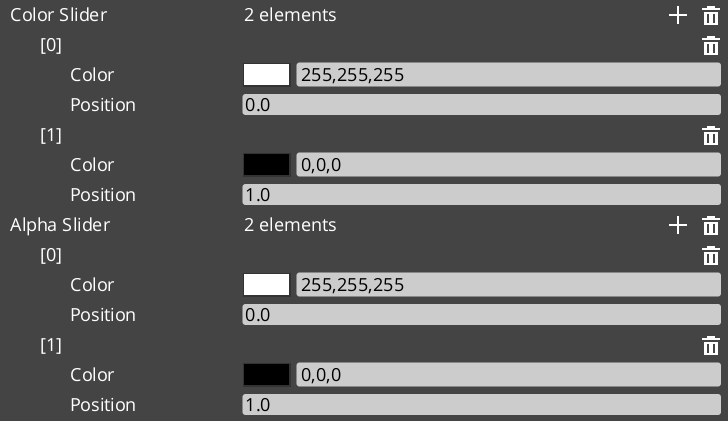
The Gradients utility provides three parallel gradient types for interpolating values over a normalized [0,1] range using a sorted list of marker points. All types are fully reflected (SerializeContext + EditContext) and editable in the Inspector with visual marker placement. Gradients are lazily sorted before evaluation.
Used by: FeedbackMaterialTrack (color/float animation), UiImageColorTrack, procedural visual effects, any system needing editable color or value ramps.
For usage guides and setup examples, see The Basics: GS_Core.
Contents
Gradient Types
| Type | Value Type | Description |
|---|
FloatGradient | float | Single float value ramp |
Vector2Gradient | AZ::Vector2 | 2D vector ramp |
ColorGradient | AZ::Color | RGBA color ramp with separate color and alpha channels |
Marker Structs
Each gradient type has a corresponding marker struct that defines a single stop on the gradient.
FloatGradientMarker
| Field | Type | Description |
|---|
markerValue | float | The float value at this stop |
markerPosition | float | Position in [0, 1] along the gradient |
Vector2GradientMarker
| Field | Type | Description |
|---|
markerValue | AZ::Vector2 | The 2D vector value at this stop |
markerPosition | float | Position in [0, 1] along the gradient |
ColorGradientMarker
| Field | Type | Description |
|---|
markerColor | AZ::Color | The color (RGB + A) at this stop |
markerPosition | float | Position in [0, 1] along the gradient |
Gradient Classes
All three gradient types share the same structure and interface:
| Field / Method | Description |
|---|
slider | AZStd::vector<Marker> — the sorted list of gradient stops (field name for Float/Vector2) |
sorted | Internal dirty flag; gradient is lazily sorted before Evaluate is called |
SortGradient() | Sorts markers by position. Called automatically before evaluation when markers change. |
Evaluate(float t) | Returns the interpolated value at normalized position t in [0, 1] |
ColorGradient
ColorGradient maintains two separate marker lists for independent RGB and alpha control:
| Field | Description |
|---|
colorSlider | AZStd::vector<ColorGradientMarker> — RGB stops |
alphaSlider | AZStd::vector<ColorGradientMarker> — alpha stops |
ColorGradient Channels
ColorGradient exposes three evaluate methods for flexible sampling:
| Method | Returns | Description |
|---|
Evaluate(float t) | AZ::Color | Full RGBA color — samples both colorSlider and alphaSlider |
EvaluateColor(float t) | AZ::Color | RGB only — alpha is always 1.0 |
EvaluateAlpha(float t) | float | Alpha channel only |
Usage Example
#include <GS_Core/Utility/Gradients/FloatGradientUtility.h>
#include <GS_Core/Utility/Gradients/ColorGradientUtility.h>

// Sample a float gradient at normalized progress (0 → 1)
float value = myFloatGradient.Evaluate(normalizedProgress);

// Sample full RGBA color
AZ::Color color = myColorGradient.Evaluate(normalizedProgress);

// Sample RGB and alpha independently
AZ::Color rgb   = myColorGradient.EvaluateColor(normalizedProgress);
float alpha     = myColorGradient.EvaluateAlpha(normalizedProgress);
See Also
For related resources:
Get GS_Core
GS_Core — Explore this gem on the product page and add it to your project.
6 - Entity Helpers
Utility functions for finding entities in the scene by name — runtime entity lookup without maintaining manual references.
The EntityUtility namespace provides helper functions for finding entities in the active scene by name. Useful for runtime entity lookup without maintaining manual entity references.
For usage guides and setup examples, see The Basics: GS_Core.
API Reference
| Function | Returns | Description |
|---|
GetEntityByName(name) | AZ::Entity* | Finds an active entity with the given name. Returns nullptr if not found. |
GetEntityIdByName(name) | AZ::EntityId | Finds an active entity’s ID by name. Returns an invalid EntityId if not found. |
Usage Example
#include <GS_Core/Utilities/EntityUtility.h>

// Find an entity by name
AZ::EntityId playerId = GS_Core::EntityUtility::GetEntityIdByName("Player");
if (playerId.IsValid())
{
    // Use the entity
}
See Also
For related resources:
Get GS_Core
GS_Core — Explore this gem on the product page and add it to your project.
7 - Angle Helpers
Angle and orientation math — sector mapping, yaw extraction, quaternion conversion, and hysteresis for directional classification.
The Orientation namespace (GS_Core::Orientation) provides angle-to-sector mapping for directional gameplay — animation direction selection, facing classification, and compass-style sector queries. It splits a full circle into N equal angular sectors and determines which sector a given angle falls into, with hysteresis to prevent rapid sector-switching at boundaries.
Used by: Paper-facing systems (gs_performer), directional input reactors (gs_unit), targeting systems (gs_interaction)
For usage guides and setup examples, see The Basics: GS_Core.
Contents
SectionConfig Enum
A reflected, editor-friendly enum selecting common sector counts and alignment modes. Two alignment modes exist per count:
- cardinal / sideAligned — sector boundaries fall on the cardinal directions; sectors straddle diagonals
- quarters / forwardAligned — sector boundaries fall on diagonals; sectors straddle cardinals
| Family | Values |
|---|
| x4 | x4_cardinal, x4_quarters |
| x6 | x6_sideAligned, x6_forwardAligned |
| x8 | x8_cardinal, x8_quarters |
| x10 | x10_sideAligned, x10_forwardAligned |
| x12 | x12_sideAligned, x12_forwardAligned |
| x14 | x14_sideAligned, x14_forwardAligned |
| x16 | x16_sideAligned, x16_forwardAligned |
| x18 | x18_sideAligned, x18_forwardAligned |
| x20 | x20_sideAligned, x20_forwardAligned |
| x22 | x22_sideAligned, x22_forwardAligned |
| x24 | x24_sideAligned, x24_forwardAligned |
Register with GS_Core::Orientation::ReflectOrientationEnums(context) to expose these in the Inspector.
RotationDirection Enum
Controls the winding convention used when computing sector angles.
| Value | Numeric | Description |
|---|
CCW | 1 | Counter-clockwise winding |
CW | -1 | Clockwise winding |
Pick Struct
Returned by all PickByAngle overloads. Contains full sector geometry for the selected sector.
| Field | Type | Description |
|---|
index | int | Which sector was selected [0, N) |
count | int | Total number of sectors |
angle | float | The input angle as provided |
width | float | Angular width of each sector (2π / N) |
center | float | Center angle of the selected sector |
start | float | Start angle of the selected sector |
end | float | End angle of the selected sector |
Use GS_Core::Orientation::Changed(pick, prevIndex) to detect when the sector index changes between frames.
API Reference
Sector Mapping
| Function | Description |
|---|
PickByAngle(angle, count, halfAligned, prevIndex, hysteresisDeg, startAngle, dir) | Primary overload — full parameter control |
PickByAngle(angle, SectionConfig, prevIndex, hysteresisDeg, startAngle, dir) | Convenience overload using SectionConfig enum |
PickByAngle(angle, count, offsetRad, prevIndex, hysteresisDeg, startAngle, dir) | Low-level overload with explicit alignment offset |
ConfigToParams(cfg) | Maps a SectionConfig value to its (count, halfAligned) pair |
Changed(pick, prevIndex) | Returns true if the sector index changed from prevIndex |
Angle Math
| Function | Description |
|---|
WrapToTwoPi(x) | Wraps any angle to [0, 2π) |
WrapToPi(x) | Wraps any angle to (-π, π] |
AlignmentOffsetRad(N, halfAligned) | Returns the alignment shift in radians for a given count and mode |
Yaw and Quaternion
| Function | Description |
|---|
YawFromDir(dir, rotDir) | Flat yaw from a direction vector (Z-up world) |
YawFromDir(dir, upAxis, forwardHint, rotDir) | General yaw with custom up and forward axes |
FlatSignedYaw_ToCam(camFwd, rootFwd, up, dir) | Signed yaw from camera-forward to entity-forward, projected flat |
QuatFromYaw(yawRad, upAxis) | Builds a rotation quaternion from a yaw angle and up axis |
Reflection
| Function | Description |
|---|
ReflectOrientationEnums(context) | Registers SectionConfig and RotationDirection with SerializeContext |
Usage Example
#include <GS_Core/Utility/Math/SectionByAngle.h>

// Member field — track previous sector to enable hysteresis
int m_prevSectorIndex = -1;

// In your tick / update function:
AZ::Vector3 moveDir = GetMovementDirection();

// Get the yaw from the movement direction (Z-up world)
float yaw = GS_Core::Orientation::YawFromDir(moveDir, GS_Core::Orientation::RotationDirection::CCW);

// Map to an 8-way sector with 5-degree hysteresis
GS_Core::Orientation::Pick pick = GS_Core::Orientation::PickByAngle(
    yaw,
    GS_Core::Orientation::SectionConfig::x8_cardinal,
    m_prevSectorIndex,  // previous index for hysteresis
    5.0f                // hysteresis in degrees
);

if (GS_Core::Orientation::Changed(pick, m_prevSectorIndex))
{
    m_prevSectorIndex = pick.index;
    // React to direction change: play animation, update facing, etc.
}
See Also
For related resources:
Get GS_Core
GS_Core — Explore this gem on the product page and add it to your project.
8 - Spline Helpers
Utility functions for O3DE spline queries — closest point, fraction, and local/world space conversion by entity ID.
The SplineUtility namespace (GS_Core::SplineUtility) provides free functions for querying the closest point on an O3DE spline component attached to an entity. All functions take an entity ID and a position in world or local space.
Used by: PathTo_DialoguePerformance (gs_cinematics), any system that guides an entity along a spline path.
For usage guides and setup examples, see The Basics: GS_Core.
Contents
API Reference
| Function | Parameters | Description |
|---|
FindClosestWorldPoint | AZ::EntityId entityId, AZ::Vector3 worldPos | Returns the closest world-space point on the spline attached to entityId |
FindClosestLocalPoint | AZ::EntityId entityId, AZ::Vector3 localPos | Returns the closest point in local spline space |
FindClosestFraction | AZ::EntityId entityId, AZ::Vector3 worldPos | Returns the normalized [0, 1] fraction along the spline of the closest point to worldPos |
Usage Example
#include <GS_Core/Utility/SplineUtility.h>

// Find how far along a path the player is (0 = start, 1 = end)
AZ::Vector3 playerPos = GetPlayerWorldPosition();
float fraction = GS_Core::SplineUtility::FindClosestFraction(splineEntityId, playerPos);

// Get the actual closest world position on the path
AZ::Vector3 closestPoint = GS_Core::SplineUtility::FindClosestWorldPoint(splineEntityId, playerPos);
See Also
For related resources:
Get GS_Core
GS_Core — Explore this gem on the product page and add it to your project.
9 - Physics Trigger Volume
Base class and component for physics trigger and collision handling — inherit to create interactive volumes with enter, exit, and hold callbacks.
The physics trigger system is two classes: PhysicsTriggeringVolume (the non-component base class with all trigger logic) and PhysicsTriggerComponent (the concrete O3DE component that wraps it with game-lifecycle awareness). Inherit from either to create interactive volumes — damage zones, pickup areas, dialogue triggers, environmental hazards — without writing boilerplate physics code.
The base class handles entity tracking (one enter/exit per entity), supports both trigger overlaps and collision contacts, and provides optional hold/persist callbacks for continuous processing.
For usage guides and setup examples, see The Basics: GS_Core.
Contents
PhysicsTriggeringVolume
File: Physics/PhysicsTriggeringVolume.h
Namespace: GS_Core
Base classes: Physics::RigidBodyNotificationBus::Handler, DebugLoggingHelper
A non-component base class that manages the full lifecycle of a physics trigger or collision volume. Add it alongside your own AZ::Component via multiple inheritance.
Configuration Fields
| Field | Type | Default | Description |
|---|
EnableCollisionAsTrigger | bool | false | Treat collision begin/persist/end events as trigger-style callbacks |
EnableTriggerHoldUpdate | bool | false | Enable per-physics-tick TriggerHold callback while entities are inside |
Lifecycle Methods
| Method | Description |
|---|
ConnectTriggering(AZ::EntityId entityId) | Subscribes to physics events on the given entity. Call from your component’s Activate(). |
DisconnectTriggering() | Unsubscribes and clears all handlers. Call from your component’s Deactivate(). |
OnPhysicsEnabled(AZ::EntityId entityId) | Called when the physics body becomes active. Internally calls InitPhysicsTriggerHandler. |
OnPhysicsDisabled(AZ::EntityId entityId) | Called when the physics body is destroyed. Internally calls DisconnectTriggering. |
Virtual Callbacks
Override these in your subclass to react to trigger and collision events.
| Method | Parameters | Returns | Description |
|---|
TriggerEnter | AZ::EntityId entity | bool | Called when an entity enters the volume. Return false to reject the entity. |
TriggerHold | float fixedDeltaTime | void | Called each physics tick while entities are inside. Requires EnableTriggerHoldUpdate = true. |
CollisionHold | AZ::EntityId entity | void | Called per-entity each physics tick for collision events. Requires EnableCollisionAsTrigger = true. |
TriggerExit | AZ::EntityId entity | bool | Called when an entity exits the volume. Return false to reject. |
Internal State
| Field | Description |
|---|
m_entities | AZStd::unordered_set<AZ::EntityId> — entities currently inside the volume |
m_triggerEntity | The entity whose physics body is being monitored |
PhysicsTriggerComponent
File: Physics/PhysicsTriggerComponent.h
Namespace: GS_Core
Base classes: PhysicsTriggeringVolume, GameManagerNotificationBus::Handler
A concrete O3DE component that wraps PhysicsTriggeringVolume and adds game-lifecycle awareness. Automatically disables the trigger during game standby and re-enables it on exit.
Used by: WorldTriggerComponent (gs_interaction), ColliderTriggerSensorComponent — these subclass PhysicsTriggerComponent to implement game-specific trigger behaviors.
Data Fields
| Field | Type | Default | Description |
|---|
isActive | bool | false | Whether the trigger is currently armed |
triggerEntity | AZ::EntityId | invalid | The entity providing the physics body to monitor |
Virtual Methods
Override these to implement game-specific trigger behavior.
| Method | Description |
|---|
ActivatePhysicsTrigger(AZ::EntityId entity) | Called when triggered. Subclasses perform the response here. |
DeactivatePhysicsTrigger() | Called on exit. Subclasses clean up here. |
Standby Handling
| Method | Description |
|---|
OnEnterStandby() | Disables the trigger when the game enters standby |
OnExitStandby() | Re-enables the trigger when the game exits standby |
Extending Physics Trigger Volume
Use the PhysicsTriggerComponent ClassWizard template to generate a new trigger component with boilerplate already in place — see GS_Core Templates.
Inherit directly from PhysicsTriggeringVolume alongside AZ::Component for a lightweight custom trigger. Use PhysicsTriggerComponent as your base if you need the built-in standby handling.
Use public virtual inheritance with PhysicsTriggeringVolume to avoid issues with multiple inheritance chains that include AZ::Component.
#pragma once
#include <AzCore/Component/Component.h>
#include <GS_Core/Utility/Physics/PhysicsTriggeringVolume.h>

namespace MyProject
{
    class DamageZoneComponent
        : public AZ::Component
        , public virtual GS_Core::PhysicsTriggeringVolume
    {
    public:
        AZ_COMPONENT_DECL(DamageZoneComponent);

        static void Reflect(AZ::ReflectContext* context);

    protected:
        void Activate() override;
        void Deactivate() override;

        // Trigger overrides
        bool TriggerEnter(AZ::EntityId entity) override;
        void TriggerHold(float fixedDeltaTime) override;
        bool TriggerExit(AZ::EntityId entity) override;

    private:
        float m_damagePerSecond = 10.0f;
    };
}
Implementation (.cpp)
#include "DamageZoneComponent.h"
#include <AzCore/Serialization/SerializeContext.h>

namespace MyProject
{
    AZ_COMPONENT_IMPL(DamageZoneComponent, "DamageZoneComponent", "{YOUR-UUID-HERE}");

    void DamageZoneComponent::Reflect(AZ::ReflectContext* context)
    {
        if (auto sc = azrtti_cast<AZ::SerializeContext*>(context))
        {
            sc->Class<DamageZoneComponent, AZ::Component, GS_Core::PhysicsTriggeringVolume>()
                ->Version(0)
                ->Field("DamagePerSecond", &DamageZoneComponent::m_damagePerSecond);

            if (AZ::EditContext* ec = sc->GetEditContext())
            {
                ec->Class<DamageZoneComponent>("Damage Zone", "Deals damage inside the trigger volume")
                    ->ClassElement(AZ::Edit::ClassElements::EditorData, "")
                        ->Attribute(AZ::Edit::Attributes::Category, "MyProject")
                        ->Attribute(AZ::Edit::Attributes::AppearsInAddComponentMenu, AZ_CRC_CE("Game"))
                    ->DataElement(AZ::Edit::UIHandlers::Default,
                        &DamageZoneComponent::m_damagePerSecond,
                        "Damage Per Second", "Damage dealt per second while inside");
            }
        }
    }

    void DamageZoneComponent::Activate()
    {
        EnableTriggerHoldUpdate = true;  // Enable hold callbacks for continuous damage
        GS_Core::PhysicsTriggeringVolume::ConnectTriggering(GetEntityId());
    }

    void DamageZoneComponent::Deactivate()
    {
        GS_Core::PhysicsTriggeringVolume::DisconnectTriggering();
    }

    bool DamageZoneComponent::TriggerEnter(AZ::EntityId entity)
    {
        AZ_TracePrintf("DamageZone", "Entity entered damage zone");
        return true; // Accept the entity
    }

    void DamageZoneComponent::TriggerHold(float fixedDeltaTime)
    {
        // Apply damage to all entities currently inside
        for (const AZ::EntityId& entity : m_entities)
        {
            // Apply m_damagePerSecond * fixedDeltaTime damage to entity...
        }
    }

    bool DamageZoneComponent::TriggerExit(AZ::EntityId entity)
    {
        AZ_TracePrintf("DamageZone", "Entity exited damage zone");
        return true;
    }
}
Setup
- Create an entity with a PhysX Collider component set as a trigger.
- Add your custom trigger component (e.g.,
DamageZoneComponent). - Configure the collider shape and component properties.
- Entities with PhysX rigid bodies that enter the collider will trigger your callbacks.
See Also
For conceptual overviews and usage guides:
For related resources:
Get GS_Core
GS_Core — Explore this gem on the product page and add it to your project.
10 - Weighted Random
Weighted random selection — pick a key from a weighted map with probability proportional to each entry’s float weight.
RandomUtils (GS_Core::RandomUtils) provides a single templated static method for weighted random selection from a map. The caller provides their own AZ::SimpleLcgRandom instance for deterministic control over the random sequence.
Used by: RandomNodeData (dialogue random node), KlattVoiceComponent (phoneme selection), any system needing weighted random draws.
For usage guides and setup examples, see The Basics: GS_Core.
Contents
API Reference
template<typename T>
static T GetRandomWeighted(
    AZ::SimpleLcgRandom* rand,
    const AZStd::unordered_map<T, float>& weightedTable
);
Selects one key from weightedTable with probability proportional to its float weight value. Higher weights mean higher probability of selection.
| Parameter | Description |
|---|
rand | Caller-owned AZ::SimpleLcgRandom instance. The caller controls seeding and lifetime. |
weightedTable | Map of candidates to weights. Keys are the items to select from; values are their relative weights. |
Returns: The selected key of type T.
Edge cases:
- Falls back to the last entry on floating-point precision edge cases.
- Asserts if
weightedTable is empty.
Usage Example
#include <GS_Core/Utility/Random/RandomUtils.h>
#include <AzCore/Math/Random.h>

// Member field — keep the random instance alive across calls
AZ::SimpleLcgRandom m_random;

// Build a weighted table: key = item, value = relative weight
AZStd::unordered_map<AZStd::string, float> lootTable;
lootTable["Common Sword"]    = 50.0f;
lootTable["Rare Shield"]     = 30.0f;
lootTable["Epic Helmet"]     = 15.0f;
lootTable["Legendary Ring"]  =  5.0f;

// Select an item — "Common Sword" is 10x more likely than "Legendary Ring"
AZStd::string selected = GS_Core::RandomUtils::GetRandomWeighted(&m_random, lootTable);
See Also
For related resources:
Get GS_Core
GS_Core — Explore this gem on the product page and add it to your project.