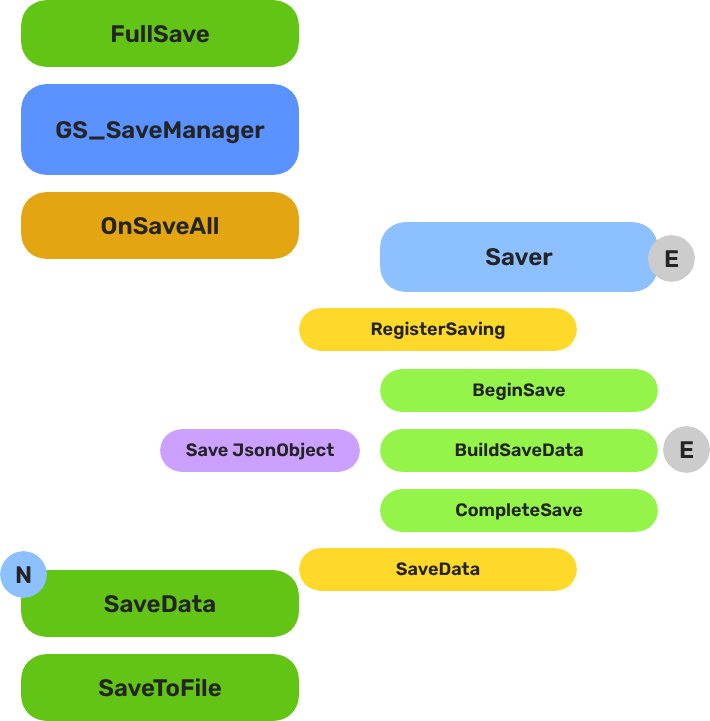
GS_Save
The persistence system — save files, load data, and track progression with managers, savers, and record keepers.
The Save system is the universal means of storing, loading, and handling game data. It provides a centralized Save Manager for file operations, entity-level Saver components for automatic data capture, and a Record Keeper for lightweight progression tracking — all backed by JSON-formatted save files that work across PC, console, and mobile platforms.
Every component that needs to persist data plugs into this system through one of two patterns: extend the Saver base class for complex per-entity data, or use the Record Keeper for simple key-value records.
For usage guides and setup examples, see The Basics: GS_Core.
Contents
Architecture
Breakdown
When a save or load is triggered, the Save Manager broadcasts to every Saver in the scene. Each Saver independently handles its own entity’s state. The Record Keeper persists flat progression data alongside the save file.
| Part | Broadcast Event | What It Means |
|---|
| Save Manager | OnSaveAll | Broadcasts to all Savers on save. Each serializes its entity state. |
| Save Manager | OnLoadAll | Broadcasts to all Savers on load. Each restores its entity state. |
| Record Keeper | RecordChanged | Fires when any progression flag is created, updated, or deleted. |
Savers are per-entity components — extend GS_SaverComponent to persist any custom data. The Record Keeper is a global singleton that lives on the Save Manager prefab.
E Indicates extensible classes and methods.
Patterns - Complete list of system patterns used in GS_Play.
Components
| Component | Purpose | Documentation |
|---|
| GS_SaveManagerComponent | Central save/load controller. Manages save files, triggers global save/load events, provides data access to all savers. | Save Manager |
| GS_SaverComponent | Base class for entity-level save handlers. Override BuildSaveData() and ProcessLoad() to persist any component data. | Savers |
| RecordKeeperComponent | Lightweight key-value store for progression tracking (string name → integer value). Extends GS_SaverComponent. | Record Keeper |
| BasicEntitySaverComponent | Pre-built saver that persists an entity’s Transform (position, rotation). | List of Savers |
| BasicPhysicsEntitySaverComponent | Pre-built saver that persists an entity’s Transform and Rigidbody state (velocity). | List of Savers |
Quick Start
- Create a Save Manager prefab with the GS_SaveManagerComponent.
- Optionally add a Record Keeper to the same prefab for progression tracking.
- Add the Save Manager
.spawnable to the Game Manager’s Startup Managers list. - Attach Saver components to any entities that need to persist data.
- Call
NewGame / LoadGame through the Game Manager — the Save Manager handles the rest.
See Also
For conceptual overviews and usage guides:
For component references:
For related resources:
Get GS_Core
GS_Core — Explore this gem on the product page and add it to your project.
1 - Save Manager
The central save/load controller — manages save files, triggers global persistence events, and provides data access for all savers.
The Save Manager is the central controller of the save system. It manages save file creation, triggers global save/load events that all Saver components respond to, and provides data access methods for storing and retrieving serialized game state.
Save files use JSON formatting for easy human interpretation, and the system uses the O3DE SaveData gem to write to the target platform’s default user data directory — PC, console, or mobile with no additional configuration.
For usage guides and setup examples, see The Basics: GS_Core.
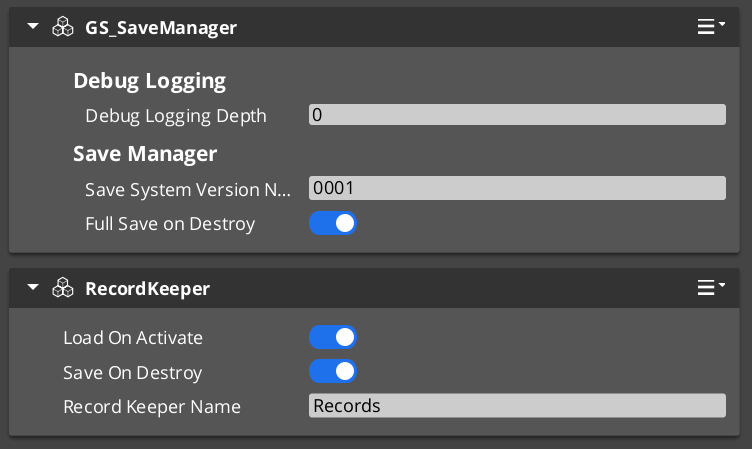
Contents
How It Works
Save File Structure
The Save Manager maintains a CoreSaveData file that acts as an index of all save files for the project. This file is identified by the combination of the Game Manager’s Project Prefix and the Save Manager’s Save System Version Number. Changing either value starts a fresh save data pass.
Each individual save file stores the full game state as a JSON document, including timestamped metadata for ordering.
Initialization
On startup, the Save Manager checks for existing save data using the Project Prefix + Version combination. It sets its internal IsContinuing flag to indicate whether previous save data is available to load. Other systems can query this to determine whether to show “Continue” or “Load Game” options.
New Game Flow
When the Game Manager calls NewGame:
- The Save Manager creates a new save file — either
defaultSaveData (no name given) or a custom name via NewGame(saveName). - The CoreSaveData index is updated with the new file entry.
Save Flow
- Game systems call
SaveData(uniqueName, data) on the SaveManagerRequestBus to store their data into the live save document. - When a full save is triggered (via method call,
OnSaveAll broadcast, or save-on-exit logic), the Save Manager serializes the complete document to disk.
Load Flow
- The Save Manager reads the target save file from disk into memory.
- It broadcasts
OnLoadAll via the SaveManagerNotificationBus. - Each Saver component responds by calling
LoadData(uniqueName, outData) to retrieve its portion of the save data.
Setup

Image showing the Manager wrapper entity set as Editor-Only inside Prefab Edit Mode.
- Create an entity. Attach the GS_SaveManagerComponent to it.
- Set the Save System Version Number (increment this when your save format changes to avoid loading incompatible data).
- Optionally add a RecordKeeperComponent to the same entity for progression tracking.
- Turn the entity into a prefab.
- Enter prefab edit mode. Set the wrapper entity (parent) to Editor Only. Save.
- Delete the Save Manager entity from the level.
- In the Game Manager prefab, add the Save Manager
.spawnable to the Startup Managers list.
Inspector Properties
| Property | Type | Default | Description |
|---|
| Save System Version Number | int | 0 | Version stamp for save file compatibility. Increment when your save data format changes — the system will treat saves from a different version as a fresh start. |
| Full Save On Destroy | bool | true | When enabled, the Save Manager performs a full save when the component is destroyed (e.g., on level exit or game shutdown). |
API Reference
Request Bus: SaveManagerRequestBus
The primary interface for all save/load operations. Singleton bus — call via Broadcast.
| Method | Parameters | Returns | Description |
|---|
NewGameSave | const AZStd::string& uniqueName | void | Creates a new save file with the given name. Pass empty string for default name. |
LoadGame | const AZStd::string& uniqueName | void | Loads the specified save file into memory and triggers data restoration. |
SaveData | const AZStd::string& uniqueName, const rapidjson::Value& data | void | Stores a named data block into the live save document. Called by Saver components during save operations. |
LoadData | const AZStd::string& uniqueName, rapidjson::Value& outData | bool | Retrieves a named data block from the loaded save document. Returns true if the data was found. |
GetOrderedSaveList | — | AZStd::vector<AZStd::pair<AZStd::string, AZ::u64>> | Returns all save files ordered by timestamp (newest first). Each entry is a name + epoch timestamp pair. |
ConvertEpochToReadable | AZ::u64 epochSeconds | AZStd::string | Converts an epoch timestamp to a human-readable date string. |
GetEpochTimeNow | — | AZ::u64 | Returns the current time as an epoch timestamp. |
GetAllocator | — | rapidjson::Document::AllocatorType* | Returns the JSON allocator for constructing save data values. |
HasData | const AZStd::string& uniqueName | bool | Checks whether the specified data block exists in the current save. |
IsContinuing | — | bool | Returns true if previous save data was found on startup. |
RegisterSaving | — | void | Registers that a save operation is in progress (used internally by the save counting system). |
Notification Bus: SaveManagerNotificationBus
Broadcast to all Saver components. Connect to this bus to participate in global save/load events.
| Event | Parameters | Description |
|---|
OnSaveAll | — | Broadcast when a full save is triggered. All savers should gather and submit their data. |
OnLoadAll | — | Broadcast when a save file has been loaded into memory. All savers should retrieve and restore their data. |
Local / Virtual Methods
These methods are available when extending the Save Manager. Override them to customize save file handling.
| Method | Description |
|---|
SaveToFile(fileName, docFile) | Serializes a JSON document to disk using the O3DE SaveData gem. |
LoadFromFile(fileName, docFile) | Deserializes a save file from disk into a JSON document. |
FullSave() | Triggers a complete save of all game data to disk. |
UpdateCoreData(saveName) | Updates the CoreSaveData index with the current save file entry. |
FileExists(dataBufferName, localUserId) | Static utility — checks if a save file exists on disk. |
GetSaveFilePath(dataBufferName, localUserId) | Static utility — returns the platform-appropriate file path for a save file. |
Usage Examples
Saving Data from a Component
#include <GS_Core/GS_CoreBus.h>

// Store your component's data into the live save document
rapidjson::Document::AllocatorType* allocator = nullptr;
GS_Core::SaveManagerRequestBus::BroadcastResult(
    allocator,
    &GS_Core::SaveManagerRequestBus::Events::GetAllocator
);

if (allocator)
{
    rapidjson::Value myData(rapidjson::kObjectType);
    myData.AddMember("health", m_health, *allocator);
    myData.AddMember("level", m_level, *allocator);

    GS_Core::SaveManagerRequestBus::Broadcast(
        &GS_Core::SaveManagerRequestBus::Events::SaveData,
        "MyComponent_PlayerStats",
        myData
    );
}
Loading Data into a Component
#include <GS_Core/GS_CoreBus.h>

rapidjson::Value outData;
bool found = false;
GS_Core::SaveManagerRequestBus::BroadcastResult(
    found,
    &GS_Core::SaveManagerRequestBus::Events::LoadData,
    "MyComponent_PlayerStats",
    outData
);

if (found)
{
    if (outData.HasMember("health")) m_health = outData["health"].GetInt();
    if (outData.HasMember("level"))  m_level = outData["level"].GetInt();
}
Checking if a Save Exists
#include <GS_Core/GS_CoreBus.h>

bool hasSave = false;
GS_Core::SaveManagerRequestBus::BroadcastResult(
    hasSave,
    &GS_Core::SaveManagerRequestBus::Events::IsContinuing
);

if (hasSave)
{
    // Show "Continue" / "Load Game" in the main menu
}
Getting the Save File List
#include <GS_Core/GS_CoreBus.h>

AZStd::vector<AZStd::pair<AZStd::string, AZ::u64>> saves;
GS_Core::SaveManagerRequestBus::BroadcastResult(
    saves,
    &GS_Core::SaveManagerRequestBus::Events::GetOrderedSaveList
);

for (const auto& [name, epoch] : saves)
{
    AZStd::string readable;
    GS_Core::SaveManagerRequestBus::BroadcastResult(
        readable,
        &GS_Core::SaveManagerRequestBus::Events::ConvertEpochToReadable,
        epoch
    );
    AZ_TracePrintf("Save", "Save: %s — %s", name.c_str(), readable.c_str());
}
Extending the Save Manager
Extend the Save Manager when you need custom save file formats, encryption, cloud save integration, or platform-specific serialization.
#pragma once
#include <Source/SaveSystem/GS_SaveManagerComponent.h>

namespace MyProject
{
    class MySaveManagerComponent
        : public GS_Core::GS_SaveManagerComponent
    {
    public:
        AZ_COMPONENT_DECL(MySaveManagerComponent);

        static void Reflect(AZ::ReflectContext* context);

    protected:
        // Override save/load to add custom behavior (e.g., encryption, compression)
        void SaveToFile(AZStd::string fileName, rapidjson::Document& docFile) override;
        void LoadFromFile(AZStd::string fileName, rapidjson::Document& docFile) override;

        // Override to customize the full save sequence
        void FullSave() override;
    };
}
Implementation (.cpp)
#include "MySaveManagerComponent.h"
#include <AzCore/Serialization/SerializeContext.h>

namespace MyProject
{
    AZ_COMPONENT_IMPL(MySaveManagerComponent, "MySaveManagerComponent", "{YOUR-UUID-HERE}",
        GS_Core::GS_SaveManagerComponent);

    void MySaveManagerComponent::Reflect(AZ::ReflectContext* context)
    {
        if (auto serializeContext = azrtti_cast<AZ::SerializeContext*>(context))
        {
            serializeContext->Class<MySaveManagerComponent, GS_Core::GS_SaveManagerComponent>()
                ->Version(0);

            if (AZ::EditContext* editContext = serializeContext->GetEditContext())
            {
                editContext->Class<MySaveManagerComponent>(
                    "My Save Manager", "Custom save manager with encryption support")
                    ->ClassElement(AZ::Edit::ClassElements::EditorData, "")
                        ->Attribute(AZ::Edit::Attributes::Category, "MyProject")
                        ->Attribute(AZ::Edit::Attributes::AppearsInAddComponentMenu, AZ_CRC_CE("Game"));
            }
        }
    }

    void MySaveManagerComponent::SaveToFile(AZStd::string fileName, rapidjson::Document& docFile)
    {
        // Example: encrypt the JSON before writing
        // ... your encryption logic ...

        // Call base to perform the actual file write
        GS_SaveManagerComponent::SaveToFile(fileName, docFile);
    }

    void MySaveManagerComponent::LoadFromFile(AZStd::string fileName, rapidjson::Document& docFile)
    {
        // Call base to perform the actual file read
        GS_SaveManagerComponent::LoadFromFile(fileName, docFile);

        // Example: decrypt the JSON after reading
        // ... your decryption logic ...
    }

    void MySaveManagerComponent::FullSave()
    {
        // Example: add a timestamp or checksum before saving
        // ... your custom logic ...

        GS_SaveManagerComponent::FullSave();
    }
}
Module Registration
m_descriptors.insert(m_descriptors.end(), {
    MyProject::MySaveManagerComponent::CreateDescriptor(),
});
Then create a prefab for your custom Save Manager and add it to the Game Manager’s Startup Managers list (replacing the default Save Manager).
See Also
For component references:
For related resources:
Get GS_Core
GS_Core — Explore this gem on the product page and add it to your project.
2 - Savers
The base class for entity-level save handlers — override BuildSaveData() and ProcessLoad() to persist any component data automatically.
For usage guides and setup examples, see The Basics: GS_Core.

Image showing the Basic Physics Saver component, an example of a Saver-inherited class, as seen in the Entity Inspector.
The GS_SaverComponent is the base class for all entity-level save handlers. By extending it, you can create companion components that save and load data alongside your entities, or inherit directly into gameplay components for built-in persistence (as done by GS_Inventory).
Savers automatically participate in the global save/load cycle — when the Save Manager broadcasts OnSaveAll or OnLoadAll, every active Saver component responds by gathering or restoring its data.
Contents
How It Works
Save Cycle
When a save event fires (global OnSaveAll, local trigger, or saveOnDestroy):
- BeginSave() — Primes the save data container.
- BuildSaveData() — Your override. Gather your component’s data and write it into
localData using the Save Manager’s JSON allocator. - CompleteSave() — Submits the data to the Save Manager via
SaveData(uniqueName, localData).
Load Cycle
When a load event fires (global OnLoadAll or loadOnActivate):
- LoadLocalData() — Retrieves this Saver’s data block from the Save Manager via
LoadData(uniqueName, outData). - ProcessLoad() — Your override. Read the retrieved data and restore your component’s state.
Automatic Identity
Each Saver generates a unique save key from the entity name and GetSubComponentName(). This ensures multiple Savers on different entities (or multiple Saver types on the same entity) don’t collide.
Setup
- Attach a Saver component (built-in or custom) to any entity that needs to persist data.
- Configure the Saver properties:
- Load On Activate — restore data automatically when the entity spawns.
- Save On Destroy — save data automatically when the entity is destroyed.
- Ensure the Save Manager is set up and running (it handles the file I/O).
Inspector Properties
| Property | Type | Default | Description |
|---|
| Load On Activate | bool | true | Automatically loads and restores this Saver’s data when the component activates. Useful for entities that spawn mid-game and need to resume their saved state. |
| Save On Destroy | bool | true | Automatically saves this Saver’s data when the component is destroyed. Ensures data is captured even if a global save hasn’t been triggered. |
API Reference
Global Event Handlers
These are called automatically when the Save Manager broadcasts global save/load events. Override to customize behavior.
| Method | Description |
|---|
OnSaveAll() | Called when the Save Manager broadcasts a global save. Default implementation calls the full save cycle (BeginSave → BuildSaveData → CompleteSave). |
OnLoadAll() | Called when the Save Manager broadcasts a global load. Default implementation calls the full load cycle (LoadLocalData → ProcessLoad). |
Save Methods
Override these to control how your component’s data is saved.
| Method | Description |
|---|
BeginSave() | Prepares the save data container. Called before BuildSaveData(). |
BuildSaveData() | Your primary override. Write your component’s data into localData using the JSON allocator. |
CompleteSave() | Submits localData to the Save Manager. Called after BuildSaveData(). |
Load Methods
Override these to control how your component’s data is restored.
| Method | Description |
|---|
LoadLocalData() | Retrieves this Saver’s data block from the Save Manager into localData. |
ProcessLoad() | Your primary override. Read localData and restore your component’s state. |
Utility Methods
| Method | Returns | Description |
|---|
SetUniqueName() | void | Generates the unique save key from the entity name and sub-component name. Override for custom key generation. |
GetSubComponentName() | AZStd::string | Returns "Saver" by default. Override to distinguish multiple Saver types on the same entity. |
Components
Pre-built Saver components included in GS_Core:
| Component | Saves | Documentation |
|---|
| BasicEntitySaverComponent | Entity Transform (position, rotation) | List of Savers |
| BasicPhysicsEntitySaverComponent | Entity Transform + Rigidbody (position, rotation, linear velocity, angular velocity) | List of Savers |
| RecordKeeperComponent | Key-value records (string → integer) | Record Keeper |
Usage Examples
Responding to Global Save/Load Events
If your component doesn’t extend GS_SaverComponent but still needs to react to save/load events, connect to the SaveManagerNotificationBus:
#include <GS_Core/GS_CoreBus.h>

class MyComponent
    : public AZ::Component
    , protected GS_Core::SaveManagerNotificationBus::Handler
{
protected:
    void Activate() override
    {
        GS_Core::SaveManagerNotificationBus::Handler::BusConnect();
    }

    void Deactivate() override
    {
        GS_Core::SaveManagerNotificationBus::Handler::BusDisconnect();
    }

    void OnSaveAll() override
    {
        // Gather and submit data to the Save Manager
    }

    void OnLoadAll() override
    {
        // Retrieve and restore data from the Save Manager
    }
};
Extending the Saver Class
Use the SaverComponent ClassWizard template to generate a new saver with boilerplate already in place — see GS_Core Templates.
Create a custom Saver whenever you need to persist component-specific data that the built-in savers don’t cover.
#pragma once
#include <Source/SaveSystem/GS_SaverComponent.h>

namespace MyProject
{
    class MyEntitySaverComponent
        : public GS_Core::GS_SaverComponent
    {
    public:
        AZ_COMPONENT_DECL(MyEntitySaverComponent);

        static void Reflect(AZ::ReflectContext* context);

    protected:
        // Saver overrides
        void BuildSaveData() override;
        void ProcessLoad() override;
        AZStd::string GetSubComponentName() const override { return "MyEntitySaver"; }
    };
}
Implementation (.cpp)
#include "MyEntitySaverComponent.h"
#include <AzCore/Serialization/SerializeContext.h>
#include <GS_Core/GS_CoreBus.h>

namespace MyProject
{
    AZ_COMPONENT_IMPL(MyEntitySaverComponent, "MyEntitySaverComponent", "{YOUR-UUID-HERE}",
        GS_Core::GS_SaverComponent);

    void MyEntitySaverComponent::Reflect(AZ::ReflectContext* context)
    {
        if (auto serializeContext = azrtti_cast<AZ::SerializeContext*>(context))
        {
            serializeContext->Class<MyEntitySaverComponent, GS_Core::GS_SaverComponent>()
                ->Version(0);

            if (AZ::EditContext* editContext = serializeContext->GetEditContext())
            {
                editContext->Class<MyEntitySaverComponent>(
                    "My Entity Saver", "Saves custom entity data")
                    ->ClassElement(AZ::Edit::ClassElements::EditorData, "")
                        ->Attribute(AZ::Edit::Attributes::Category, "MyProject")
                        ->Attribute(AZ::Edit::Attributes::AppearsInAddComponentMenu, AZ_CRC_CE("Game"));
            }
        }
    }

    void MyEntitySaverComponent::BuildSaveData()
    {
        // Get the JSON allocator from the Save Manager
        rapidjson::Document::AllocatorType* allocator = nullptr;
        GS_Core::SaveManagerRequestBus::BroadcastResult(
            allocator,
            &GS_Core::SaveManagerRequestBus::Events::GetAllocator
        );

        if (!allocator) return;

        // Write your data into localData (inherited member)
        localData.SetObject();
        localData.AddMember("myValue", 42, *allocator);
        localData.AddMember("myFlag", true, *allocator);

        // Example: save a string
        rapidjson::Value nameVal;
        nameVal.SetString("hello", *allocator);
        localData.AddMember("myString", nameVal, *allocator);
    }

    void MyEntitySaverComponent::ProcessLoad()
    {
        // Read your data from localData (populated by LoadLocalData)
        if (localData.HasMember("myValue"))
        {
            int myValue = localData["myValue"].GetInt();
            // ... restore state ...
        }

        if (localData.HasMember("myFlag"))
        {
            bool myFlag = localData["myFlag"].GetBool();
            // ... restore state ...
        }
    }
}
Module Registration
m_descriptors.insert(m_descriptors.end(), {
    MyProject::MyEntitySaverComponent::CreateDescriptor(),
});
Attach your custom Saver to any entity that needs persistence. The save/load cycle handles the rest automatically.
See Also
For component references:
For related resources:
Get GS_Core
GS_Core — Explore this gem on the product page and add it to your project.
2.1 - List of Savers
Pre-built saver components included in GS_Core — ready-to-use entity persistence without writing code.
For usage guides and setup examples, see The Basics: GS_Core.
Contents
GS_Core includes pre-built Saver components that handle common persistence scenarios out of the box. Attach one to any entity that needs to remember its state between save/load cycles — no custom code required.
All built-in Savers inherit from GS_SaverComponent and participate in the global save/load cycle automatically.
Basic Entity Saver
A companion component that saves and loads an entity’s Transform data: position and rotation.
When to Use
Use the Basic Entity Saver for any entity that can be moved or rotated during gameplay and needs to retain its position across saves — collectibles, furniture, doors, NPCs with fixed patrol points, etc.
Inspector Properties
| Property | Type | Default | Description |
|---|
| Load On Activate | bool | true | Inherited from GS_SaverComponent. Automatically restores the saved Transform on activation. |
| Save On Destroy | bool | true | Inherited from GS_SaverComponent. Automatically saves the current Transform on destruction. |
What It Saves
| Data | Type | Description |
|---|
| Position | AZ::Vector3 | World-space position of the entity. |
| Rotation | AZ::Quaternion | World-space rotation of the entity. |
Setup
- Attach the BasicEntitySaverComponent to any entity that needs Transform persistence.
- Ensure the Save Manager is running.
- That’s it — the component saves and loads automatically.
Basic Physics Entity Saver
Image showing the Basic Physics Saver component, as seen in the Entity Inspector.
A companion component that saves and loads an entity’s Transform and Rigidbody physics state.
When to Use
Use the Basic Physics Entity Saver for physics-driven entities that need to retain both their position and their motion state across saves — throwable objects, rolling boulders, physics puzzles, ragdolls, etc.
Inspector Properties
| Property | Type | Default | Description |
|---|
| Load On Activate | bool | true | Inherited from GS_SaverComponent. Automatically restores saved state on activation. |
| Save On Destroy | bool | true | Inherited from GS_SaverComponent. Automatically saves current state on destruction. |
What It Saves
| Data | Type | Description |
|---|
| Position | AZ::Vector3 | World-space position of the entity. |
| Rotation | AZ::Quaternion | World-space rotation of the entity. |
| Linear Velocity | AZ::Vector3 | Current linear velocity of the rigidbody. |
| Angular Velocity | AZ::Vector3 | Current angular velocity of the rigidbody. |
Transform data (position, rotation) loads reliably. Rigidbody velocity restoration may not behave as expected in all physics scenarios.
Setup
- Attach the BasicPhysicsEntitySaverComponent to any entity with a Rigidbody component.
- Ensure the Save Manager is running.
- The component saves and loads automatically.
Creating Your Own Saver
Need to persist data that the built-in Savers don’t cover? See the Extending the Saver Class guide for a complete walkthrough with header, implementation, and module registration.
See Also
For component references:
Get GS_Core
GS_Core — Explore this gem on the product page and add it to your project.
3 - Record Keeper
Lightweight key-value progression tracking — store and retrieve named integer records without writing a custom saver.
For usage guides and setup examples, see The Basics: GS_Core.

Image showing the Record Keeper component with its unique variables and inherited Saver properties, as seen in the Entity Inspector.
The Record Keeper is a companion component that provides a simple key-value store for tracking progression, switch states, quest stages, or any other data that doesn’t require a complex Saver implementation. Each record is a SaveRecord — a name/value pair of recordName (string) and recordProgress (integer).
Because it extends GS_SaverComponent, the Record Keeper saves and loads automatically with the rest of the save system. No custom serialization code needed.
Contents
How It Works
- The Record Keeper lives on your Save Manager prefab entity (recommended) or any entity with save system access.
- Game systems call
SetRecord, GetRecord, HasRecord, and DeleteRecord via the RecordKeeperRequestBus. - On each call to
SetRecord, the Record Keeper broadcasts RecordChanged on the RecordKeeperNotificationBus so listeners can react. - When a global save event fires (
OnSaveAll), the Record Keeper serializes all its records into the save file automatically. - On load, it deserializes its records and makes them available immediately.
SaveRecord Data Structure
struct SaveRecord
{
    AZStd::string recordName;    // Unique key (e.g., "quest_village_rescue", "switch_bridge_01")
    AZ::s32       recordProgress; // Integer value (progression stage, state, count, etc.)
};
TypeId: {F6F4F258-819A-468A-B015-CAF51D8289BF}
Setup
- Open your Save Manager prefab in prefab edit mode.
- Add the RecordKeeperComponent to the Save Manager entity.
- Set the Record Keeper Name — this drives unique save/load identification and allows multiple Record Keepers if needed.
- Enable the Saver booleans as needed:
- Load On Activate — automatically loads records when the component activates (recommended: on).
- Save On Destroy — automatically saves records when the component is destroyed (recommended: on).
Inspector Properties
| Property | Type | Default | Description |
|---|
| Record Keeper Name | AZStd::string | "" | Unique identifier for this Record Keeper. Drives the save/load key. Required if using multiple Record Keepers. |
| Load On Activate | bool | true | Inherited from GS_SaverComponent. Automatically loads records from save data on activation. |
| Save On Destroy | bool | true | Inherited from GS_SaverComponent. Automatically saves records to the save system on destruction. |
API Reference
Request Bus: RecordKeeperRequestBus
The primary interface for reading and writing records.
| Method | Parameters | Returns | Description |
|---|
HasRecord | const AZStd::string& recordName | bool | Returns true if a record with the given name exists. |
SetRecord | const AZStd::string& recordName, AZ::s32 recordProgress | void | Creates or updates a record. Broadcasts RecordChanged on success. |
GetRecord | const AZStd::string& recordName | AZ::s32 | Returns the value of the named record. Returns 0 if the record does not exist. |
DeleteRecord | const AZStd::string& recordName | void | Removes the named record from the store. |
Notification Bus: RecordKeeperNotificationBus
Connect to this bus to react when records change.
| Event | Parameters | Description |
|---|
RecordChanged | const AZStd::string& recordName, AZ::s32 recordValue | Broadcast whenever SetRecord is called. Use this to update UI, trigger gameplay events, or log progression. |
Usage Examples
Setting a Progression Record
#include <GS_Core/GS_CoreBus.h>

// Mark quest stage 2 as complete
GS_Core::RecordKeeperRequestBus::Broadcast(
    &GS_Core::RecordKeeperRequestBus::Events::SetRecord,
    "quest_village_rescue",
    2
);
Reading a Record
#include <GS_Core/GS_CoreBus.h>

AZ::s32 questStage = 0;
GS_Core::RecordKeeperRequestBus::BroadcastResult(
    questStage,
    &GS_Core::RecordKeeperRequestBus::Events::GetRecord,
    "quest_village_rescue"
);

if (questStage >= 2)
{
    // The player has completed stage 2 — unlock the bridge
}
Checking if a Record Exists
#include <GS_Core/GS_CoreBus.h>

bool exists = false;
GS_Core::RecordKeeperRequestBus::BroadcastResult(
    exists,
    &GS_Core::RecordKeeperRequestBus::Events::HasRecord,
    "switch_bridge_01"
);

if (!exists)
{
    // First time encountering this switch — initialize it
    GS_Core::RecordKeeperRequestBus::Broadcast(
        &GS_Core::RecordKeeperRequestBus::Events::SetRecord,
        "switch_bridge_01",
        0
    );
}
Listening for Record Changes
#include <GS_Core/GS_CoreBus.h>

// In your component header:
class MyQuestTrackerComponent
    : public AZ::Component
    , protected GS_Core::RecordKeeperNotificationBus::Handler
{
protected:
    void Activate() override
    {
        GS_Core::RecordKeeperNotificationBus::Handler::BusConnect();
    }

    void Deactivate() override
    {
        GS_Core::RecordKeeperNotificationBus::Handler::BusDisconnect();
    }

    // RecordKeeperNotificationBus
    void RecordChanged(const AZStd::string& recordName, AZ::s32 recordValue) override
    {
        if (recordName == "quest_village_rescue" && recordValue >= 3)
        {
            // Quest complete — trigger reward
        }
    }
};
Extending the Record Keeper
For complex data needs beyond simple key-value records, create custom Saver components.
See Also
For component references:
Get GS_Core
GS_Core — Explore this gem on the product page and add it to your project.