The Options Manager is the runtime of the GS_Options system. It loads the project’s option profiles and presets, merges them into a live value map, pushes values through their apply targets, persists them, and notifies anything listening when a value changes.
It also holds the active Input Profile and serves it to Input Readers.
As a Manager, it is spawned by the Game Manager and participates in the standard startup sequence.
For usage guides and setup examples, see The Basics: GS_Core.
Contents
Setup
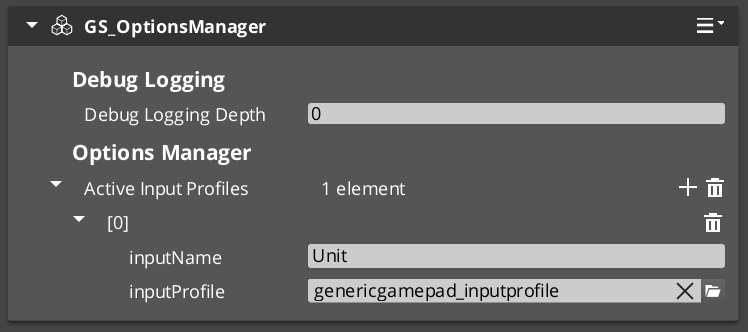
- Create an entity. Attach the GS_OptionsManagerComponent.
- Assign your option profiles and any presets.
- Assign your Input Profile.
- Turn the entity into a prefab. Enter prefab edit mode, set the wrapper entity to Editor Only, and save.
- Delete the Options Manager entity from the level.
- In the Game Manager prefab, add the Options Manager
.spawnableto the Startup Managers list.
Inspector Properties
| Property | Type | Description |
|---|---|---|
| Option Profiles | assets | The option catalogs to merge. Multiple profiles stack and merge by key. |
| Option Presets | assets | Preset value sets, surfaced by GetPresetNames and ApplyPreset. |
| Input Profile | asset | The active input binding profile, served to Input Readers. |
Plus Headless and Logging Depth, inherited from the manager base.
Lifecycle
| Stage | What happens |
|---|---|
| Activate | Begins loading the profile and preset assets. |
| OnSetupManagers | Waits for those loads, builds the option map, seeds defaults, then overlays persisted values. |
| OnStartupComplete | Schedules ApplyAll — see below. |
| OnShutdownManagers | Saves options. |
Why apply is deferred
Applying everything at OnStartupComplete is too early. Managers finish starting up before the render pipeline and window are ready, so display and render-scale settings applied at that moment silently do not take effect.
The manager therefore applies after a short tick delay rather than immediately. Any apply target that touches the renderer or the window inherits this constraint — if you write one, it will be applied on that same delayed pass, not during startup.
This is also why the launch-time path exists: the settings that most need to be right before the window exists are handled by console commands at boot, and the deferred apply covers everything else.
API Reference
Request Bus: OptionsManagerRequestBus
Singleton bus — call via Broadcast.
Generic value access
| Method | Parameters | Returns | Description |
|---|---|---|---|
SetOption | key, OptionValue | void | Applies, persists and notifies. The single write path. |
GetOption | key | OptionValue | Current value. |
HasOption | key | bool | Whether the key exists in the merged catalog. |
ResetToDefault | key | void | Restores the option’s authored default. |
ResetAllToDefault | — | void | Restores every option. |
Typed convenience
Script-friendly — no OptionValue object required.
| Method | Parameters | Returns |
|---|---|---|
SetOptionBool | key, bool | void |
SetOptionFloat | key, double | void |
SetOptionInt | key, s64 | void |
SetOptionString | key, string | void |
GetOptionBool | key | bool |
GetOptionFloat | key | double |
GetOptionInt | key | s64 |
GetOptionString | key | string |
Catalog
| Method | Parameters | Returns | Description |
|---|---|---|---|
GetAllOptionKeys | — | vector<string> | Every key in the merged catalog. |
GetOptionsByCategory | category | vector<string> | Keys in one category — how a menu builds its pages. |
GetOptionDefinition | key | OptionType* | The option’s definition. Non-owning, C++ only. |
Lifecycle and presets
| Method | Parameters | Returns | Description |
|---|---|---|---|
ApplyAll | — | void | Pushes every current value through its apply target. |
SaveOptions | — | void | Flushes current values to the user registry. |
GetPresetNames | — | vector<string> | Loaded preset names. |
ApplyPreset | presetName | void | Overwrites matching options, then applies and persists. |
GetActivePresetName | — | string | The preset whose values all match, otherwise "Custom". |
Input
| Method | Parameters | Returns | Description |
|---|---|---|---|
GetActiveInputProfile | inputName | input profile asset | The active profile, requested by Input Readers on activation. |
Notification Bus: OptionsManagerNotificationBus
| Event | Parameters | Description |
|---|---|---|
OnOptionChanged | key, OptionValue | Fired on every value change. Script-bindable, so UI and gameplay can react without polling. |
Usage Examples
C++ — reading a setting
#include <GS_Core/GS_Options/GS_OptionsManagerBus.h>

float masterVolume = 1.0f;
GS_Core::OptionsManagerRequestBus::BroadcastResult(
    masterVolume,
    &GS_Core::OptionsManagerRequests::GetOptionFloat,
    "audio.master"
);
C++ — building a settings page
AZStd::vector<AZStd::string> keys;
GS_Core::OptionsManagerRequestBus::BroadcastResult(
    keys,
    &GS_Core::OptionsManagerRequests::GetOptionsByCategory,
    "Graphics"
);

// GetOptionDefinition gives you the display name, description and widget
// hint for each key, so a menu can build itself from the catalog.
Writing a value goes through SetOption or its typed forms, which apply, persist and notify in one call — a menu never has to apply or save separately.
See Also
For related systems:
- Settings — profiles, option types, apply targets, presets and persistence
- Display & Window Modes — what the window apply targets do
- Input Profiles — the other branch of GS_Options
- ImGui Debug Menu — a live editor for the whole catalog
- Manager (Base) — the lifecycle it participates in
For conceptual overviews and usage guides:
Get GS_Core
GS_Core — Explore this gem on the product page and add it to your project.