GS_InputOptions
The input subsystem — Input Profiles for grouped event-to-binding mappings and Input Readers for processing input in gameplay.
Input Options is the input subsystem within the Options system. It provides two core pieces:
- Input Profiles — Data assets that map input bindings to named events, organized into toggleable groups. These replace O3DE’s raw input binding files with a more flexible system that supports runtime rebinding and per-group enable/disable toggling.
- Input Readers — Components that read input through the active profile and fire gameplay events. They can be extended for specialized input handling (player controllers, UI navigation, etc.).
For usage guides and setup examples, see The Basics: GS_Core.
Contents
Architecture
GS_OptionsManagerComponent
  │
  └── Active GS_InputProfile (data asset)
        │
        ├── InputBindingGroup: "Movement"
        │     ├── EventInputMapping: "MoveForward" → [keyboard_key_alphanumeric_W]
        │     ├── EventInputMapping: "MoveBack"    → [keyboard_key_alphanumeric_S]
        │     └── EventInputMapping: "Sprint"      → [keyboard_key_modifier_shift_l]
        │
        ├── InputBindingGroup: "Combat"
        │     ├── EventInputMapping: "Attack"   → [mouse_button_left]
        │     └── EventInputMapping: "Block"    → [mouse_button_right]
        │
        └── InputBindingGroup: "UI"
              ├── EventInputMapping: "Confirm"  → [keyboard_key_alphanumeric_E]
              └── EventInputMapping: "Cancel"   → [keyboard_key_navigation_escape]

GS_InputReaderComponent (on player entity, UI entity, etc.)
  │
  ├── Queries OptionsManager for active profile
  ├── Listens for raw O3DE input events
  ├── Matches bindings → fires named events
  └── EnableInputGroup / DisableInputGroup for runtime control
Data assets that map key bindings to named events, organized into toggleable groups. They replace O3DE’s raw input binding files with a more flexible system that supports runtime rebinding and per-group enable/disable toggling.
| Asset / Type | Purpose |
|---|
| GS_InputProfile | Data asset defining input groups, event mappings, and key bindings. |
| InputBindingGroup | Named group of event mappings — can be toggled at runtime. |
| EventInputMapping | Maps a named event to one or more raw O3DE input bindings. |
Input Profiles API
Components that read input through the active profile and fire named gameplay events. Supports runtime group toggling to enable or disable input categories on the fly, and a claim flag to absorb matched events from other readers.
| Component | Purpose |
|---|
| GS_InputReaderComponent | Per-entity input processor. Queries the active profile, matches raw input, and fires named gameplay events. |
Input Reader API
Setup
- Create a GS_InputProfile data asset in the Asset Editor.
- Add input groups and event mappings to the profile.
- Assign the profile to the Options Manager.
- Attach a GS_InputReaderComponent to any entity that needs to process input.
- The Input Reader automatically queries the Options Manager for the active profile on activation.
Readers resolve raw input into named events. Reactors decide what those events do. A reactor component carries a profile asset listing authored reaction types, and dispatches each event to whichever reactors subscribed to it — with the phase (pressed, held, released, analog) already classified.
Input Reactors API
See Also
For component references:
For related resources:
Get GS_Core
GS_Core — Explore this gem on the product page and add it to your project.
1 - Input Profiles
Data assets for input binding configuration — map key bindings to named events, organized into toggleable groups for advanced runtime input control.
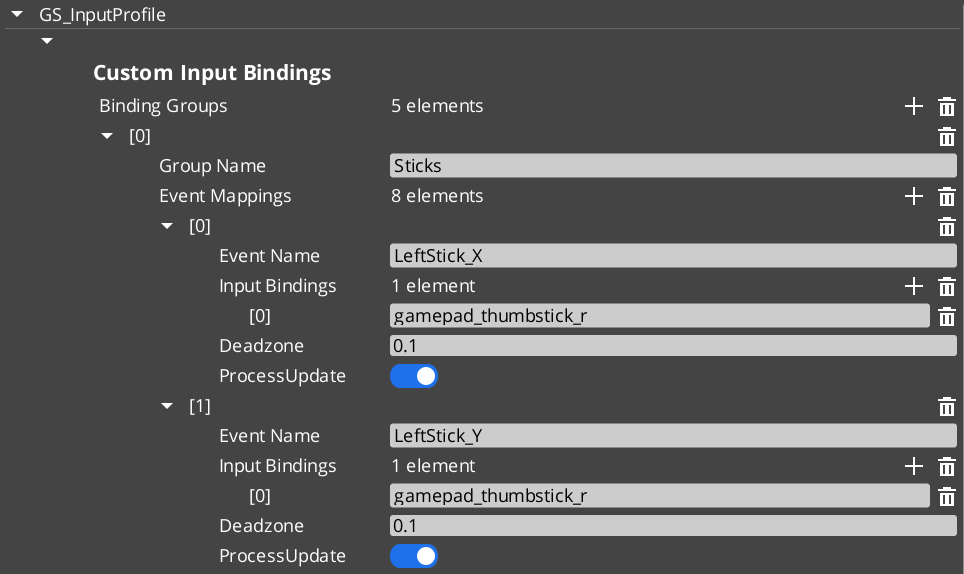
Input Profiles are data assets that map key bindings to named events, organized into groups that can be enabled and disabled at runtime. They replace O3DE’s raw input binding files with a more flexible system that supports runtime rebinding, per-group toggling, and options menu customization.
For usage guides and setup examples, see The Basics: GS_Core.
Contents
How It Works
An Input Profile contains a list of InputBindingGroups. Each group contains EventInputMappings that define the relationship between a named event, its key bindings, and processing options.
Data Structure
GS_InputProfile
  └── InputBindingGroups[]
        ├── groupName: "Movement"
        └── eventMappings[]
              ├── EventInputMapping
              │     ├── eventName: "MoveForward"
              │     ├── inputBindings: ["keyboard_key_alphanumeric_W"]
              │     ├── deadzone: 0.0
              │     └── processUpdate: true
              └── EventInputMapping
                    ├── eventName: "Jump"
                    ├── inputBindings: ["keyboard_key_alphanumeric_Space"]
                    ├── deadzone: 0.0
                    └── processUpdate: false
| Field | Type | Description |
|---|
eventName | AZStd::string | The name used to fire this event in gameplay through Input Readers. This is the identifier your gameplay code listens for. |
inputBindings | AZStd::vector<AZStd::string> | One or more raw O3DE input binding names (e.g., keyboard_key_alphanumeric_W, mouse_button_left, gamepad_button_a). Multiple bindings allow the same event to fire from different input sources. |
deadzone | float | Dead zone threshold for analog inputs (joysticks, triggers). Values below this threshold are treated as zero. Set to 0.0 for digital inputs (keys, buttons). |
processUpdate | bool | When true, the event fires continuously while the input is held. When false, the event fires only on initial press and release. Use true for movement and camera input; false for discrete actions like jumping or interacting. |
TypeId: {61421EC2-7B99-4EF2-9C56-2A7F41ED3474}
Reflection: GS_InputProfile extends AZ::Data::AssetData. Its Reflect() function requires GS_AssetReflectionIncludes.h — see Serialization Helpers.
| Field | Type | Description |
|---|
groupName | AZStd::string | Name of the group (e.g., “Movement”, “Combat”, “UI”). Used by Input Readers to enable/disable groups at runtime. |
eventMappings | AZStd::vector<EventInputMapping> | The event mappings belonging to this group. |
TypeId: {37E880D1-9AB4-4E10-9C3C-020B5C32F75B}
For initial startup instructions refer to the Core Set Up Guide.
- In the Asset Editor, open the New menu and select GS_InputProfile. This creates a blank Input Profile.
- Add Input Groups — Create groups that cluster related input events (e.g., “Movement”, “Combat”, “UI”). Groups can be toggled on/off at runtime by Input Readers.
- Add Event Mappings — Within each group, add EventInputMappings. Set the Event Name to the identifier your gameplay code will listen for.
- Set Bindings — Add the raw O3DE input bindings that should trigger each event. These are standard O3DE raw mapping names.
- Configure Deadzone — For gamepad joystick or trigger inputs, set an appropriate deadzone value (e.g.,
0.15). Leave at 0.0 for keyboard and mouse inputs. - Set Process Update — Enable for continuous input (movement, camera look). Disable for discrete actions (jump, interact, attack).
- Assign to Options Manager — Add the profile to the Options Manager’s Input Profile property.
API Reference
These methods are available on the GS_InputProfile data asset class for runtime binding queries and modifications.
| Method | Parameters | Returns | Description |
|---|
GetMappingFromBinding | const AZStd::string& binding, const AZStd::string& groupName = "" | const EventInputMapping* | Looks up the event mapping associated with a raw binding. Optionally restrict the search to a specific group. Returns nullptr if not found. |
GetGroupNameFromBinding | const AZStd::string& binding | const AZStd::string* | Returns the group name that contains the given binding. Returns nullptr if not found. |
HasBinding | const AZStd::string& binding | bool | Returns true if the binding exists anywhere in the profile. |
ReplaceEventInputBinding | const AZStd::string& eventName, const AZStd::string& newBinding | bool | Replaces the existing binding for the named event with a new one. For runtime rebinding in options menus. Returns true on success. |
AddEventInputBinding | const AZStd::string& eventName, const AZStd::string& newBinding | bool | Adds an additional binding to the named event. Returns true on success. |
RemoveEventBinding | const AZStd::string& eventName, const AZStd::string& bindingToRemove | bool | Removes a specific binding from the named event. Returns true on success. |
Usage Examples
Runtime Rebinding (Options Menu)
#include <GS_Core/GS_CoreBus.h>

// Get the active input profile
AZ::Data::Asset<GS_Core::GS_InputProfile> profile;
GS_Core::OptionsManagerRequestBus::BroadcastResult(
    profile,
    &GS_Core::OptionsManagerRequestBus::Events::GetActiveInputProfile
);

if (profile.IsReady())
{
    // Rebind the "Jump" event from Space to E
    profile.Get()->ReplaceEventInputBinding(
        "Jump",
        "keyboard_key_alphanumeric_E"
    );

    // Add an alternative binding (gamepad A button)
    profile.Get()->AddEventInputBinding(
        "Jump",
        "gamepad_button_a"
    );
}
Checking if a Binding Exists
if (profile.IsReady() && profile.Get()->HasBinding("keyboard_key_alphanumeric_W"))
{
    // This binding is mapped to an event in the profile
}
See Also
For component references:
For related resources:
Get GS_Core
GS_Core — Explore this gem on the product page and add it to your project.
2 - Input Reader
Component that reads input through the active profile and fires named gameplay events, with runtime group toggling and input claiming.
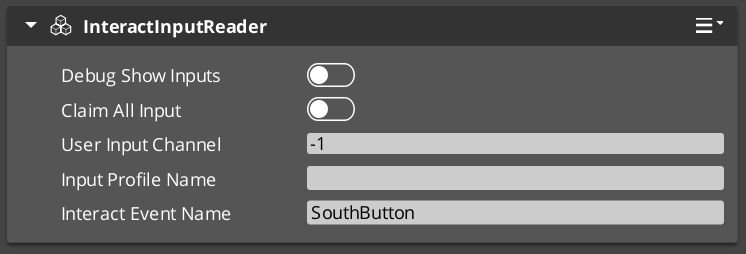
The Input Reader component sits on any entity that needs to process input. It queries the Options Manager for the active Input Profile, then listens for raw O3DE input events and matches them against the profile’s bindings to fire named gameplay events.
For usage guides and setup examples, see The Basics: GS_Core.
Contents
How It Works
On activation the Input Reader queries the Options Manager for the active Input Profile and subscribes to raw O3DE input events. Each frame it matches incoming raw input against the profile bindings. When a match is found it fires the associated named event into the gameplay event system. Input groups can be enabled or disabled at runtime to control which events are active at any moment.
Key Features
- Group toggling — Enable or disable entire input groups at runtime. For example, disable “Combat” inputs during a dialogue sequence, or disable “Movement” inputs during a cutscene.
- Claim input — The
ClaimAllInput flag causes the reader to absorb matched input events, preventing them from reaching other readers. Useful for layered input (e.g., UI absorbs input before gameplay). - Extensible — Extend the Input Reader for specialized input handling. GS_Play uses this internally for player controller input and UI navigation input.
API Reference
GS_InputReaderComponent
| Field | Value |
|---|
| Header | GS_Core/GS_CoreBus.h |
Request Bus: InputReaderRequestBus
Entity-addressed bus – call via Event(entityId, ...).
| Method | Parameters | Returns | Description |
|---|
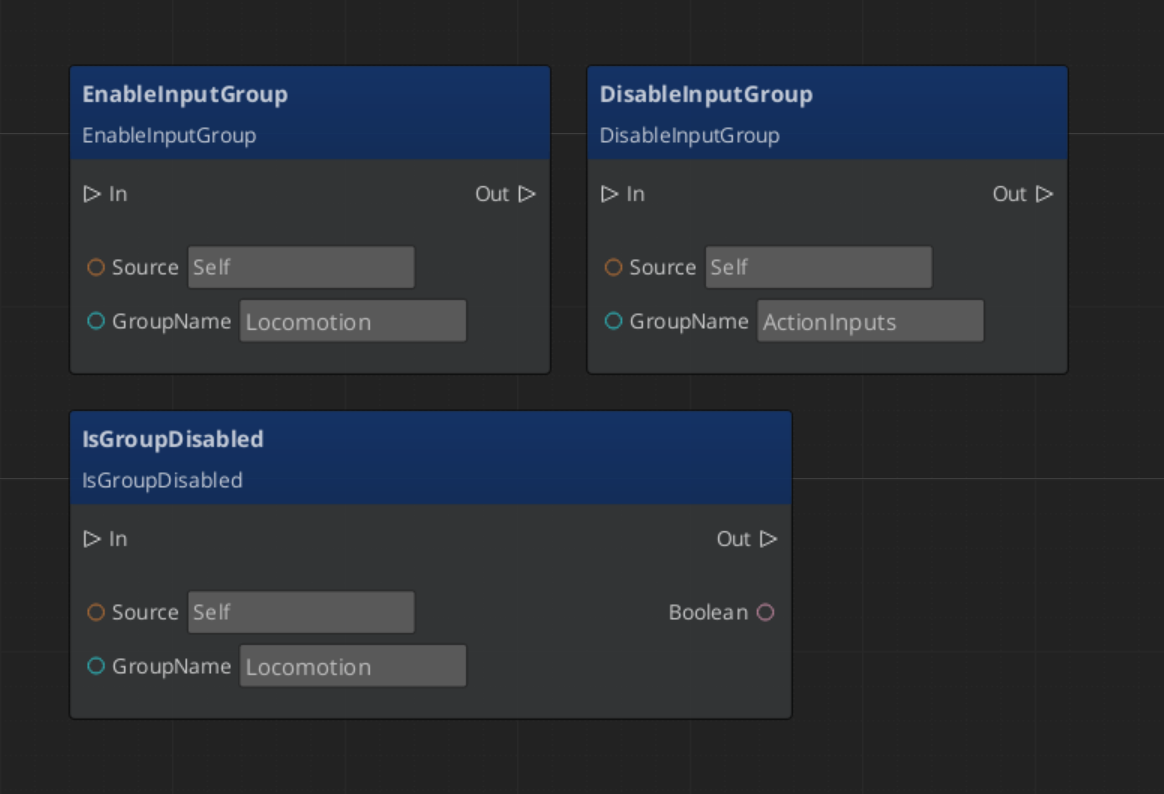
EnableInputGroup | const AZStd::string& groupName | void | Enables a named input group for this reader. Events in this group will fire on matched input. |
DisableInputGroup | const AZStd::string& groupName | void | Disables a named input group. Events in this group will be ignored until re-enabled. |
IsGroupDisabled | const AZStd::string& groupName | bool | Returns true if the named group is currently disabled. |
Usage Examples
Toggling Input Groups
#include <GS_Core/GS_CoreBus.h>

// Disable combat inputs during dialogue
GS_Core::InputReaderRequestBus::Event(
    playerEntityId,
    &GS_Core::InputReaderRequestBus::Events::DisableInputGroup,
    AZStd::string("Combat")
);

// Re-enable when dialogue ends
GS_Core::InputReaderRequestBus::Event(
    playerEntityId,
    &GS_Core::InputReaderRequestBus::Events::EnableInputGroup,
    AZStd::string("Combat")
);
Script Canvas
See Also
For component references:
For related resources:
Get GS_Core
GS_Core — Explore this gem on the product page and add it to your project.
3 - Input Reactors
The reactor mechanism — a component driven by a reactor profile asset that dispatches named input events to authored reaction types, with a notification bus for scripts.
An Input Reactor turns a named input event into gameplay. Input Readers resolve raw device input into named events like "Jump" or "MoveForward"; reactors decide what those events do.
GS_Core owns the mechanism and the extension base. The reactions themselves are authored data, and the concrete reaction types are supplied by whichever gem owns that gameplay domain — GS_Unit ships movement and jump reactors, and your own gem can ship its own.
For usage guides and setup examples, see The Basics: GS_Core.
Contents
How It Fits Together
raw device input
      │
      ▼
Input Reader          resolves bindings through the active input profile
      │                   fires a named event, e.g. "Jump"
      ▼
Input Reactor         classifies the event's phase and dispatches it
      │                   to every reactor subscribed to that name
      ▼
reactor types         do the gameplay thing
The split matters: the reader knows about devices and bindings, the reactor knows about gameplay, and neither knows about the other’s concerns. Rebinding a key changes nothing about the reaction, and changing a reaction changes nothing about the binding.
Reactor Profiles
InputReactorProfileAsset
A reactor profile is an asset holding AZStd::vector<InputReactorType*> — the set of reactions an entity has.
This is the framework’s polymorphic array shape: the serializer supplies an Add dropdown listing every reactor type reflected anywhere in the project, so a profile can mix reactors from GS_Unit, from another gem, and from your own game.
Because the reaction set is an asset, different entity kinds share or diverge by swapping profiles rather than by rebuilding component stacks.
The Component
GS_InputReactorComponent goes on the entity that should react. It carries one Reactor Profile.
At activation it clones the profile’s reactors so each component owns its own instances, then builds an event-name-to-reactor dispatch map from what each reactor declares it listens to. Cloning is what lets a reactor hold per-entity runtime state — two characters using the same profile do not share it.
It also tracks the current value of every event it has seen, which is what lets it classify phases and answer state queries.
Event Phases
The component classifies each fed event before handing it on, so a reactor is told what kind of input this is rather than having to work it out from value changes.
| Phase | Meaning |
|---|
| Pressed | The value went from zero to non-zero on this feed. |
| Held | A repeat feed while the value stays non-zero. |
| Released | The value went from non-zero back to zero. |
| Analog | A continuous update, carrying the raw value. |
Discrete inputs — buttons and keys — produce Pressed, Held and Released. Axis inputs produce Analog with the value.
This is why a jump reactor can be three lines: set the state on Pressed, clear it on Released, and ignore everything else.
API Reference
Request Bus: InputReactorRequestBus
Entity-addressed, single handler. This is how an Input Reader feeds a resolved event to a target entity.
| Method | Parameters | Returns | Description |
|---|
FeedInputEvent | eventName, value | void | Feed a resolved event. The component classifies its phase and dispatches. |
ClearInput | — | void | Clear all tracked event state — used when input should stop mattering, such as entering a menu. |
GetEventState | eventName | float | The current value of a named event. |
Notification Bus: InputReactorNotificationBus
Entity-addressed, multiple handlers. Emitted in parallel with internal reactor dispatch, so ScriptCanvas graphs and other components can react to the same events without being reactor types.
| Event | Parameters | Description |
|---|
OnInputEvent | eventName, value, phase | An input event fired on this entity. Phase is 0 Pressed, 1 Held, 2 Released, 3 Analog. |
OnInputCleared | — | Input state was cleared. |
This bus is the answer to “I just want a graph to run when the player presses a key” — you do not need to write a reactor type for one-off behaviour.
Writing a Reactor Type
Derive InputReactorType and implement two methods:
| Method | Required | Purpose |
|---|
GetSubscribedEvents | Yes | The event names this reactor listens to. The component builds its dispatch map from these. |
OnInputEvent | Yes | Called with the owning entity, the event name, its value and its phase. |
OnActivate | No | Connect to downstream systems for this owner. |
OnDeactivate | No | Disconnect. |
Reflect it against the base and it appears in the reactor profile’s Add dropdown. There is no registry to add it to and no discovery step.
Two design habits worth adopting from the shipped reactors:
- Author event names as fields. The shipped reactors expose their event names as editable strings rather than hard-coding them, so one reactor type serves projects with different naming conventions.
- Keep per-owner state on the reactor. Because each component clones its reactors, instance state is safe — the keyboard movement reactor uses this to handle a player releasing one direction key while still holding the opposite one.
See Also
For related systems:
For conceptual overviews and usage guides:
Get GS_Core
GS_Core — Explore this gem on the product page and add it to your project.