GS_Managers
The game lifecycle management system — startup sequencing, systemic navigation, and the extensible manager pattern.
The Managers system is the backbone of every GS_Play project. It provides a controlled startup sequence that initializes game systems in the correct order, global access to those systems via EBus, and systemic navigation (New Game, Load Game, Quit) from a single point of control.
Every GS_Play gem that has a manager component (Save, Stage, UI, Unit, Camera, Audio, etc.) plugs into this system automatically.
For usage guides and setup examples, see The Basics: GS_Core.
Contents
Architecture
Breakdown
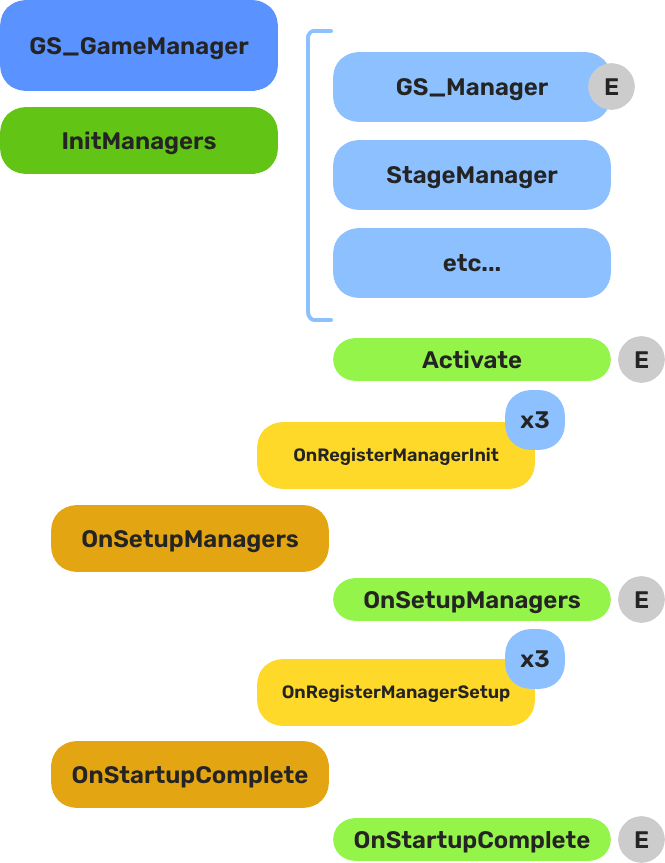
When the project starts, the Game Manager runs three stages before the game is considered ready:
| Stage | Broadcast Event | What It Means |
|---|
| 1 — Initialize | (internal) | Each manager is spawned. They activate, then report ready. |
| 2 — Setup | OnSetupManagers | Setup stage. Now safe to query other managers. |
| 3 — Complete | OnStartupComplete | Last stage. Everything is ready.
Do any last minute things. Now safe to begin gameplay. |
For most scripts, you only need OnStartupComplete. Wait for this event before doing anything that depends on managers to be completely setup.
E Indicates extensible classes and methods.
Patterns - Complete list of system patterns used in GS_Play.
Components
| Component | Purpose | Reference |
|---|
| GS_GameManagerComponent | Top-level lifecycle controller. Spawns managers, handles New Game / Load / Quit / Standby. | Game Manager |
| GS_ManagerComponent | Base class for all game system managers. Handles the two-stage init pattern automatically. | Manager |
Quick Start
For step-by-step setup, see Game Manager — Setup and Manager — Setup.
For creating custom managers, see Manager — Extending the Manager Class.
See Also
For conceptual overviews and usage guides:
For component references:
For related resources:
Get GS_Core
GS_Core — Explore this gem on the product page and add it to your project.
1 - Game Manager
The top-level game lifecycle controller — startup sequencing, systemic navigation, standby mode, and debug support.
The Game Manager is the root component of every GS_Play project. It controls the game lifecycle from startup through shutdown: spawning and initializing all Manager components in the correct order, providing systemic navigation (New Game, Load Game, Return to Title, Quit), and coordinating standby mode for pausing gameplay during level transitions or other blocking operations.
Every level in your project should contain the same Game Manager prefab. In debug mode it stays in the current level on start; in release mode it navigates to your title stage.
For usage guides and setup examples, see The Basics: GS_Core.
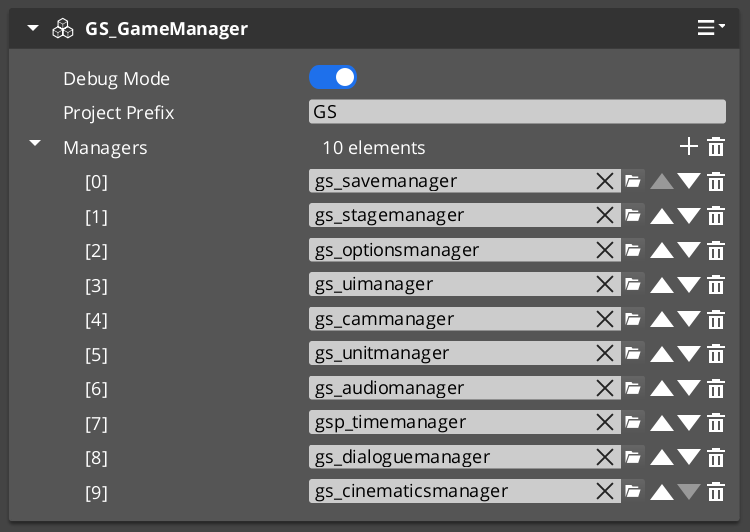
The Game Manager component in the Entity Inspector, with added manager prefabs in the Startup Managers list.
Contents
Design Intent
Extend the Game Manager when you need project-wide changes to startup ordering, custom post-startup logic (analytics sessions, online service initialization), or additional global lifecycle events. For most projects, the built-in component is sufficient as-is. Do not move gameplay logic here — the Game Manager orchestrates systems, it does not run game rules.
Dependencies & Interactions
| Coordinates with | Role |
|---|
| GS_SaveManager | Owns all save/load file operations triggered by NewGame, ContinueGame, LoadGame, SaveAndExitGame |
| GS_StageManager | Owns level navigation during NewGame, LoadGame, and ReturnToTitle |
| GS_ManagerComponent | Base class all spawned managers extend |
| All other GS gem managers | Any manager in the Startup Managers list registers automatically |
Setup
Game Manager Entity

The Game Manager wrapper entity set as Editor-Only inside Prefab Edit Mode.
- Create an entity and attach the GS_GameManagerComponent (or your extended version).
- Turn the entity into a prefab.
- Enter prefab edit mode. Set the wrapper entity (the parent of your Game Manager entity) to Editor Only. Save the prefab.
- Create Manager prefabs for the systems you need (Save, Stage, Options, or custom managers).
- Add each Manager
.spawnable to the Game Manager’s Startup Managers list in the Entity Inspector. - Push your overrides into the prefab to propagate across all levels.
Place your Game Manager prefab at the top of every level in the Entity Outliner.
The premade manager prefabs for each GS_Play gem are located in that gem’s Assets/Prefabs directory.
Core Concepts
Startup Sequence
When the project starts, the Game Manager executes a three-stage startup:
- Spawn Managers — The Game Manager instantiates every prefab in its Startup Managers list. Each manager component runs its
Activate() and reports back via OnRegisterManagerInit(). - Startup Managers — Once all managers report initialized, the Game Manager broadcasts
OnSetupManagers(). Managers now connect to each other and report back via OnRegisterManagerStartup(). - Startup Complete — Once all managers report started up, the Game Manager broadcasts
OnStartupComplete(). The game is fully initialized and ready to run.
At each stage, the Game Manager counts reports and only proceeds when every spawned manager has reported. This guarantees safe cross-referencing between managers in Stage 2.
Systemic Navigation
The Game Manager provides the high-level game flow methods that drive your project:
- NewGame / NewGame(saveName) — Starts a new game, optionally with a named save file.
- ContinueGame — Loads the most recent save and continues.
- LoadGame(saveName) — Loads a specific save file.
- ReturnToTitle — Returns to the title stage, tearing down the current game session.
- SaveAndExitGame / ExitGame — Saves and/or exits the application.
These methods coordinate with the Save Manager and Stage Manager automatically.
Standby Mode
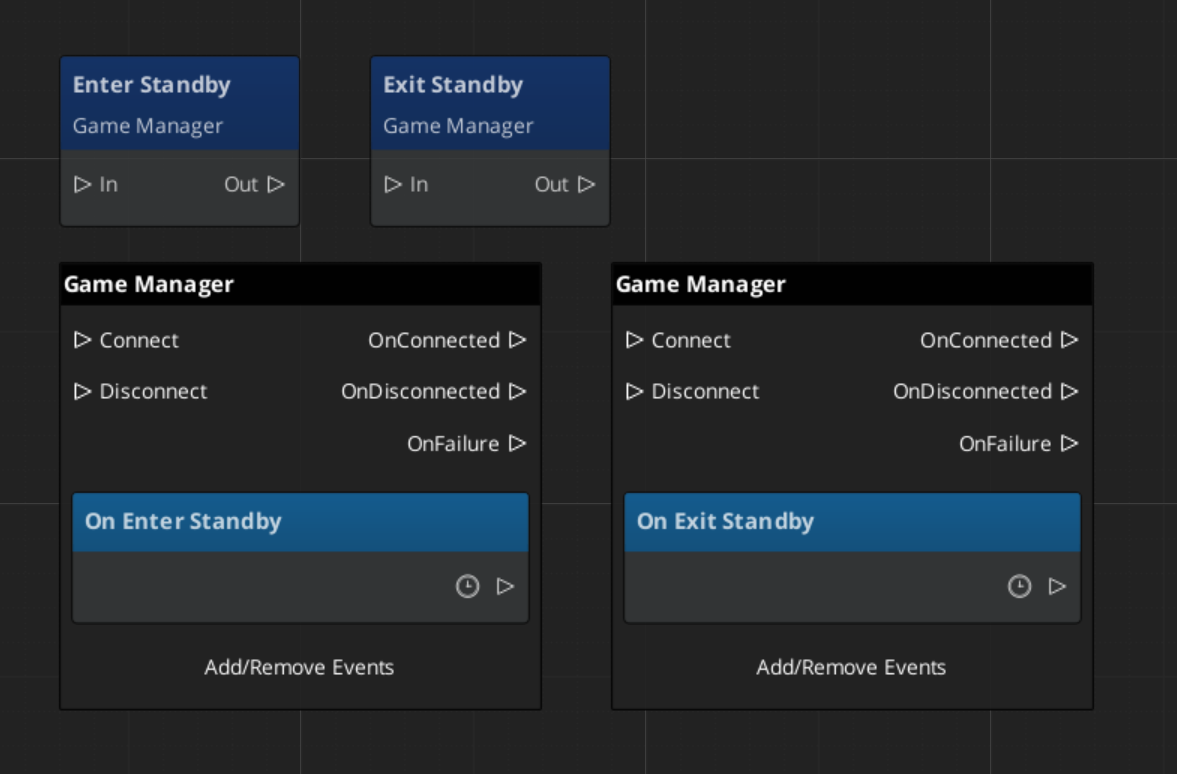
Standby is a global pause mechanism. When the Game Manager enters standby, it broadcasts OnEnterStandby() to all managers, which propagate the signal to their subsystems. This halts timers, physics, gameplay ticks, and other simulation while a blocking operation (like a stage change) completes. Calling ExitStandby reverses the process.
Debug Mode
When Debug Mode is enabled in the Inspector, the Game Manager skips navigating to the title stage and remains in the current level. This allows rapid iteration — you can start the game from any level without going through the full title-to-gameplay flow. If save data and unit management are enabled, it loads default save data but overrides position data with the current level’s default spawn point.
Inspector Properties
| Property | Type | Description |
|---|
| Project Prefix | String | Sets the project prefix for generated files (e.g. save files). Example: "GS" produces GS_SaveGame.json. |
| Startup Managers | List of Manager Prefabs | The manager prefab spawnables to instantiate on game start. Order does not matter — the two-stage init handles dependencies. (C++: AZStd::vector<SpawnableAssetRef>) |
| Debug Mode | Bool | When enabled, the Game Manager stays in the current level instead of navigating to the title stage. |
API Reference
Request Bus: GameManagerRequestBus
Commands sent to the Game Manager. Singleton bus — single address, single handler.
| Method | Parameters | Returns | Description |
|---|
IsInDebug | — | bool | Returns whether debug mode is active. |
IsStarted | — | bool | Returns whether the startup sequence has completed. |
GetProjectPrefix | — | AZStd::string | Returns the configured project prefix string. |
EnterStandby | — | void | Broadcasts standby to all managers, pausing gameplay. |
ExitStandby | — | void | Broadcasts standby exit, resuming gameplay. |
NewGame | — | void | Starts a new game with the default save name. |
NewGame | const AZStd::string& saveName | void | Starts a new game with a specified save file name. |
ContinueGame | — | void | Loads the most recent save file and continues. |
LoadGame | const AZStd::string& saveName | void | Loads a specific save file by name. |
ReturnToTitle | — | void | Returns to the title stage, tearing down the current session. |
SaveAndExitGame | — | void | Saves the current game state and exits the application. |
ExitGame | — | void | Exits the application without saving. |
Notification Bus: GameManagerNotificationBus
Events broadcast by the Game Manager. Multiple handler bus — any number of components can subscribe.
| Event | Parameters | Returns | Description |
|---|
OnSetupManagers | — | — | Fired when all managers have reported initialized. Managers should now connect to each other. |
OnStartupComplete | — | — | Fired when the full startup sequence is complete. Safe to begin gameplay. |
OnShutdownManagers | — | — | Fired when the game is shutting down. Managers should clean up. |
OnBeginGame | — | — | Fired when a new game or loaded game begins. |
OnEnterStandby | — | — | Fired when entering standby mode. Pause your systems. |
OnExitStandby | — | — | Fired when exiting standby mode. Resume your systems. |
ScriptCanvas Nodes
These methods and events are available as ScriptCanvas nodes.
Request Nodes
| Node | Description |
|---|
TriggerNewGame | Starts a new game with the default save name. |
TriggerNewGameWithName(saveName) | Starts a new game with a named save file. |
TriggerContinueGame | Continues from the most recent save. |
TriggerLoadGame(saveName) | Loads a specific save file by name. |
TriggerReturnToTitle | Returns to the title stage. |
TriggerSaveAndExitGame | Saves and exits. |
TriggerExitGame | Exits without saving. |
Notification Nodes
Listen for these events on GameManagerNotificationBus.
| Node | When It Fires |
|---|
OnStartupComplete | The game is fully initialized and ready to run. |
OnBeginGame | A new or loaded game session begins. |
OnEnterStandby | The game has entered standby (paused). |
OnExitStandby | The game has exited standby (resumed). |
Virtual Methods
Override these when extending the Game Manager. Always call the base implementation.
| Method | Parameters | Returns | Description |
|---|
InitializeManagers() | — | void | Spawns the Startup Managers list. Override to add custom spawn logic. |
ProcessFallbackSpawn() | — | void | Handles fallback when a manager fails to spawn. |
StartupManagers() | — | void | Broadcasts OnSetupManagers. Override to inject logic between init and startup stages. |
CompleteStartup() | — | void | Broadcasts OnStartupComplete. Override to add post-startup logic. |
BeginGame() | — | void | Called when transitioning into active gameplay. |
SC ↔ C++ Quick Reference
| Action | ScriptCanvas Node | C++ Method | Notes |
|---|
| Start a new game | TriggerNewGame | NewGame() | Default save name |
| Start with named save | TriggerNewGameWithName(name) | NewGame(saveName) | Named save file |
| Continue from last save | TriggerContinueGame | ContinueGame() | Loads most recent save |
| Load specific save | TriggerLoadGame(name) | LoadGame(saveName) | Load by file name |
| Return to title | TriggerReturnToTitle | ReturnToTitle() | Tears down current session |
| Save and exit | TriggerSaveAndExitGame | SaveAndExitGame() | — |
| Exit without saving | TriggerExitGame | ExitGame() | — |
| Check if started | — | IsStarted() | Returns bool |
Usage Examples
ScriptCanvas: Title Screen Workflow
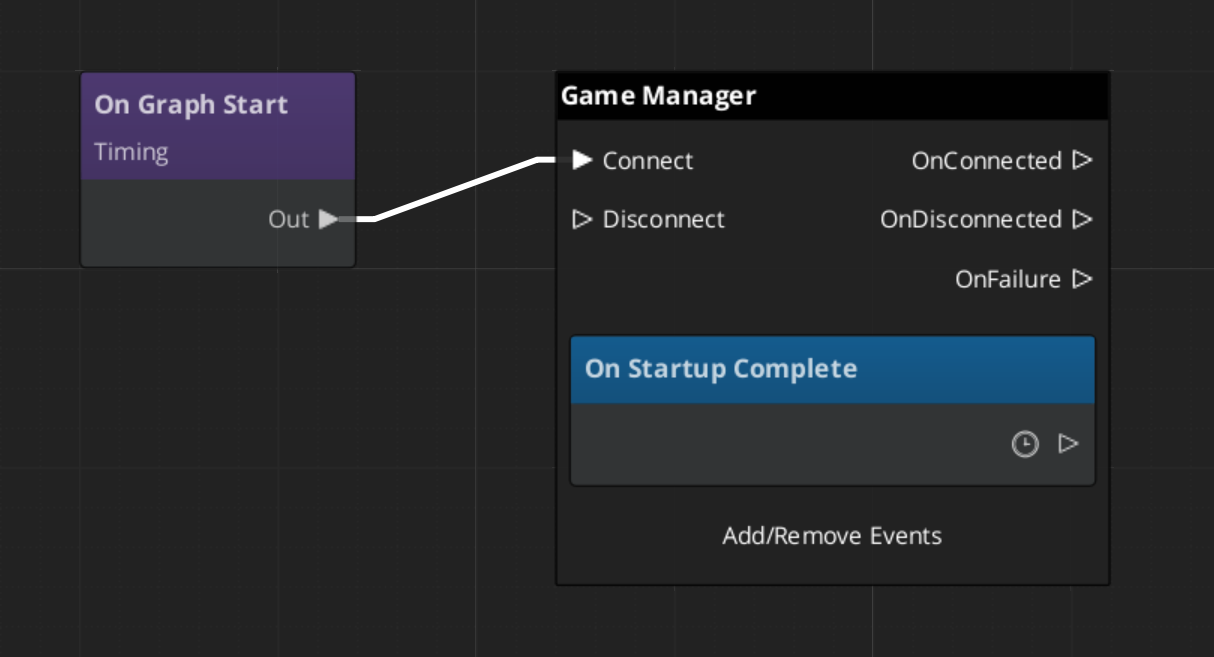
Calling new or load game proceedes to start the gameplay and systems. Begin Game event fires to start all systems across the game.
Debug Mode automatically begins the game.
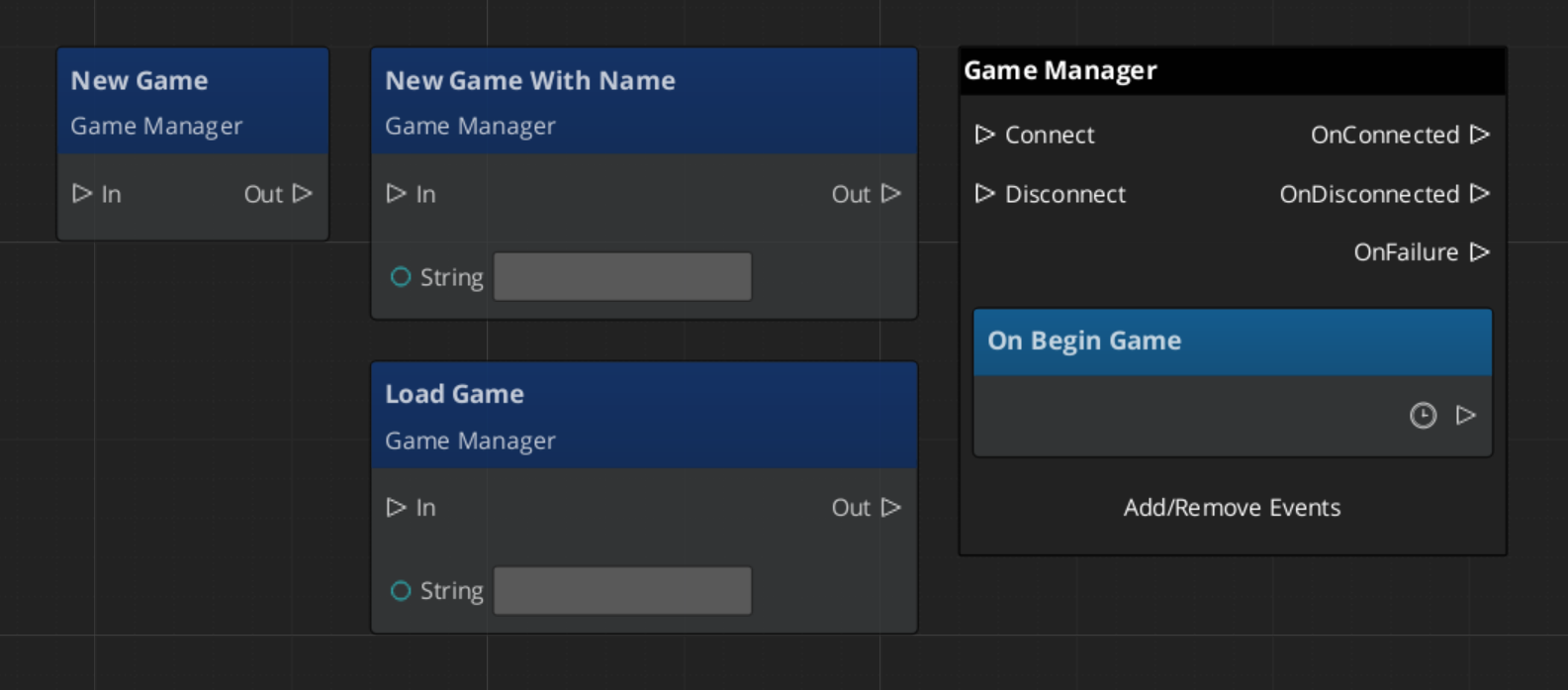
ScriptCanvas: Standby Logic
C++: Reacting to Events
A gameplay component that listens to the full startup and standby lifecycle:
#include <GS_Core/GS_CoreBus.h>

class MyGameplayComponent
    : public AZ::Component
    , protected GS_Core::GameManagerNotificationBus::Handler
{
protected:
    void Activate() override
    {
        GS_Core::GameManagerNotificationBus::Handler::BusConnect();
    }

    void Deactivate() override
    {
        GS_Core::GameManagerNotificationBus::Handler::BusDisconnect();
    }

    void OnStartupComplete() override
    {
        // Safe to access all managers and begin gameplay logic
    }

    void OnEnterStandby() override
    {
        // Pause your gameplay systems
    }

    void OnExitStandby() override
    {
        // Resume your gameplay systems
    }
};
C++: Custom Manager Integration
A manager that receives the startup handshake from the Game Manager. Add this class’s prefab to the Game Manager’s Startup Managers list:
#include <GS_Core/GS_CoreBus.h>
#include <Source/Managers/GS_ManagerComponent.h>

class MySystemManager
    : public GS_Core::GS_ManagerComponent
    , protected GS_Core::GameManagerNotificationBus::Handler
{
public:
    AZ_COMPONENT_DECL(MySystemManager);
    static void Reflect(AZ::ReflectContext* context);

protected:
    void Activate() override
    {
        GS_Core::GS_ManagerComponent::Activate();                        // Required: registers with Game Manager
        GS_Core::GameManagerNotificationBus::Handler::BusConnect();
    }

    void Deactivate() override
    {
        GS_Core::GameManagerNotificationBus::Handler::BusDisconnect();
        GS_Core::GS_ManagerComponent::Deactivate();                      // Required: deregisters from Game Manager
    }

    // Called during Stage 2 — safe to reference other managers here
    void OnSetupManagers() override
    {
        // Connect to other managers, set up cross-system references
    }

    // Called when the full startup sequence completes — safe to begin gameplay
    void OnStartupComplete() override
    {
        // Initialize systems that depend on all managers being ready
    }

    void OnEnterStandby() override { /* pause your systems */ }
    void OnExitStandby()  override { /* resume your systems */ }
};
Extending the Game Manager
Extend the Game Manager to add custom startup logic, additional lifecycle events, or project-specific behavior. Extension is done in C++.
#pragma once
#include <GS_Core/GS_CoreBus.h>
#include <Source/Managers/GS_GameManagerComponent.h>

namespace MyProject
{
    class MyGameManager : public GS_Core::GS_GameManagerComponent
    {
    public:
        AZ_COMPONENT_DECL(MyGameManager);

        static void Reflect(AZ::ReflectContext* context);

    protected:
        void InitializeManagers() override;
        void StartupManagers() override;
        void CompleteStartup() override;
        void BeginGame() override;
    };
}
Implementation (.cpp)
#include "MyGameManager.h"
#include <AzCore/Serialization/SerializeContext.h>

namespace MyProject
{
    AZ_COMPONENT_IMPL(MyGameManager, "MyGameManager", "{YOUR-UUID-HERE}");

    void MyGameManager::Reflect(AZ::ReflectContext* context)
    {
        if (auto serializeContext = azrtti_cast<AZ::SerializeContext*>(context))
        {
            serializeContext->Class<MyGameManager, GS_Core::GS_GameManagerComponent>()
                ->Version(0);

            if (AZ::EditContext* editContext = serializeContext->GetEditContext())
            {
                editContext->Class<MyGameManager>("My Game Manager", "Custom game manager for MyProject")
                    ->ClassElement(AZ::Edit::ClassElements::EditorData, "")
                        ->Attribute(AZ::Edit::Attributes::Category, "MyProject")
                        ->Attribute(AZ::Edit::Attributes::AppearsInAddComponentMenu, AZ_CRC_CE("Game"));
            }
        }
    }

    void MyGameManager::InitializeManagers()
    {
        // Call base to spawn the standard manager list
        GS_GameManagerComponent::InitializeManagers();
        // Custom initialization logic here
    }

    void MyGameManager::StartupManagers()
    {
        // Call base to handle standard startup
        GS_GameManagerComponent::StartupManagers();
    }

    void MyGameManager::CompleteStartup()
    {
        // Call base to broadcast OnStartupComplete
        GS_GameManagerComponent::CompleteStartup();
        // Post-startup logic here (e.g. connect to analytics, initialize online services)
    }

    void MyGameManager::BeginGame()
    {
        GS_GameManagerComponent::BeginGame();
        // Custom game start logic
    }
}
See Also
For scripting patterns and SC-first usage:
For related components:
Get GS_Core
GS_Core — Explore this gem on the product page and add it to your project.
2 - Manager
The base class for all game system managers — automatic two-stage initialization and lifecycle integration with the Game Manager.
For usage guides and setup examples, see The Basics: GS_Core.

A Manager prefab with the wrapper entity set as Editor-Only inside Prefab Edit Mode.
GS_GameManager
  └── (spawns) GS_ManagerComponent ◄ you are here — and all other managers extend this
The GS_ManagerComponent is the base class that all game system managers inherit from. It handles the two-stage initialization pattern with the Game Manager automatically, so you can focus on your system’s logic without worrying about startup ordering.
Every built-in GS_Play manager (Save, Stage, Options, UI, Unit, Camera, Audio, Performer) extends this class. When you need a custom game system manager, you extend it too.
Contents
How It Works
When the Game Manager spawns its list of manager prefabs, each Manager component goes through this lifecycle:
Activate — The component initializes itself (connects to buses, sets up internal state). When done, broadcasts OnRegisterManagerInit() to tell the Game Manager it is ready.
OnStartupManagers — Called by the Game Manager after all managers have reported initialized. Connect to other managers and set up cross-references here. When done, broadcasts OnRegisterManagerStartup().
OnStartupComplete — The Game Manager broadcasts this after all managers report started up. The game is fully ready.
OnEnterStandby / OnExitStandby — Called when the Game Manager enters or exits standby mode. Pause and resume your subsystem here.
OnShutdownManagers — Called when the game is shutting down. Clean up resources and disconnect buses.
The base class handles steps 1–2 automatically. Override them to add your logic, then call the base implementation to complete the handshake.
Setup
The Manager wrapper entity set as Editor-Only inside Prefab Edit Mode.
- Create an entity. Attach your Manager component (built-in or custom) to it.
- Configure any properties needed in the Entity Inspector.
- Turn the entity into a prefab.
- Enter prefab edit mode. Set the wrapper entity (parent of your Manager entity) to Editor Only. Save.
- Delete the Manager entity from the level (it will be spawned by the Game Manager at runtime).
- In the Game Manager prefab, add your Manager
.spawnable to the Startup Managers list.
The premade manager prefabs for each GS_Play gem are located in that gem’s Assets/Prefabs directory.
Inspector Properties
The base GS_ManagerComponent exposes no inspector properties of its own. Properties are defined by each inheriting manager component (e.g., the Save Manager exposes a Save System Version Number, the Stage Manager exposes a Stages list).
API Reference
Lifecycle Events: GameManagerNotificationBus
The Manager base class automatically subscribes to these events from the Game Manager:
| Event | When It Fires | What You Do |
|---|
OnStartupManagers | All managers are initialized | Connect to other managers, set up cross-references, then call base to report. |
OnStartupComplete | All managers are started up | Begin runtime operation. |
OnEnterStandby | Game is entering standby | Pause your subsystem (stop ticks, halt processing). |
OnExitStandby | Game is exiting standby | Resume your subsystem. |
OnShutdownManagers | Game is shutting down | Clean up resources, disconnect buses. |
Registration Methods
Called internally by the Manager base class to report back to the Game Manager. Do not call these manually — call the base class method instead.
| Method | Description |
|---|
OnRegisterManagerInit() | Called at the end of Activate(). Reports to the Game Manager that this manager has initialized. |
OnRegisterManagerStartup() | Called at the end of OnStartupManagers(). Reports to the Game Manager that this manager has started up. |
Usage Examples
C++ — Checking if the Game Manager Is Ready
#include <GS_Core/GS_CoreBus.h>

bool isStarted = false;
GS_Core::GameManagerRequestBus::BroadcastResult(
    isStarted,
    &GS_Core::GameManagerRequestBus::Events::IsStarted
);

if (isStarted)
{
    // Safe to access all managers
}
Extending the Manager Class
Create a custom manager whenever you need a singleton game system that initializes with the rest of the framework. Extension is done in C++.
#pragma once
#include <Source/Managers/GS_ManagerComponent.h>

// Define your EBus interface for other systems to call your manager
class MyManagerRequests
{
public:
    AZ_RTTI(MyManagerRequests, "{YOUR-UUID-HERE}");
    virtual ~MyManagerRequests() = default;

    virtual int GetSomeValue() = 0;
    virtual void DoSomething() = 0;
};

class MyManagerBusTraits : public AZ::EBusTraits
{
public:
    static constexpr AZ::EBusHandlerPolicy HandlerPolicy = AZ::EBusHandlerPolicy::Single;
    static constexpr AZ::EBusAddressPolicy AddressPolicy = AZ::EBusAddressPolicy::Single;
};

using MyManagerRequestBus = AZ::EBus<MyManagerRequests, MyManagerBusTraits>;

namespace MyProject
{
    class MyManagerComponent
        : public GS_Core::GS_ManagerComponent
        , protected MyManagerRequestBus::Handler
    {
    public:
        AZ_COMPONENT_DECL(MyManagerComponent);

        static void Reflect(AZ::ReflectContext* context);

    protected:
        // Manager lifecycle
        void Activate() override;
        void Deactivate() override;
        void OnStartupManagers() override;
        void OnEnterStandby() override;
        void OnExitStandby() override;

        // Your bus implementation
        int GetSomeValue() override;
        void DoSomething() override;

    private:
        int m_someValue = 0;
    };
}
Implementation (.cpp)
#include "MyManagerComponent.h"
#include <AzCore/Serialization/SerializeContext.h>

namespace MyProject
{
    AZ_COMPONENT_IMPL(MyManagerComponent, "MyManagerComponent", "{YOUR-UUID-HERE}");

    void MyManagerComponent::Reflect(AZ::ReflectContext* context)
    {
        if (auto serializeContext = azrtti_cast<AZ::SerializeContext*>(context))
        {
            serializeContext->Class<MyManagerComponent, GS_Core::GS_ManagerComponent>()
                ->Version(0)
                ->Field("SomeValue", &MyManagerComponent::m_someValue);

            if (AZ::EditContext* editContext = serializeContext->GetEditContext())
            {
                editContext->Class<MyManagerComponent>("My Manager", "A custom game system manager")
                    ->ClassElement(AZ::Edit::ClassElements::EditorData, "")
                        ->Attribute(AZ::Edit::Attributes::Category, "MyProject")
                        ->Attribute(AZ::Edit::Attributes::AppearsInAddComponentMenu, AZ_CRC_CE("Game"))
                    ->DataElement(AZ::Edit::UIHandlers::Default,
                        &MyManagerComponent::m_someValue, "Some Value", "Description of this property");
            }
        }
    }

    void MyManagerComponent::Activate()
    {
        MyManagerRequestBus::Handler::BusConnect();

        // IMPORTANT: Call base Activate last — it reports OnRegisterManagerInit()
        GS_ManagerComponent::Activate();
    }

    void MyManagerComponent::Deactivate()
    {
        MyManagerRequestBus::Handler::BusDisconnect();
        GS_ManagerComponent::Deactivate();
    }

    void MyManagerComponent::OnStartupManagers()
    {
        // Access other managers here — they are all initialized by now

        // IMPORTANT: Call base last — it reports OnRegisterManagerStartup()
        GS_ManagerComponent::OnStartupManagers();
    }

    void MyManagerComponent::OnEnterStandby()
    {
        // Pause your subsystem
    }

    void MyManagerComponent::OnExitStandby()
    {
        // Resume your subsystem
    }

    int MyManagerComponent::GetSomeValue()
    {
        return m_someValue;
    }

    void MyManagerComponent::DoSomething()
    {
        // Your game system logic
    }
}
Module Registration
m_descriptors.insert(m_descriptors.end(), {
    MyProject::MyManagerComponent::CreateDescriptor(),
});
Then create a prefab for your manager and add it to the Game Manager’s Startup Managers list.
See Also
For conceptual overviews and usage guides:
For component references:
For related resources:
Get GS_Core
GS_Core — Explore this gem on the product page and add it to your project.