Dialogue System
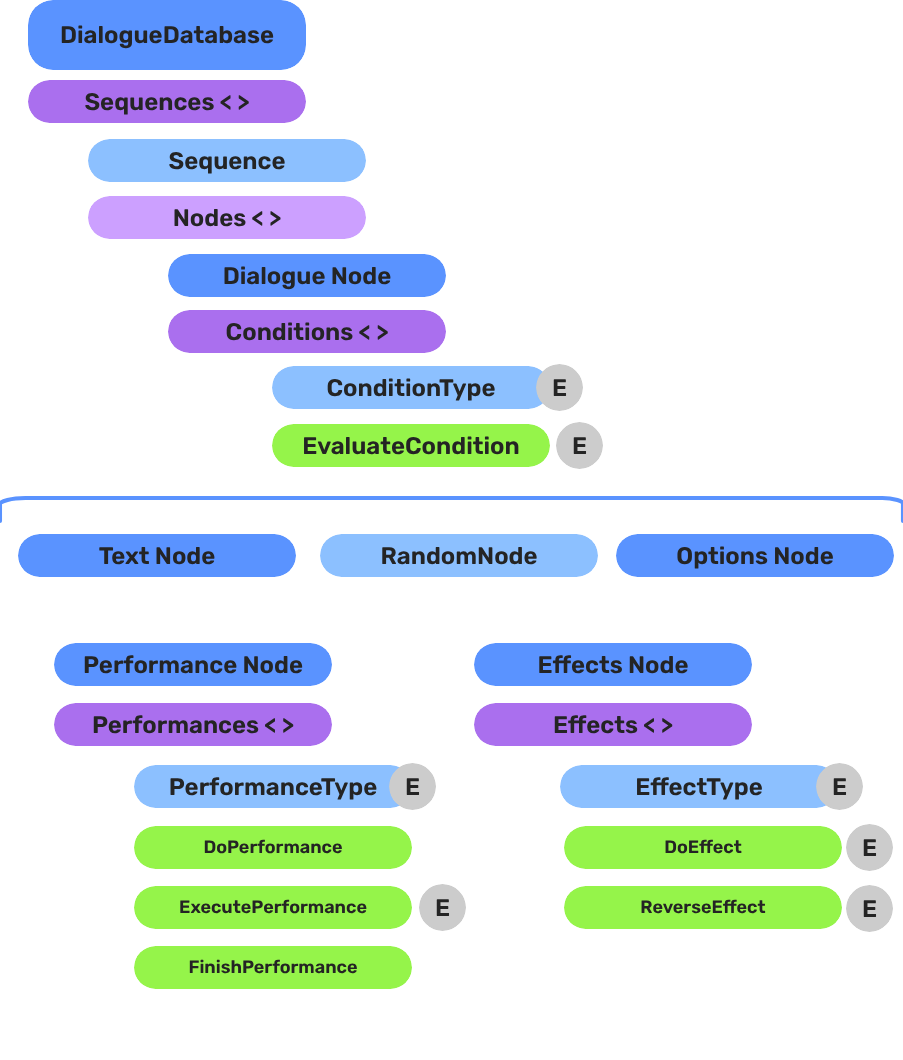
Architecture overview of the GS_Cinematics dialogue system — sequencing, data structures, UI display, actors, and extensible conditions, effects, and performances.
The Dialogue System is the runtime engine inside GS_Cinematics that drives all authored narrative experiences. It connects a persistent .dialoguedb asset to a node-graph sequencer, world-space and screen-space UI display, and an extensible set of polymorphic conditions, effects, and performances. Every piece is a standalone component communicating through EBus interfaces, so you can replace or extend any layer without modifying the gem itself.
The system is managed by the GS_DialogueManagerComponent, which participates in the standard Game Manager startup sequence.
For usage guides and setup examples, see The Basics: GS_Cinematics.
Contents
Architecture
Breakdown
A dialogue sequence is authored in the node editor, stored in a .dialoguedb asset, and driven at runtime by the Dialogue Manager and Sequencer:
| Layer | What It Means |
|---|
| DialogueDatabase | Stores named actors and sequences. Loaded at runtime by the Dialogue Manager. |
| DialogueSequence | A directed node graph. The Sequencer walks from startNodeId through Text, Selection, Effects, and Performance nodes. |
| Conditions | Polymorphic evaluators on branches. Failed conditions skip that branch automatically. |
| Effects | Polymorphic actions at EffectsNodeData nodes — set records, toggle entities. |
| Performers | Named actor anchors in the level. Resolved from database actor names via DialoguePerformerMarkerComponent. |
Conditions, effects, and performances are discovered automatically at startup — custom types from any gem appear in the editor without modifying GS_Cinematics.
E Indicates extensible classes and methods.
Patterns - Complete list of system patterns used in GS_Play.
Dialogue Manager
GS_DialogueManagerComponent owns the active dialogue database and performer registry. Extends GS_Core::GS_ManagerComponent.
Dialogue Manager API
Dialogue Sequencer
DialogueSequencerComponent traverses a node graph at runtime. The DialogueUIBridgeComponent routes dialogue and selection events to whichever UI is registered.
Dialogue Sequencer API
Data Structure
The .dialoguedb asset format, DialogueSequence, ActorDefinition, all node types, the polymorphic condition hierarchy, and localization types.
Data Structure API
Effects
Polymorphic DialogueEffect types executed synchronously from EffectsNodeData nodes. Built-in: SetRecords_DialogueEffect, ToggleEntitiesActive_DialogueEffect. Fully extensible.
Effects API
Polymorphic DialoguePerformance types executed asynchronously from PerformanceNodeData nodes. Built-in: MoveTo, PathTo, RepositionPerformer. Fully extensible.
Performances API
Dialogue UI
Screen-space and world-space dialogue display, selection menus, the typewriter text-reveal system, and the babble audio system.
Dialogue UI API
Actors
DialoguePerformerMarkerComponent places named performer anchors in the world, plus the ActorDefinition data model.
Dialogue Actors API
Editor
The in-engine GUI for authoring dialogue databases, sequences, and node graphs.
Dialogue Editor
See Also
For conceptual overviews and usage guides:
For related references:
Get GS_Cinematics
GS_Cinematics — Explore this gem on the product page and add it to your project.
1 - Dialogue Manager
Full API reference for GS_DialogueManagerComponent — dialogue database management, performer marker registration, and the DialoguePerformerMarkerComponent.
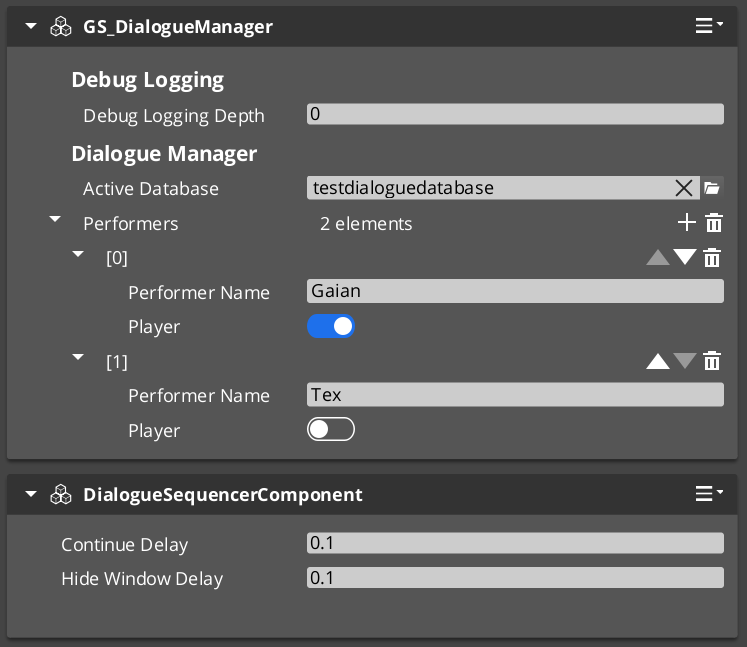
GS_DialogueManagerComponent owns the active dialogue database and performer registry. It extends GS_Core::GS_ManagerComponent and participates in the standard Game Manager startup sequence.
For usage guides and setup examples, see The Basics: GS_Cinematics.
Contents
GS_DialogueManagerComponent
Singleton GS_Play manager that owns the active .dialoguedb asset and the performer registry. Registered with the Game Manager startup sequence via GS_Core::GS_ManagerComponent.
| Property | Value |
|---|
| Extends | GS_Core::GS_ManagerComponent |
| Bus | DialogueManagerRequestBus (Single address, single handler) |
| Notifications | DialogueManagerNotificationBus (inherited from ManagerBaseOutgoingEvents) |
Request Bus: DialogueManagerRequestBus
Singleton bus — Single address, single handler.
| Method | Parameters | Returns | Description |
|---|
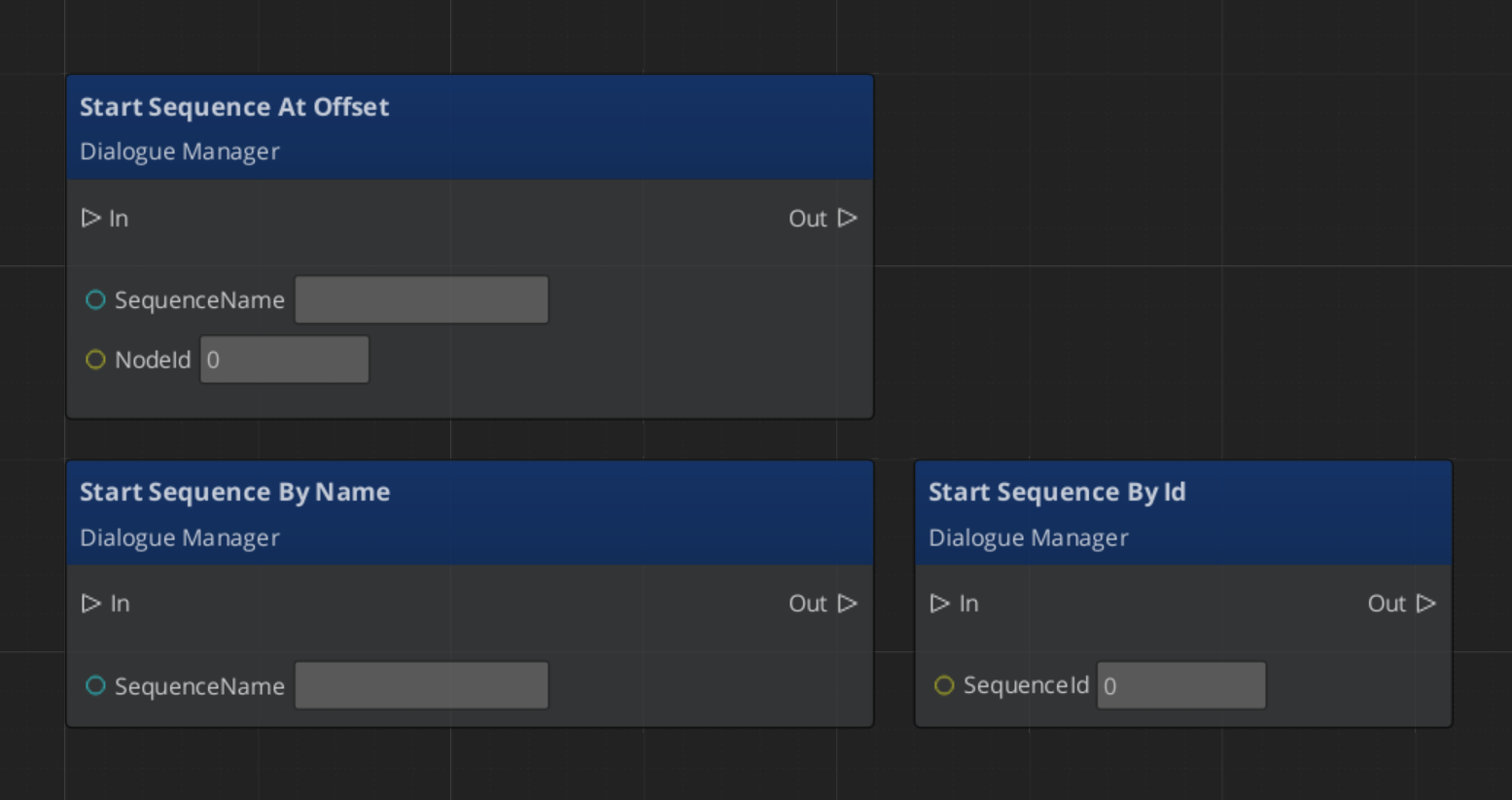
StartDialogueSequenceByName | const AZStd::string& sequenceName | void | Looks up a sequence by name in the active database and starts playback through the sequencer. |
ChangeDialogueDatabase | AZ::Data::Asset<DialogueDatabase> database | void | Swaps the active .dialoguedb asset at runtime. |
RegisterPerformerMarker | const AZStd::string& name, AZ::EntityId entity | void | Registers a DialoguePerformerMarkerComponent entity under the given performer name. |
GetPerformer | const AZStd::string& name | AZ::EntityId | Returns the entity registered under the given performer name. |
Notification Bus: DialogueManagerNotificationBus
Dialogue Manager notifications are inherited from ManagerBaseOutgoingEvents. See Manager for the full notification interface.
A world-space anchor component placed on NPC entities in the level. Performer markers register by name with the Dialogue Manager during activation. The dialogue system resolves actor names from the database to these world-space entities.
| Method | Parameters | Returns | Description |
|---|
GetPerformerName | – | AZStd::string | Returns the registered name for this performer. |
GetPosEntity | – | AZ::EntityId | Returns the entity used as the position reference for this performer. |
GetPosPoint | – | AZ::Vector3 | Returns the world-space position of the performer anchor. |
ShouldTrackTarget | – | bool | Returns whether this performer should track a target entity. |
Script Canvas Examples
Starting a dialogue sequence by name:
See Also
For usage guides:
For component references:
For related resources:
Get GS_Cinematics
GS_Cinematics — Explore this gem on the product page and add it to your project.
2 - Dialogue Data Structure
Full reference for the DialogueDatabase asset, dialogue sequences, node types, conditions, effects, localization types, and the extension guide for custom polymorphic types.
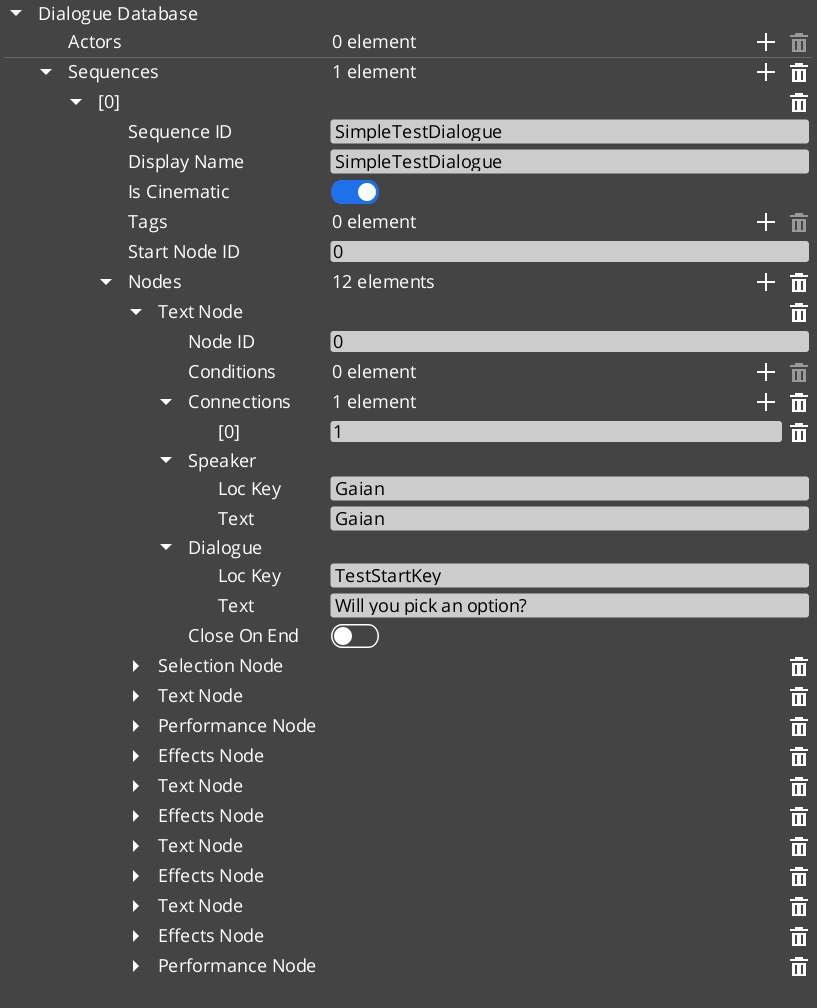
All dialogue content lives in a .dialoguedb asset file. This page documents the complete data model: the database container, sequences, actor definitions, every node type, the polymorphic condition and effect hierarchies, and the localization pipeline. It also provides an extension guide for registering custom conditions and effects from external gems.
For usage guides and setup examples, see The Basics: GS_Cinematics.
Contents
DialogueDatabase
The top-level asset that contains all data for a set of dialogue encounters.
| Property | Type | Description |
|---|
| Asset Extension | .dialoguedb | Custom O3DE asset type. |
| TypeId | {4C5D6E7F-8A9B-0C1D-2E3F-4A5B6C7D8E9F} | Registered asset type identifier. |
| Actors | AZStd::unordered_map<AZStd::string, ActorDefinition> | Named actor definitions. Keyed by actor name. |
| Sequences | AZStd::unordered_map<AZStd::string, DialogueSequence> | Named dialogue sequences. Keyed by sequence name. |
| Metadata | Various | Database-level settings (default delays, typewriter speed, UI profiles). |
The Dialogue Manager loads one database at a time. You can swap databases at runtime via DialogueManagerRequestBus::ChangeDialogueDatabase.
DialogueSequence
A single dialogue encounter within the database. Contains a linear or branching graph of nodes.
| Property | Type | Description |
|---|
| TypeId | {2B3C4D5E-6F7A-8B9C-0D1E-2F3A4B5C6D7E} | |
| metadata | Various | Sequence name, description, and editor settings. |
| nodes | AZStd::vector<DialogueNodeData*> | Polymorphic vector of node data. Ownership is held by the sequence. |
| startNodeId | AZStd::string | The ID of the first node the sequencer processes when this sequence begins. |
ActorDefinition
Defines a named character that appears in dialogue.
| Property | Type | Description |
|---|
| TypeId | {1A2B3C4D-5E6F-7A8B-9C0D-1E2F3A4B5C6D} | |
| Actor Name | AZStd::string | Internal name used for lookups and performer matching. |
| Portrait | Asset reference | Default portrait image for this actor. |
| Metadata | Various | Display name, emotion categories, pose sets, profile image sets. |
The actor name in the database is matched against the performer name registered by a DialoguePerformerMarkerComponent in the level. This links authored data to a world-space entity.
Node Types
All nodes inherit from the abstract DialogueNodeData base class. The sequencer uses the concrete type to determine processing behavior.
DialogueNodeData (Abstract Base)
| Property | Type | Description |
|---|
| TypeId | {D1E2F3A4-B5C6-7D8E-9F0A-1B2C3D4E5F6A} | |
| nodeId | AZStd::string | Unique identifier within the sequence. |
| connections | AZStd::vector<NodeConnection> | Outgoing connections, each with a target node ID, optional conditions, and optional weight. |
Concrete Node Types
| Type | TypeId | Description |
|---|
| TextNodeData | {A2B3C4D5-E6F7-8901-2345-6789ABCDEF01} | Displays dialogue text. Contains speaker name, localized text, portrait override, close-text flag, and continue settings (display-and-delay, wait-for-input, after-seconds). |
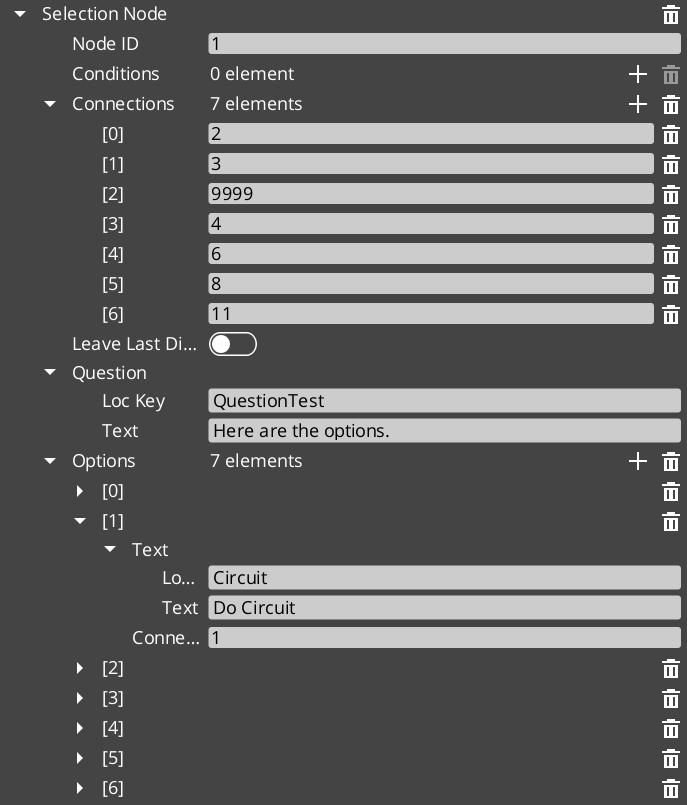
| SelectionNodeData | {C4D5E6F7-A890-1234-5678-9ABCDEF01234} | Presents player choices. Contains a vector of SelectionOption objects. Each option has its own text, conditions, and outgoing connections. |
| RandomNodeData | {D5E6F7A8-B901-2345-6789-ABCDEF012345} | Picks a random outgoing connection. Supports pure random and weighted modes. Does not pause for input. |
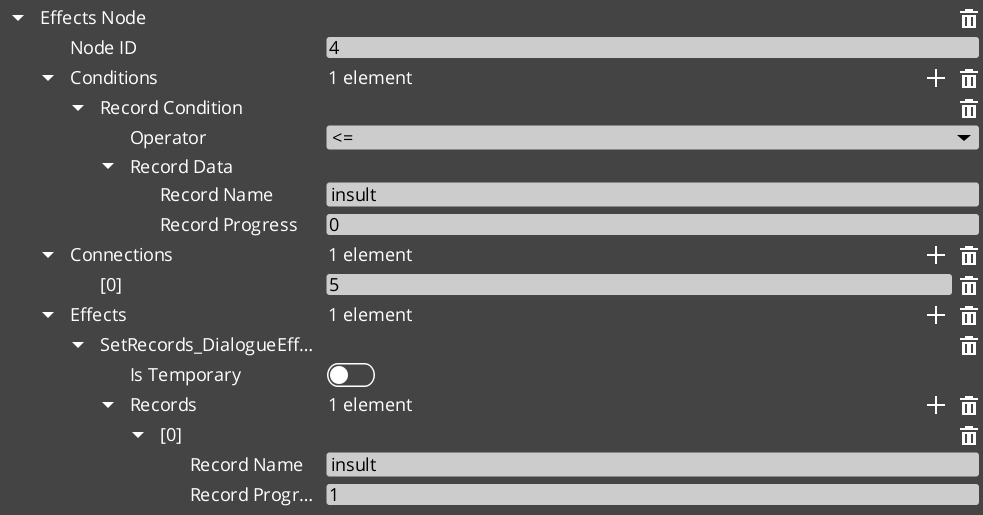
| EffectsNodeData | {E6F7A8B9-C012-3456-789A-BCDEF0123456} | Executes a list of DialogueEffect instances. Processing continues immediately after all effects fire. |
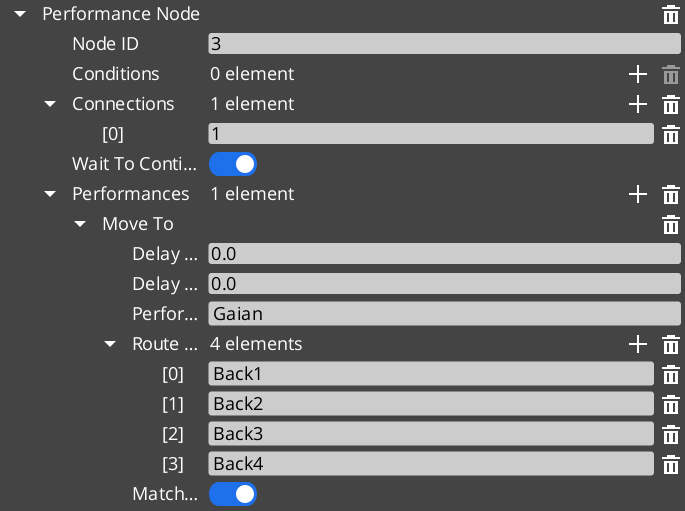
| PerformanceNodeData | {F7A8B9C0-D123-4567-89AB-CDEF01234567} | Starts a DialoguePerformance on a named performer. The sequencer waits for the performance to complete before advancing. |
SelectionOption
A single choice within a SelectionNodeData.
| Property | Type | Description |
|---|
| TypeId | {B3C4D5E6-F7A8-9012-3456-789ABCDEF012} | |
| text | LocalizedStringId | The display text for this option. |
| conditions | AZStd::vector<DialogueCondition*> | Conditions that must pass for this option to appear. |
| connections | AZStd::vector<NodeConnection> | Outgoing connections followed when this option is selected. |
Conditions
Conditions are polymorphic evaluators attached to node connections and selection options. They are registered automatically by extending the base class.
DialogueCondition (Abstract Base)
| Property | Type | Description |
|---|
| TypeId | {E44DAD9C-F42B-458B-A44E-1F15971B8F4C} | |
| Method | EvaluateCondition() | Returns bool. Called by the sequencer to determine whether a connection or option is valid. |
Built-in Conditions
| Type | TypeId | Description |
|---|
| Boolean_DialogueCondition | {34040E77-A58F-48CD-AC36-B3FE0017AA1F} | Base boolean comparison. Evaluates a simple true/false state. |
| Record_DialogueCondition | {E9C5C06D-B2C7-42EF-98D0-2290DE23635D} | Checks game records via the GS_Save RecordKeeper system. Supports greater-than, less-than, equal, and not-equal operators against integer record values. |
Effects
Effects are polymorphic actions triggered by EffectsNodeData nodes. Each effect can also be reversed. They are registered automatically by extending the base class.
DialogueEffect (Abstract Base)
| Property | Type | Description |
|---|
| TypeId | {71E2E05E-A7A3-4EB3-8954-2F75B26D5E3A} | |
| Methods | DoEffect(), ReverseEffect() | DoEffect() executes the effect. ReverseEffect() undoes it (used for rollback or undo scenarios). |
Built-in Effects
| Type | TypeId | Description |
|---|
| SetRecords_DialogueEffect | {FFCACF63-0625-4EE5-A74B-86C809B7BF80} | Sets one or more game records in the GS_Save RecordKeeper system. Commonly used to flag quest progress, NPC disposition, or world state changes. |
| ToggleEntitiesActive_DialogueEffect | {F97E1B87-EE7A-4D26-814C-D2F9FA810B28} | Activates or deactivates entities in the level. Used to show/hide objects, enable/disable triggers, or change the world during dialogue. |
Localization
All player-visible text in the dialogue system passes through the localization layer.
LocalizedStringId
A reference to a localizable string.
| Property | Type | Description |
|---|
| TypeId | {7D8E9F0A-1B2C-3D4E-5F6A-7B8C9D0E1F2A} | |
| key | AZStd::string | Lookup key into the active LocalizedStringTable. |
| defaultText | AZStd::string | Fallback text returned when no localized entry exists for the key. |
| Resolve() | – returns AZStd::string | Resolves the string: looks up key in the active table, falls back to defaultText. |
LocalizedStringTable
Runtime lookup table loaded alongside the active dialogue database.
| Property | Type | Description |
|---|
| TypeId | {3D4E5F6A-7B8C-9D0E-1F2A-3B4C5D6E7F8A} | |
| Entries | AZStd::unordered_map<AZStd::string, AZStd::string> | Key-value pairs mapping string keys to localized text. |
Complete Type Reference
| Type | TypeId | Category |
|---|
DialogueDatabase | {4C5D6E7F-8A9B-0C1D-2E3F-4A5B6C7D8E9F} | Asset |
DialogueSequence | {2B3C4D5E-6F7A-8B9C-0D1E-2F3A4B5C6D7E} | Data |
ActorDefinition | {1A2B3C4D-5E6F-7A8B-9C0D-1E2F3A4B5C6D} | Data |
DialogueNodeData | {D1E2F3A4-B5C6-7D8E-9F0A-1B2C3D4E5F6A} | Node (Abstract) |
TextNodeData | {A2B3C4D5-E6F7-8901-2345-6789ABCDEF01} | Node |
SelectionNodeData | {C4D5E6F7-A890-1234-5678-9ABCDEF01234} | Node |
RandomNodeData | {D5E6F7A8-B901-2345-6789-ABCDEF012345} | Node |
EffectsNodeData | {E6F7A8B9-C012-3456-789A-BCDEF0123456} | Node |
PerformanceNodeData | {F7A8B9C0-D123-4567-89AB-CDEF01234567} | Node |
SelectionOption | {B3C4D5E6-F7A8-9012-3456-789ABCDEF012} | Data |
DialogueCondition | {E44DAD9C-F42B-458B-A44E-1F15971B8F4C} | Condition (Abstract) |
Boolean_DialogueCondition | {34040E77-A58F-48CD-AC36-B3FE0017AA1F} | Condition |
Record_DialogueCondition | {E9C5C06D-B2C7-42EF-98D0-2290DE23635D} | Condition |
DialogueEffect | {71E2E05E-A7A3-4EB3-8954-2F75B26D5E3A} | Effect (Abstract) |
SetRecords_DialogueEffect | {FFCACF63-0625-4EE5-A74B-86C809B7BF80} | Effect |
ToggleEntitiesActive_DialogueEffect | {F97E1B87-EE7A-4D26-814C-D2F9FA810B28} | Effect |
DialoguePerformance | {BCCF5C52-42C3-49D4-8202-958120EA8743} | Performance (Abstract) |
MoveTo_DialoguePerformance | {6033A69D-F46F-40DF-A4A0-A64C4E28D6D5} | Performance |
PathTo_DialoguePerformance | {C0DF4B0E-924D-4C38-BD26-5A286161D95C} | Performance |
RepositionPerformer_DialoguePerformance | {DE1E0930-F0A4-4F60-A741-4FB530610AEE} | Performance |
LocalizedStringId | {7D8E9F0A-1B2C-3D4E-5F6A-7B8C9D0E1F2A} | Localization |
LocalizedStringTable | {3D4E5F6A-7B8C-9D0E-1F2A-3B4C5D6E7F8A} | Localization |
Extension Guide
Use the ClassWizard templates to generate new dialogue extension classes — see GS_Cinematics Templates:
DialogueCondition — generates a condition stub (Basic or Boolean variant). Requires a Reflect(context) call in DialogueSequencerComponent.cpp.DialogueEffect — generates an effect stub with DoEffect() / ReverseEffect(). Same manual registration step.DialoguePerformance — generates a performance stub with the full ExecutePerformance() / FinishPerformance() lifecycle. Same manual registration step.
All three types are polymorphic and discovered automatically.
External gems can add custom conditions, effects, and performances without modifying GS_Cinematics. The process is the same for all three categories.
Adding a Custom Condition
1. Define the class
#pragma once
#include <GS_Cinematics/Dialogue/Conditions/DialogueCondition.h>

namespace MyGem
{
    class HasItem_DialogueCondition : public GS_Cinematics::DialogueCondition
    {
    public:
        AZ_RTTI(HasItem_DialogueCondition, "{YOUR-UUID-HERE}", GS_Cinematics::DialogueCondition);
        AZ_CLASS_ALLOCATOR(HasItem_DialogueCondition, AZ::SystemAllocator);

        static void Reflect(AZ::ReflectContext* context);

        bool EvaluateCondition() override;

    private:
        AZStd::string m_itemName;
    };
}
2. Implement and reflect
#include "HasItem_DialogueCondition.h"
#include <AzCore/Serialization/SerializeContext.h>

namespace MyGem
{
    void HasItem_DialogueCondition::Reflect(AZ::ReflectContext* context)
    {
        if (auto sc = azrtti_cast<AZ::SerializeContext*>(context))
        {
            sc->Class<HasItem_DialogueCondition, GS_Cinematics::DialogueCondition>()
                ->Version(1)
                ->Field("ItemName", &HasItem_DialogueCondition::m_itemName);

            if (auto ec = sc->GetEditContext())
            {
                ec->Class<HasItem_DialogueCondition>("Has Item", "Checks if the player has a specific item.")
                    ->ClassElement(AZ::Edit::ClassElements::EditorData, "")
                        ->Attribute(AZ::Edit::Attributes::Category, "MyGem/Conditions")
                    ->DataElement(AZ::Edit::UIHandlers::Default, &HasItem_DialogueCondition::m_itemName, "Item Name", "");
            }
        }
    }

    bool HasItem_DialogueCondition::EvaluateCondition()
    {
        // Query your inventory system
        bool hasItem = false;
        // MyGem::InventoryRequestBus::BroadcastResult(hasItem, ...);
        return hasItem;
    }
}
The same pattern applies to custom effects (inherit DialogueEffect, implement DoEffect() / ReverseEffect()) and custom performances (inherit DialoguePerformance, implement DoPerformance() / ExecutePerformance() / FinishPerformance()).
See Also
For conceptual overviews and usage guides:
For component references:
For related resources:
Get GS_Cinematics
GS_Cinematics — Explore this gem on the product page and add it to your project.
3 - Editor
Information on the in engine GUI.
For usage guides and setup examples, see The Basics: GS_Cinematics.


Performer Targeting
Sequences
Localization
Nodes
Start / End
End
Restart
New Sequence
Specific Node
Dialogue
Text
Animated/Stylized Text
Performance
Posing
Pathing
Portrait
Trigger Timeline
Sound
2D
3D
Actions + Set Record
Conditions
How to use conditions to determine path.
Not always related to player choice.
Timeline Integration
Start Sequence
Continue Dialogue
UI
Editor GUI

Adding icon to editor is a complex problem, outlined by Nick. 
Sequence Window

The Inspector Window can have any number of sub-tabs. Which might be valuable for adding unique settings, or multiple Conditions, for example. Basically component-ize different node types.
System Window
Actors Window
Ingame UI
Get GS_Cinematics
GS_Cinematics — Explore this gem on the product page and add it to your project.
4 - Dialogue Sequencer
Full API reference for the DialogueSequencerComponent and DialogueUIBridgeComponent — runtime dialogue graph traversal, node processing, and UI routing.
The Dialogue Sequencer is the runtime engine that executes dialogue sequences node-by-node. It receives a DialogueSequence from the Dialogue Manager, traverses the node graph, evaluates conditions, fires effects and performances, and routes text and selection events to the UI layer through the DialogueUIBridgeComponent.
The two components on this page work together:
| Component | Role |
|---|
| DialogueSequencerComponent | Traverses the node graph. Processes each DialogueNodeData in order, manages runtime tokens, and signals sequence completion. |
| DialogueUIBridgeComponent | Decouples the sequencer from presentation. Routes dialogue text and selection events to whichever DialogueUIComponent or DialogueUISelectionComponent is currently registered. |
For usage guides and setup examples, see The Basics: GS_Cinematics.
Contents
DialogueSequencerComponent
The sequencer is the core playback controller. When a sequence starts, the sequencer reads the startNodeId, resolves the first node, and begins processing. Each node type has its own processing logic:
- TextNodeData – Sends text, speaker, and portrait data to the UI bridge for display.
- SelectionNodeData – Sends options to the UI bridge. Waits for a player selection before continuing.
- RandomNodeData – Picks a random outgoing connection (pure random or weighted) and continues.
- EffectsNodeData – Executes all attached
DialogueEffect instances, then continues. - PerformanceNodeData – Starts a
DialoguePerformance. Waits for the performance to signal completion before continuing.
At each node, outgoing connections are evaluated. Conditions on connections are tested in priority order; the first connection whose conditions all pass is followed. When no outgoing connections remain, the sequence ends.
Request Bus: DialogueSequencerRequestBus
Singleton bus – Single address, single handler.
| Method | Parameters | Returns | Description |
|---|
StartDialogueBySequence | const DialogueSequence& sequence | void | Begins playback of the given sequence from its startNodeId. |
OnPerformanceComplete | – | void | Called by a running DialoguePerformance when it finishes. The sequencer advances to the next node. |
Notification Bus: DialogueSequencerNotificationBus
Multiple handler bus – any number of components can subscribe.
| Event | Parameters | Description |
|---|
OnDialogueTextBegin | const DialogueTextPayload& payload | Fired when the sequencer begins processing a text node. Contains speaker name, text, portrait, and display settings. |
OnDialogueSequenceComplete | – | Fired when the sequencer reaches the end of a sequence (no further outgoing connections). |
Runtime Token Management
The sequencer maintains a set of runtime tokens that track state within a single sequence execution. Tokens are used internally to prevent infinite loops, track visited nodes, and manage branching state. They are cleared when a sequence completes or is interrupted.
DialogueUIBridgeComponent
The UI Bridge sits between the sequencer and the presentation layer. It holds a reference to the currently registered DialogueUIComponent and DialogueUISelectionComponent. When the sequencer needs to display text or a selection menu, it calls the bridge, which forwards the request to the active UI. This allows you to swap between screen-space, world-space, or custom UI implementations at runtime without changing the sequencer or the dialogue data.
Request Bus: DialogueUIBridgeRequestBus
Singleton bus.
| Method | Parameters | Returns | Description |
|---|
RunDialogue | const DialogueTextPayload& payload | void | Forwards a dialogue text event to the registered DialogueUIComponent. |
RunSelection | const DialogueSelectionPayload& payload | void | Forwards a selection event to the registered DialogueUISelectionComponent. |
RegisterDialogueUI | AZ::EntityId uiEntity | void | Registers the entity whose DialogueUIComponent and/or DialogueUISelectionComponent will receive events. |
CloseDialogue | – | void | Tells the registered UI to close and clean up. |
Notification Bus: DialogueUIBridgeNotificationBus
Multiple handler bus.
| Event | Parameters | Description |
|---|
OnDialogueComplete | – | Fired when the registered UI finishes displaying a dialogue line (after typewriter completes or the player advances). The sequencer listens for this to advance to the next node. |
OnSelectionComplete | int selectedIndex | Fired when the player selects an option. The sequencer uses the index to follow the corresponding connection. |
Execution Flow
A typical dialogue playback follows this path:
- Start –
DialogueManagerRequestBus::StartDialogueSequenceByName("MySequence") looks up the sequence in the active database and calls DialogueSequencerRequestBus::StartDialogueBySequence(sequence). - Node Processing – The sequencer reads the start node and begins processing. For each node:
- Text – The sequencer calls
DialogueUIBridgeRequestBus::RunDialogue(payload). The bridge forwards to the registered UI. The UI displays text (via TypewriterComponent), then fires OnDialogueComplete. The sequencer advances. - Selection – The sequencer calls
DialogueUIBridgeRequestBus::RunSelection(payload). The bridge forwards to the selection UI. The player picks an option, the UI fires OnSelectionComplete(index). The sequencer follows the indexed connection. - Effects – The sequencer executes each
DialogueEffect on the node, then advances immediately. - Performance – The sequencer starts the
DialoguePerformance. When the performance calls OnPerformanceComplete, the sequencer advances. - Random – The sequencer picks a connection and advances immediately.
- End – When no outgoing connections remain, the sequencer fires
OnDialogueSequenceComplete and calls DialogueUIBridgeRequestBus::CloseDialogue().
C++ Usage
Starting a Sequence
#include <GS_Cinematics/GS_CinematicsBus.h>

// Start by name through the Dialogue Manager
GS_Cinematics::DialogueManagerRequestBus::Broadcast(
    &GS_Cinematics::DialogueManagerRequestBus::Events::StartDialogueSequenceByName,
    AZStd::string("PerryConfrontation")
);
Listening for Sequence Completion
#include <GS_Cinematics/GS_CinematicsBus.h>

class MyListener
    : public AZ::Component
    , protected GS_Cinematics::DialogueSequencerNotificationBus::Handler
{
protected:
    void Activate() override
    {
        GS_Cinematics::DialogueSequencerNotificationBus::Handler::BusConnect();
    }

    void Deactivate() override
    {
        GS_Cinematics::DialogueSequencerNotificationBus::Handler::BusDisconnect();
    }

    void OnDialogueSequenceComplete() override
    {
        // Sequence finished — resume gameplay, unlock camera, etc.
    }
};
See Also
For conceptual overviews and usage guides:
For component references:
For related resources:
Get GS_Cinematics
GS_Cinematics — Explore this gem on the product page and add it to your project.
5 - Dialogue UI
Full API reference for all dialogue UI components — screen-space and world-space dialogue display, selection menus, typewriter text reveal, and babble audio.
The Dialogue UI layer handles all player-facing presentation of dialogue content. It is completely decoupled from the sequencer through the DialogueUIBridgeComponent – the sequencer never talks to a UI component directly. This page documents the seven components that make up the built-in UI system.
For usage guides and setup examples, see The Basics: GS_Cinematics.
Contents
DialogueUIComponent
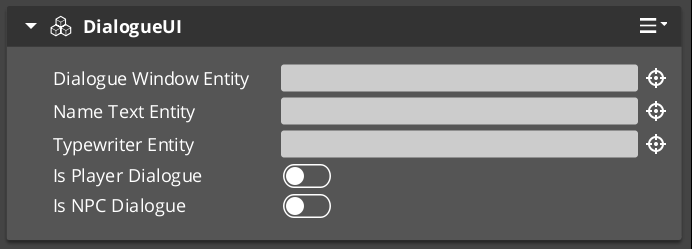
The standard screen-space dialogue display. Receives dialogue payloads from the UI Bridge and renders speaker name, portrait, and text lines using LyShine UI canvases.
Request Bus: DialogueUIRequestBus
| Method | Parameters | Returns | Description |
|---|
DoDialogue | const DialogueTextPayload& payload | void | Processes a full dialogue payload: sets speaker name, portrait, and begins text display through the typewriter. |
ShowDialogue | – | void | Makes the dialogue UI canvas visible. |
HideDialogue | – | void | Hides the dialogue UI canvas without destroying it. |
CloseUI | – | void | Fully closes and cleans up the dialogue UI. |
GetTypewriter | – | AZ::EntityId | Returns the entity that holds the TypewriterComponent used by this UI. |
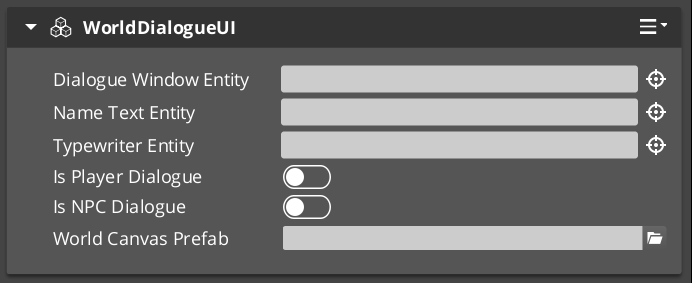
WorldDialogueUIComponent
Extends DialogueUIComponent for world-space rendering. Displays speech bubbles attached to performer entities in 3D space. Shares the same DialogueUIRequestBus interface as the base class. The world-space variant tracks the performer entity’s position and orients the UI element toward the camera.
Use WorldDialogueUIComponent when you want dialogue to appear as in-world speech bubbles rather than as a screen overlay.
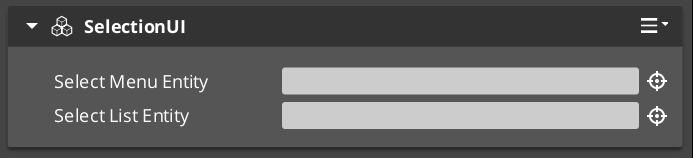
DialogueUISelectionComponent
Screen-space player choice display. Builds a list of selectable options from a DialogueSelectionPayload, spawns DialogueSelectButtonComponent instances for each valid option, and waits for the player to pick one.
Request Bus: DialogueUISelectionRequestBus
| Method | Parameters | Returns | Description |
|---|
DoSelection | const DialogueSelectionPayload& payload | void | Builds and displays the selection menu from the provided options. |
OnSelection | int selectedIndex | void | Called when a button is pressed. Processes the selection and notifies the bridge. |
ShowSelection | – | void | Makes the selection UI canvas visible. |
ClearSelection | – | void | Removes all spawned option buttons and resets the selection state. |
CloseUI | – | void | Fully closes and cleans up the selection UI. |
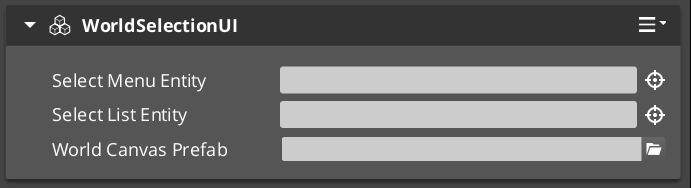
WorldDialogueUISelectionComponent
Extends DialogueUISelectionComponent for world-space rendering. Displays selection options as in-world UI elements attached to performer entities. Shares the same DialogueUISelectionRequestBus interface as the base class.
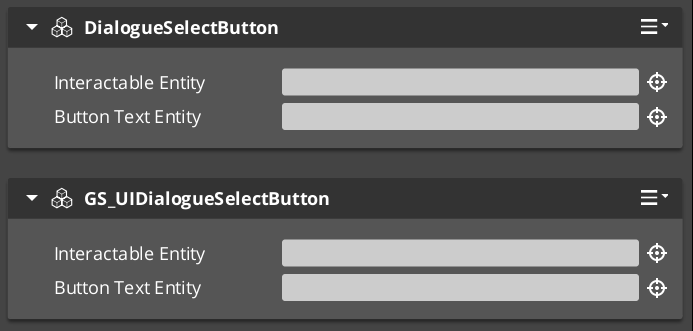
An individual button within a selection menu. One instance is spawned per valid option. The button displays option text and forwards press events to the parent selection component.
| Method | Parameters | Returns | Description |
|---|
SetupOption | const SelectionOption& option, int index | void | Configures the button with display text and its index in the selection list. |
GetInteractableEntity | – | AZ::EntityId | Returns the LyShine interactable entity used for input detection. |
TypewriterComponent
Character-by-character text reveal system. The typewriter receives a full text string and reveals it one character at a time at a configurable speed. It fires events on each character reveal and when the full text has been displayed. The typewriter is used internally by DialogueUIComponent but can also be used independently for any text reveal effect.
For detailed usage and standalone setup, see the Typewriter sub-page.
Request Bus: TypewriterRequestBus
| Method | Parameters | Returns | Description |
|---|
StartTypewriter | const AZStd::string& text, float speed | void | Begins revealing the given text at the specified characters-per-second speed. |
ForceComplete | – | void | Immediately reveals all remaining text. Fires OnTypewriterComplete. |
ClearTypewriter | – | void | Clears all displayed text and resets the typewriter state. |
Notification Bus: TypewriterNotificationBus
Multiple handler bus.
| Event | Parameters | Description |
|---|
OnTypeFired | char character | Fired each time a character is revealed. Used by the BabbleComponent to synchronize audio. |
OnTypewriterComplete | – | Fired when all characters have been revealed, either naturally or via ForceComplete. |
BabbleComponent
Procedural audio babble that plays in sync with the typewriter. Each character reveal from OnTypeFired can trigger a short audio event, creating a character-by-character speech sound. Different speakers can have different babble tones.
Request Bus: BabbleRequestBus
| Method | Parameters | Returns | Description |
|---|
GetBabbleEvent | const AZStd::string& speakerName | BabbleToneEvent | Returns the babble audio event associated with the given speaker. |
Data Types
| Type | Description |
|---|
| BabbleToneEvent | A single audio event reference (FMOD or Wwise event) that represents one character’s babble sound. |
| SpeakerBabbleEvents | A mapping of speaker names to BabbleToneEvent instances. Stored on the BabbleComponent and queried at runtime. |
Setup Guide
Screen-Space Dialogue
- Create a UI canvas entity with your dialogue layout (speaker name text, portrait image, dialogue text area).
- Attach a DialogueUIComponent to the entity.
- Attach a TypewriterComponent to the text entity (or the same entity).
- Optionally attach a BabbleComponent and configure speaker babble events.
- Attach a DialogueUISelectionComponent to a separate entity (or the same canvas) for player choices.
- Register the UI entity with
DialogueUIBridgeRequestBus::RegisterDialogueUI(uiEntityId).
World-Space Dialogue
- Follow the same steps as screen-space, but use WorldDialogueUIComponent and WorldDialogueUISelectionComponent instead.
- The world-space components will track the performer entity’s position automatically.
- Register the UI entity with the bridge the same way.
Swapping between screen-space and world-space at runtime requires only changing which UI entity is registered with the bridge. No sequencer or dialogue data changes are needed.
See Also
For conceptual overviews and usage guides:
For component references:
For related resources:
Get GS_Cinematics
GS_Cinematics — Explore this gem on the product page and add it to your project.
5.1 - Typewriter
Full API reference for the TypewriterComponent — character-by-character text reveal with configurable speed, force-complete, and notification events.
The TypewriterComponent provides character-by-character text reveal for dialogue display. It receives a string and a speed value, then reveals one character at a time on tick. It fires a notification on every character reveal and again when the full text is complete. The component is used internally by the DialogueUIComponent but can also be attached to any text entity independently for non-dialogue text effects.
For usage guides and setup examples, see The Basics: GS_Cinematics.

Contents
Request Bus: TypewriterRequestBus
Entity-addressed bus.
| Method | Parameters | Returns | Description |
|---|
StartTypewriter | const AZStd::string& text, float speed | void | Begins revealing the given text. speed is in characters per second. The component connects to TickBus and reveals characters on each tick. |
ForceComplete | – | void | Immediately reveals all remaining text. Fires OnTypewriterComplete. Useful when the player presses a button to skip the reveal. |
ClearTypewriter | – | void | Clears all displayed text and resets the internal state. Disconnects from TickBus. |
Notification Bus: TypewriterNotificationBus
Multiple handler bus – any number of listeners can connect.
| Event | Parameters | Description |
|---|
OnTypeFired | char character | Fired each time a single character is revealed. The BabbleComponent listens to this event to trigger per-character audio. Custom effects (particles, screen shake, emphasis) can also listen here. |
OnTypewriterComplete | – | Fired when all characters have been revealed, either through normal tick-based reveal or through ForceComplete. The dialogue UI listens for this to know when the line is fully displayed. |
How It Works
- A caller (typically
DialogueUIComponent) calls StartTypewriter(text, speed). - The component runs
ParseFormattedText on the input string, stripping inline [command] tags and building an internal command schedule — pauses, speed changes, and style runs are all resolved before the first tick. - The component stores the parsed text, resets its character index to zero, and connects to
TickBus. - On each tick, the component calculates how many characters should be visible based on elapsed time and the current speed. For each newly revealed character it fires
OnTypeFired(character). Scheduled commands (pauses, speed changes, style tags) execute when their character position is reached. - The component updates the associated LyShine text element — style tags (
[color], [b], etc.) are output as LyShine <font> / <b> / <i> markup inside the visible string. - When the last character is revealed, the component fires
OnTypewriterComplete and disconnects from TickBus. - If
ForceComplete is called mid-reveal, all remaining characters are revealed at once, OnTypewriterComplete fires, and the tick handler disconnects.
Text Command Reference
Inline commands are embedded directly in dialogue text strings and parsed by ParseFormattedText before reveal begins. Commands do not appear in the displayed text.
Format: [command=value] to open, [/command] to close where applicable.
[pause=X]
Pause the reveal for X seconds before continuing. If no value is given, defaults to 1.0 second. No closing tag.
[speed=X] / [/speed]
Change the typing speed to X characters per second from this point forward. [/speed] resets to the component’s configured default speed. Setting speed=0 causes all following text to appear instantly until the next speed tag.
Normal text [speed=5]fast text[/speed] normal again.
[color=VALUE] / [/color]
Change text colour. VALUE is any valid LyShine <font color> value — hex (#FF0000) or a named colour. Outputs <font color="VALUE">…</font> to the text element. Styles are tracked on a stack so nested formatting closes correctly.
Regular [color=#FF4444]danger text[/color] back to normal.
[size=VALUE] / [/size]
Change font size. VALUE is a numeric point size (e.g. 32). Outputs <font size="VALUE">…</font> to the text element.
Normal [size=48]big text[/size] normal.
[bold] or [b] / [/bold] or [/b]
Apply bold formatting. Both bold and b are valid keywords. Outputs <b>…</b>.
This is [b]bold[/b] text.
[italic] or [i] / [/italic] or [/i]
Apply italic formatting. Both italic and i are valid keywords. Outputs <i>…</i>.
This is [i]italic[/i] text.
[n] or [new]
Insert a newline character. No closing tag. Both n and new are valid.
First line[n]Second line.
Standalone Usage
The typewriter is not limited to dialogue. You can attach it to any entity with a LyShine text element for effects like:
- Tutorial text that types out instructions
- Item descriptions that reveal on hover
- Narrative text during loading screens
- Any text that benefits from a gradual reveal
Setup
- Create an entity with a LyShine text component.
- Attach a TypewriterComponent to the same entity.
- Call
TypewriterRequestBus::Event(entityId, &TypewriterRequestBus::Events::StartTypewriter, text, speed) from C++ or ScriptCanvas. - Optionally listen to
TypewriterNotificationBus for per-character or completion events.
C++ Usage
#include <GS_Cinematics/GS_CinematicsBus.h>

// Start typewriter on a specific entity
AZ::EntityId textEntity = /* your text entity */;
GS_Cinematics::TypewriterRequestBus::Event(
    textEntity,
    &GS_Cinematics::TypewriterRequestBus::Events::StartTypewriter,
    AZStd::string("Hello, traveler. Welcome to the village."),
    12.0f  // 12 characters per second
);

// Force-complete if the player presses a button
GS_Cinematics::TypewriterRequestBus::Event(
    textEntity,
    &GS_Cinematics::TypewriterRequestBus::Events::ForceComplete
);
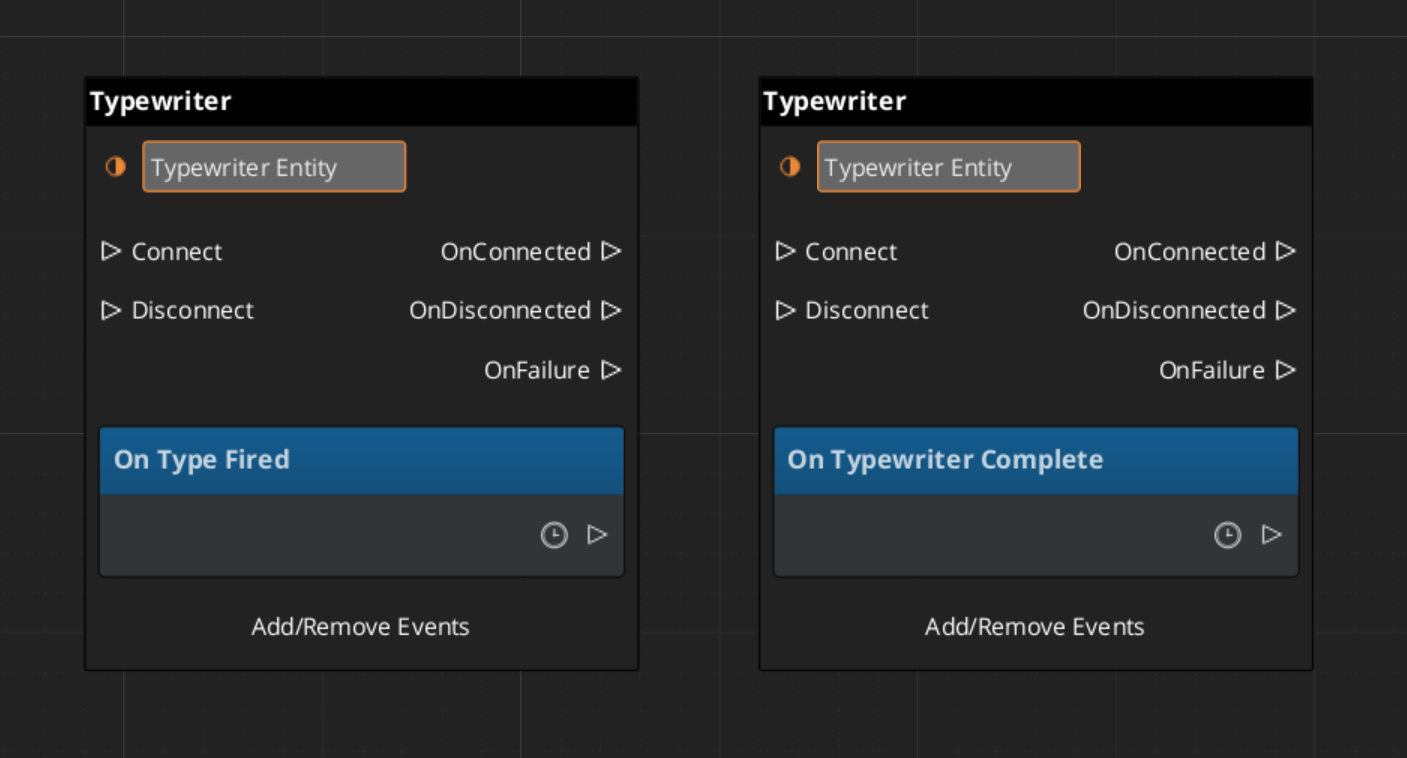
Script Canvas
Typewriter requests and notification events:
See Also
For conceptual overviews and usage guides:
For component references:
Get GS_Cinematics
GS_Cinematics — Explore this gem on the product page and add it to your project.
6 - Dialogue Actors
Full API reference for DialoguePerformerMarkerComponent, ActorDefinition data model, and the performer registration and lookup system.
Dialogue Actors connect authored character data in the .dialoguedb asset to world-space entities in the level. The system has two halves:
- ActorDefinition – The data side. Defined in the DialogueDatabase, it holds the actor’s name, portrait, and metadata.
- DialoguePerformerMarkerComponent – The world side. Attached to an entity in the level, it registers a named performer with the Dialogue Manager so the sequencer can find it at runtime.
When a dialogue sequence references an actor by name, the sequencer looks up the matching performer entity through DialogueManagerRequestBus::GetPerformer(name). This links the authored text, portraits, and performance instructions to a specific entity in the world.
For usage guides and setup examples, see The Basics: GS_Cinematics.
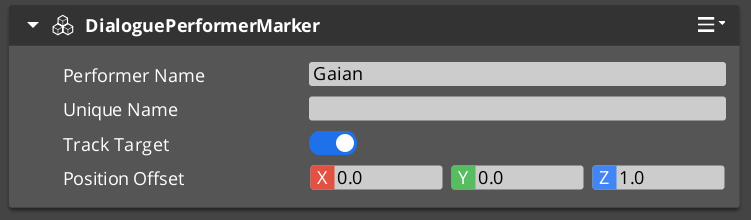
A component placed on any entity that represents a dialogue performer in the level. On Activate(), the marker registers itself with the Dialogue Manager by name. Multiple performers with the same name can exist in different levels, but only one should be active at a time within a single level.
Entity-addressed bus – each marker entity responds on its own address.
| Method | Parameters | Returns | Description |
|---|
GetPerformerName | – | AZStd::string | Returns the performer’s registered name. This name must match the actor name in the dialogue database. |
GetPosEntity | – | AZ::EntityId | Returns the entity to use as the performer’s position source. Typically the marker entity itself, but can point to a child entity for offset control. |
GetPosPoint | – | AZ::Vector3 | Returns the performer’s current world-space position. |
ShouldTrackTarget | – | bool | Returns whether the performer entity should continuously track and face its dialogue target during a sequence. |
ActorDefinition Data Model
The ActorDefinition is the authored data for a single character, stored inside the DialogueDatabase.
| Property | Type | Description |
|---|
| TypeId | {1A2B3C4D-5E6F-7A8B-9C0D-1E2F3A4B5C6D} | |
| Actor Name | AZStd::string | Internal lookup name. Must match the performer marker name in the level. |
| Display Name | AZStd::string | The name shown to the player in dialogue UI. Can differ from the internal name. |
| Portrait | Asset reference | Default portrait image. Overridden per-node in TextNodeData when needed. |
| Emotion Categories | AZStd::vector | Groupings of emotional states (e.g. happy, angry, sad). Used to organize profile images and poses. |
| Profile Image Sets | AZStd::vector | Sets of portrait images keyed by emotion or attitude. The sequencer can switch profiles during dialogue. |
| Pose Sets | AZStd::vector | Sets of body poses and idle animations keyed by attitude. Referenced by performance nodes. |
Registration Flow
- A
DialoguePerformerMarkerComponent activates on an entity in the level. - During
Activate(), the component calls DialogueManagerRequestBus::RegisterPerformerMarker(name, entityId). - The Dialogue Manager stores the mapping from name to entity ID.
- When the component deactivates, it unregisters itself.
Lookup Flow
- The sequencer processes a node that references an actor name (e.g. a
TextNodeData with speaker “perry” or a PerformanceNodeData targeting “perry”). - The sequencer calls
DialogueManagerRequestBus::GetPerformer("perry"). - The Dialogue Manager returns the registered entity ID.
- The sequencer (or performance) can now query the performer’s position, facing, and tracking state through
PerformerMarkerRequestBus.
The actorTargetId field on node data allows a sequence to target a specific instance of a performer when multiple entities share the same actor name. This supports scenarios like having the same NPC appear in multiple locations across different levels while keeping the same actor definition in the database.
Setup
- In your
.dialoguedb asset, define an actor with a unique name (e.g. “perry”) using the Dialogue Editor. - In your level, create an entity and attach a DialoguePerformerMarkerComponent.
- Set the marker’s performer name to match the actor name in the database (e.g. “perry”).
- Position the entity where the performer should appear in the world.
- Optionally, add child entities for position offsets or attach visual representation (mesh, animation) to the same entity.
The marker entity will self-register with the Dialogue Manager on activation. The sequencer can now find this performer when processing sequences that reference the matching actor name.
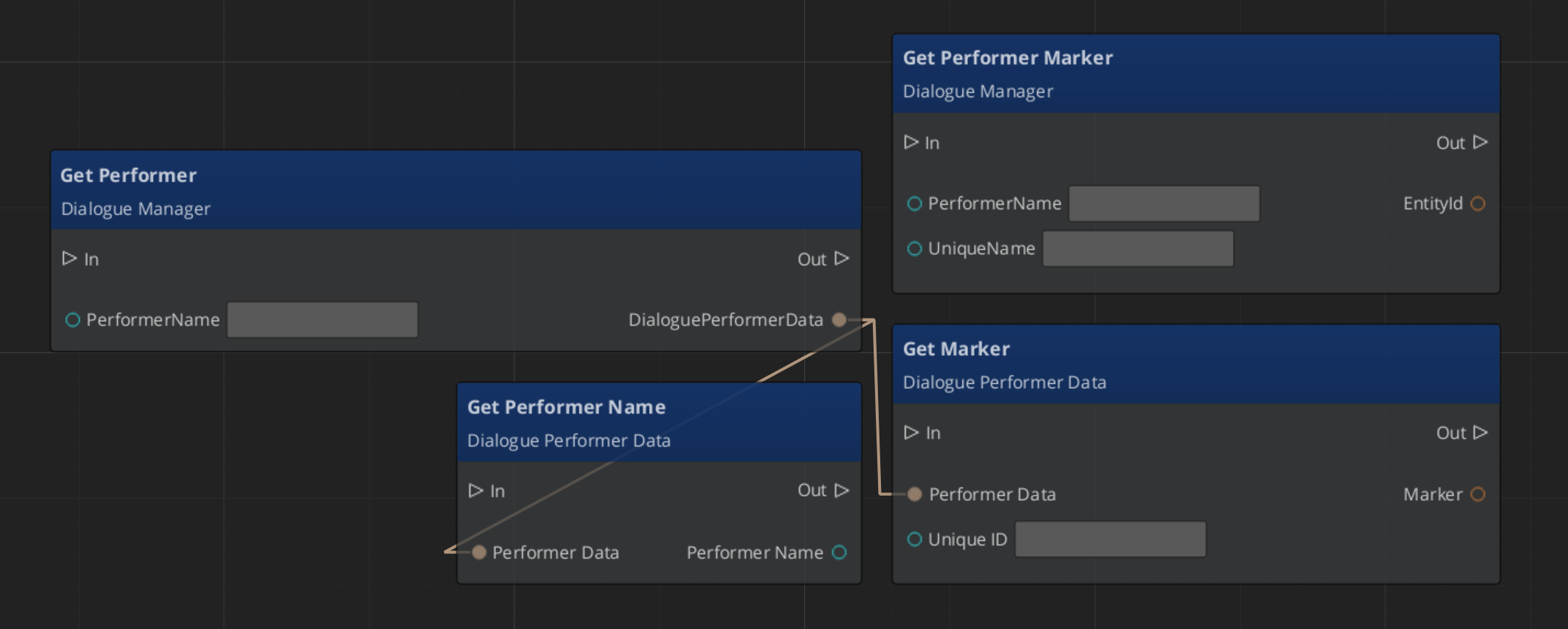
Script Canvas Examples
Getting a performer’s name and world position:
See Also
Get GS_Cinematics
GS_Cinematics — Explore this gem on the product page and add it to your project.
7 - Effects
Full API reference for the DialogueEffect base class and built-in effect types — SetRecords and ToggleEntitiesActive.
Effects are synchronous actions executed from EffectsNodeData nodes within a dialogue sequence. When the Dialogue Sequencer encounters an Effects node, it calls DoEffect() on each DialogueEffect in the node’s list in order, then immediately advances to the next node.
All effects are polymorphic — extending the base class automatically populates the effects list in the dialogue editor at startup.
For usage guides and setup examples, see The Basics: GS_Cinematics.
Contents
DialogueEffect (Abstract Base)
The base class for all dialogue effects. Effects execute synchronously and can be reversed for rollback scenarios.
| Property | Type | Description |
|---|
| TypeId | {71E2E05E-A7A3-4EB3-8954-2F75B26D5E3A} | |
Virtual Methods
| Method | Description |
|---|
DoEffect() | Executes the effect. Called by the sequencer when the EffectsNodeData is processed. |
ReverseEffect() | Undoes the effect. Used for rollback or undo scenarios. |
Lifecycle
- The sequencer encounters an
EffectsNodeData node. - The sequencer calls
DoEffect() on each effect in the node’s list in order. - All effects complete synchronously within the same frame.
- The sequencer immediately advances to the next node.
SetRecords_DialogueEffect
Sets one or more game records in the GS_Save RecordKeeper system. Commonly used to flag quest progress, NPC disposition, or world state changes triggered by dialogue.
| Property | Type | Description |
|---|
| TypeId | {FFCACF63-0625-4EE5-A74B-86C809B7BF80} | |
| Records | AZStd::vector<RecordEntry> | List of record name/value pairs to set on execution. |
ToggleEntitiesActive_DialogueEffect
Activates or deactivates a list of entities in the level. Used to show or hide objects, enable or disable triggers, or change world state during dialogue.
| Property | Type | Description |
|---|
| TypeId | {F97E1B87-EE7A-4D26-814C-D2F9FA810B28} | |
| Entities | AZStd::vector<AZ::EntityId> | The entities to activate or deactivate. |
| Active | bool | Target active state: true to activate, false to deactivate. |
Complete Effect Type Reference
| Type | TypeId | Description |
|---|
DialogueEffect | {71E2E05E-A7A3-4EB3-8954-2F75B26D5E3A} | Abstract base |
SetRecords_DialogueEffect | {FFCACF63-0625-4EE5-A74B-86C809B7BF80} | Sets game records |
ToggleEntitiesActive_DialogueEffect | {F97E1B87-EE7A-4D26-814C-D2F9FA810B28} | Activates/deactivates entities |
Creating a Custom Effect
To add a custom effect type from an external gem:
1. Define the class
#pragma once
#include <GS_Cinematics/Dialogue/Effects/DialogueEffect.h>

namespace MyGem
{
    class PlaySound_DialogueEffect : public GS_Cinematics::DialogueEffect
    {
    public:
        AZ_RTTI(PlaySound_DialogueEffect, "{YOUR-UUID-HERE}", GS_Cinematics::DialogueEffect);
        AZ_CLASS_ALLOCATOR(PlaySound_DialogueEffect, AZ::SystemAllocator);

        static void Reflect(AZ::ReflectContext* context);

        void DoEffect() override;
        void ReverseEffect() override;

    private:
        AZStd::string m_soundEvent;
    };
}
2. Implement and reflect
#include "PlaySound_DialogueEffect.h"
#include <AzCore/Serialization/SerializeContext.h>

namespace MyGem
{
    void PlaySound_DialogueEffect::Reflect(AZ::ReflectContext* context)
    {
        if (auto sc = azrtti_cast<AZ::SerializeContext*>(context))
        {
            sc->Class<PlaySound_DialogueEffect, GS_Cinematics::DialogueEffect>()
                ->Version(1)
                ->Field("SoundEvent", &PlaySound_DialogueEffect::m_soundEvent);

            if (auto ec = sc->GetEditContext())
            {
                ec->Class<PlaySound_DialogueEffect>("Play Sound", "Fires a sound event during dialogue.")
                    ->ClassElement(AZ::Edit::ClassElements::EditorData, "")
                        ->Attribute(AZ::Edit::Attributes::Category, "MyGem/Effects")
                    ->DataElement(AZ::Edit::UIHandlers::Default, &PlaySound_DialogueEffect::m_soundEvent, "Sound Event", "");
            }
        }
    }

    void PlaySound_DialogueEffect::DoEffect()
    {
        // Fire the sound event
    }

    void PlaySound_DialogueEffect::ReverseEffect()
    {
        // Stop the sound if needed
    }
}
Custom effects are discovered automatically at startup through O3DE serialization — no manual registration step is required.
See Also
For conceptual overviews and usage guides:
For component references:
For related resources:
Get GS_Cinematics
GS_Cinematics — Explore this gem on the product page and add it to your project.
8 - Performances
Full API reference for the DialoguePerformance base class and built-in performance types — MoveTo, PathTo, and RepositionPerformer.
Performances are asynchronous actions executed from PerformanceNodeData nodes within a dialogue sequence. When the Dialogue Sequencer encounters a performance node, it instantiates the appropriate DialoguePerformance subclass, starts it, and waits for it to signal completion before advancing to the next node.
All performances are polymorphic by extending the class they automatically populate the performances list when adding performances to a node.
For usage guides and setup examples, see The Basics: GS_Cinematics.
Contents
The base class for all dialogue performances. Extends AZ::TickBus::Handler so that performances can drive time-based behavior across multiple frames.
| Property | Type | Description |
|---|
| TypeId | {BCCF5C52-42C3-49D4-8202-958120EA8743} | |
| Tick Handler | AZ::TickBus::Handler | Performances connect to TickBus during execution for frame-by-frame updates. |
Virtual Methods
| Method | Description |
|---|
DoPerformance() | Entry point called by the sequencer. Sets up the performance and calls ExecutePerformance(). |
ExecutePerformance() | Core execution logic. Override this in subclasses to implement the actual behavior (movement, animation, etc.). |
FinishPerformance() | Called when the performance is complete. Disconnects from TickBus and signals the sequencer via DialogueSequencerRequestBus::OnPerformanceComplete(). |
- The sequencer encounters a
PerformanceNodeData and instantiates the corresponding DialoguePerformance subclass. - The sequencer calls
DoPerformance(). DoPerformance() connects to TickBus and calls ExecutePerformance().- The performance runs across multiple ticks until its completion condition is met.
- The performance calls
FinishPerformance(), which disconnects from TickBus and notifies the sequencer. - The sequencer advances to the next node.
Moves a performer entity to a named stage marker position over time using direct interpolation (no navmesh). Suitable for short-distance movements within a scene where pathfinding is unnecessary.
| Property | Type | Description |
|---|
| TypeId | {6033A69D-F46F-40DF-A4A0-A64C4E28D6D5} | |
| Target | Stage marker name | The destination position, resolved through CinematicsManagerRequestBus::GetStageMarker(). |
| Speed / Duration | float | Controls how quickly the performer reaches the target. |
Request Bus: MoveTo_PerformanceRequestBus
| Method | Parameters | Returns | Description |
|---|
StartMoveTo | AZ::EntityId performer, AZ::Vector3 target, float speed | void | Begins moving the performer entity toward the target position. |
Notification Bus: MoveTo_PerformanceNotificationBus
| Event | Description |
|---|
OnMoveToComplete | Fired when the performer reaches the target position. The performance calls FinishPerformance() in response. |
Navigates a performer entity to a named stage marker along a RecastNavigation navmesh path. Suitable for longer-distance movements where the performer must navigate around obstacles. Requires RecastNavigation to be enabled in the project.
| Property | Type | Description |
|---|
| TypeId | {C0DF4B0E-924D-4C38-BD26-5A286161D95C} | |
| Target | Stage marker name | The destination position, resolved through CinematicsManagerRequestBus::GetStageMarker(). |
| Navigation | RecastNavigation | Uses the navmesh to compute a valid path from the performer’s current position to the target. |
Request Bus: PathTo_PerformanceRequestBus
| Method | Parameters | Returns | Description |
|---|
StartPathTo | AZ::EntityId performer, AZ::Vector3 target | void | Computes a navmesh path and begins navigating the performer toward the target. |
Notification Bus: PathTo_PerformanceNotificationBus
| Event | Description |
|---|
OnPathToComplete | Fired when the performer reaches the end of the computed path. The performance calls FinishPerformance() in response. |
Instantly teleports a performer entity to a named stage marker position. No interpolation, no pathfinding – the entity is moved in a single frame. Useful for off-screen repositioning between scenes or for snapping a performer to a mark before a sequence begins.
| Property | Type | Description |
|---|
| TypeId | {DE1E0930-F0A4-4F60-A741-4FB530610AEE} | |
| Target | Stage marker name | The destination position, resolved through CinematicsManagerRequestBus::GetStageMarker(). |
Notification Bus: RepositionPerformer_PerformanceNotificationBus
| Event | Description |
|---|
OnRepositionComplete | Fired immediately after the performer is teleported. The performance calls FinishPerformance() in the same frame. |
| Type | TypeId | Movement | Navigation |
|---|
DialoguePerformance | {BCCF5C52-42C3-49D4-8202-958120EA8743} | Abstract base | – |
MoveTo_DialoguePerformance | {6033A69D-F46F-40DF-A4A0-A64C4E28D6D5} | Interpolated | None |
PathTo_DialoguePerformance | {C0DF4B0E-924D-4C38-BD26-5A286161D95C} | Navmesh path | RecastNavigation |
RepositionPerformer_DialoguePerformance | {DE1E0930-F0A4-4F60-A741-4FB530610AEE} | Instant teleport | None |
To add a custom performance type from an external gem:
1. Define the class
#pragma once
#include <GS_Cinematics/Dialogue/Performances/DialoguePerformance.h>

namespace MyGem
{
    class PlayAnimation_DialoguePerformance : public GS_Cinematics::DialoguePerformance
    {
    public:
        AZ_RTTI(PlayAnimation_DialoguePerformance, "{YOUR-UUID-HERE}", GS_Cinematics::DialoguePerformance);
        AZ_CLASS_ALLOCATOR(PlayAnimation_DialoguePerformance, AZ::SystemAllocator);

        static void Reflect(AZ::ReflectContext* context);

    protected:
        void ExecutePerformance() override;
        void OnTick(float deltaTime, AZ::ScriptTimePoint time) override;

    private:
        AZStd::string m_animationName;
        bool m_animationComplete = false;
    };
}
2. Implement and register
void PlayAnimation_DialoguePerformance::ExecutePerformance()
{
    // Start the animation on the performer entity
    // Listen for animation completion
}

void PlayAnimation_DialoguePerformance::OnTick(float deltaTime, AZ::ScriptTimePoint time)
{
    if (m_animationComplete)
    {
        FinishPerformance();
    }
}
See Also
For conceptual overviews and usage guides:
For component references:
For related resources:
Get GS_Cinematics
GS_Cinematics — Explore this gem on the product page and add it to your project.