Base — ships in GS_Audio.
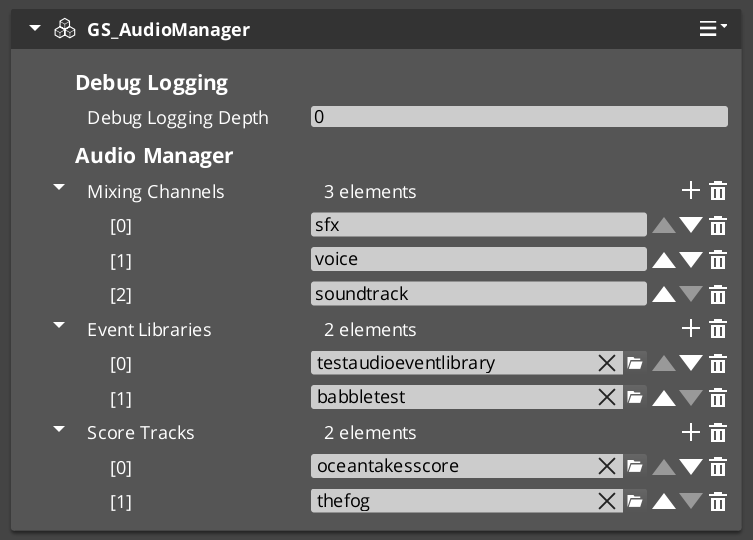
The Audio Manager is the singleton that owns the audio system. It initializes the engine, builds the mixing channel graph, loads your event libraries, and carries the listener that all spatialization is measured against.
It extends GS_ManagerComponent, so it participates in the standard manager lifecycle — including headless deployment if your project has no Game Manager. Like every manager it responds to standby, pausing audio while a blocking operation such as a stage change completes.
| Field | Value |
|---|---|
| Component | GS_AudioManagerComponent |
| TypeId | {F28721FD-B9FD-4C04-8CD1-6344BD8A3B78} |
| Extends | GS_Core::GS_ManagerComponent |
| Request Bus | AudioManagerRequestBus (Single / Single) |
For usage guides and setup examples, see The Basics: GS_Audio.
Contents
What It Owns
- The miniaudio engine, node graph and output endpoint.
- The named set of mixing channels.
- The loaded
.aevevent libraries. - The authoritative listener.
- The shared Steam Audio context and HRTF used for spatialization.
- The mix effect registry and its deferred routing.
Score, graphs and voice are not here
Procedural scoring, the Audio Event Graph runtime and Klatt voice synthesis live in GS_AudioPro, onAudioScoreRequestBus, AudioGraphRequestBus and the Klatt buses respectively. They are not reachable through AudioManagerRequestBus.The base manager does not tick. Per-frame work belongs to the systems that need it.
The Listener
There is no separate listener component. The manager carries the listener, and you point it at an entity. One listener, unambiguous.
| Method | Effect |
|---|---|
SetListener | Both position and facing follow this entity. |
SetListenerSpatialTarget | Position only — proximity and distance are computed from here. |
SetListenerOrientationTarget | Facing only — direction and HRTF are computed from here. |
GetListener | Returns the current listener entity. |
GetListenerSpatialTarget | Returns the current spatial target. |
GetListenerOrientationTarget | Returns the current orientation target. |
GetListenerTransform | Returns the resolved listener transform. |
Splitting the listener for third-person
The split targets exist for third-person games, and they are the recommended setup for one.
In third person, the camera and the character are in different places, and the two halves of “where is the listener” want different answers. Proximity should follow the character — how close a sound is to you is about your body, not your camera. Direction should follow the camera — what is on your left is about where you are looking.
Set them separately and the manager switches to computing both, which is what produces the result the framework was tuned for. Set only SetListener and both follow one entity, which is correct for first-person.
A listener target is always set
If no listener target is configured by the time managers set up, the manager defaults to its own entity and warns. This exists because the failure it replaces was genuinely hard to diagnose: pointing the listener at an entity that could not act as one produced silent, centered audio with no error at all.Project Settings
GS_AudioProjectSettings is a reflected block on the manager, so the component panel is the configuration UI. TypeId {2B7F4C19-8E63-4A05-9D2C-6F1A8B3E7D40}.
| Setting | Default | Description |
|---|---|---|
| Spatialization | Binaural | Stereo (HRTF off) or Binaural (Steam Audio HRTF). |
| HRTF Interpolation | Nearest | Nearest is cheap and suits point sources. Bilinear costs more and suits wide-band material. |
| HRTF Volume | 1.0 | Level of the binaural path. |
| Frame Size Mode | Auto | Auto matches the audio device period. Recommended — a mismatched frame size is audible as crunching. |
| Fixed Frame Size | 512 | Used only in Fixed mode. |
| Default Min Distance | 1.0 | Metres. |
| Default Max Distance | 100.0 | Metres. |
HRTF settings are hidden unless spatialization is Binaural; the fixed frame size is hidden unless the mode is Fixed.
Geometry settings are not here — they are additive on the Pro manager, and the base gem never reflects them.
API Reference
Request Bus: AudioManagerRequestBus
Singleton bus — single address, single handler. Call via Broadcast.
Libraries and playback
| Method | Parameters | Description |
|---|---|---|
AddAudioLibrary | AZ::Data::Asset<AudioEventLibrary> | Load a library and register its events. |
RemoveAudioLibrary | const AZStd::string& name | Unregister a library’s events. |
PlayEvent2D | const AZStd::string& eventName | Fire an event with no spatialization. |
PlayEventAtLocation | const AZStd::string& eventName, const AZ::Vector3& position | Fire at a world position. |
PlayEventOnEntity | const AZStd::string& eventName, AZ::EntityId entity | Fire on an entity and track it. |
Volume and channels
| Method | Parameters | Description |
|---|---|---|
ChangeMasterVolume | float volume | Set the master output level. |
ChangeChannelVolume | const AZStd::string& channel, float volume | Set a named volume channel’s level. |
GetMixingChannelNames | — | Enumerate the configured channel names. |
GetMixingBus | const AZStd::string& channel | Retrieve a channel’s mixing bus. |
These are the natural attachment point for the options system’s audio sliders.
Environmental influence
| Method | Parameters | Description |
|---|---|---|
ApplyAudioEffectInfluence | influencer, effects | Impose an effect set on channels while the influencer applies. |
RemoveAudioEffectInfluence | influencer | Remove that influencer’s contribution. |
See Mixing & Effects for how influences stack.
Mix effect routing
Runtime control of named mix effect chains — RerouteMixEffect, SetMixEffectParam, SetMixEffectParamOn and the registration and wiring calls. Documented in full on the Mix Effects page.
Listener
The seven listener methods are tabled under The Listener.
Extending with GS_AudioPro
Worth understanding even if you never write a gem against it, because it is a clean example of how GS gems layer.
GS_AudioPro does not subclass the base manager’s internals or reach into its private state. It fetches primitives across a small accessor surface and attaches its own nodes to them:
| Accessor | Returns | Used for |
|---|---|---|
GetEngine | the miniaudio engine | creating sounds |
GetGraph | the node graph | allocating nodes |
GetEndpoint | the terminal node | attaching output |
GetMixingBus | a volume channel | routing into a channel |
GetSteamAudioContext | the shared Steam Audio context | reusing one context |
GetSteamAudioHrtf | the shared HRTF | reusing one HRTF |
GetSteamAudioFrameSize | the audio timestep | matching block size |
GetAudioProjectSettings | the settings block | reading base configuration |
Two accessors run the other way and are null in a base-only install — this is how the base gem stays standalone while Pro enriches it:
| Accessor | Purpose |
|---|---|
RegisterSpatialSim / GetSpatialSim | Pro registers its geometric simulator; the base per-voice spatializer consumes occlusion values from it if one is present. |
GetReverbSendNode | The tap base voices use to feed Pro’s geometry-driven reverb. |
The interface those two are typed against is declared in the base gem and implemented in Pro. That is the entire enrichment mechanism: base defines the socket, Pro supplies the plug, and nothing breaks when the plug is absent.
The Pro manager subclasses the base one and declares itself incompatible with it, so the two cannot coexist on an entity. A project running Pro puts the Pro manager component on its manager prefab in place of the base one, and authors everything — channels, libraries, project settings — on that single component.
See Also
For related systems:
- Audio Events — what the libraries contain
- Mixing & Effects — the channels this manager owns
- Spatialization — what the listener feeds
- Manager (Base) — the lifecycle it participates in
For conceptual overviews and usage guides:
Get GS_Audio
GS_Audio — Explore this gem on the product page and add it to your project.