GS_Audio
The GS audio framework — event-based playback, mixing and the full DSP effect palette, HRTF spatialization, and the premium Audio Pro tier adding visual graph authoring, geometric acoustics, scoring and voice synthesis.
Audio in GS_Play is two gems, and the line between them is the free/premium product line.
- GS_Audio — the base gem. Free. The engine, audio events, pooling, mixing, the full DSP effect palette, the listener, and HRTF spatialization with distance attenuation.
- GS_AudioPro — the premium gem. Depends on the base. Adds the visual Audio Event Graph, procedural scoring, Klatt voice synthesis, and geometric acoustics.
The split is about authoring, not audio quality
The base gem is not a cut-down signal path. It carries the complete DSP effect palette and the same HRTF spatialization that Pro uses. What Pro adds is authoring surface — a visual canvas instead of component panels — plus geometry-driven acoustics, procedural music and synthesised speech. A project built entirely on the free tier is not signal-crippled.Every page in this section marks features Base or Pro, because that tag tells you which gem a feature ships in.
For usage guides and setup examples, see The Basics: GS_Audio.
Contents
Start Here: the Signal Model
Before the feature pages, read the Audio Signal Model. It covers the two-plane architecture, what miniaudio, Steam Audio and SoLoud each actually do, the canonical order stages run in, and the vocabulary the rest of these pages use.
It also explains the one thing most likely to trip you up: spatialization is a property of a source, not a mix effect.
Audio Signal Model
What Lives Where
| Capability | GS_Audio (Base, free) | GS_AudioPro (Premium) |
|---|
| Audio engine, node graph and output | Yes | uses the base engine |
| Audio events, libraries, pooling and instancing | Yes | — |
| Mixing buses, volume channels, influence system | Yes | — |
| DSP effects | all 22 effect types, authored on components | the same processors, authored as graph nodes |
| Spatialization | HRTF binaural + distance attenuation | adds occlusion and reflections |
| The listener | Yes, including split spatial/orientation targets | — |
| Visual Audio Event Graph | — | Yes |
| Procedural scoring | — | Yes |
| Klatt voice synthesis | — | Yes |
| Geometric acoustics | — | Yes |
One processor, two authoring skins: each DSP effect exists once and is surfaced twice — as a component-authored mix effect in the base gem, and as a graph node in Pro. They are the same processor wearing different authoring surfaces.
Audio Management
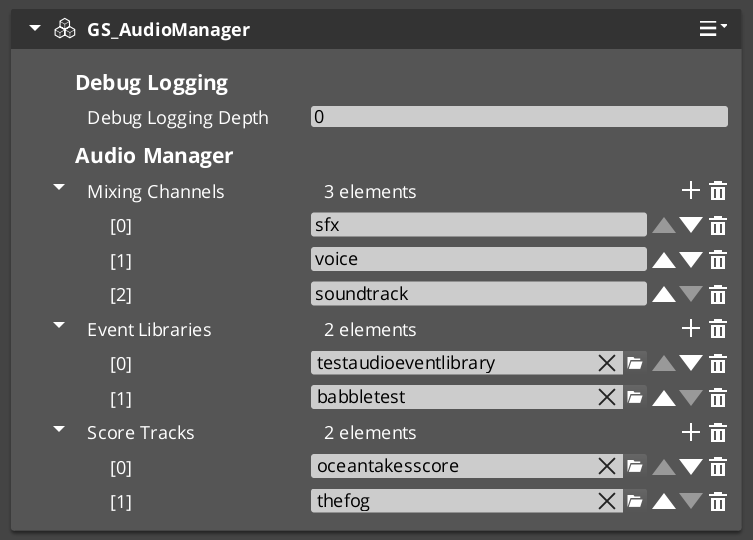
Base. The Audio Manager is the singleton that owns the audio engine, the mixing channels, the loaded event libraries and the listener. It extends GS_ManagerComponent and participates in the standard manager lifecycle — including headless deployment, if you want audio in a project with no Game Manager.
| Component | Purpose |
|---|
| Audio Manager | Master audio controller — engine lifecycle, project settings, the listener, mixing channels, event libraries. |
Audio Manager API
Audio Events
Base. A named sound the game can fire, authored in a .aev library. An event declares only what plays — pooling, concurrency, distance, tracking and spatialization are shared machinery every event type inherits.
| Page | Purpose |
|---|
| Audio Events | Event libraries, the three event types, pooling and concurrency, and how to write a new event type. |
| SFXR Profiles | Procedural chiptone assets, sfxr.me import, and randomized profile pools. |
Three kinds of event ship: file pools (a set of clips, one picked at random per fire), procedural noise, and sfxr chiptones. All three are pooled the same way, so variation costs nothing at the call site.
Audio Events API
SFXR Profiles
Mixing & Effects
Base. Named volume channels built on custom miniaudio nodes, each with its own level and an optional effects chain, plus environmental influence that lets world volumes push effects onto channels with priority stacking.
This is the free tier’s authoring surface for the DSP palette — all 22 effect types, configured on components and routed by name rather than wired on a canvas.
| Page | Purpose |
|---|
| Mixing & Effects | Volume channels, environmental influence, and the mixing request bus. |
| Mix Effects | The 22 effect types, named chains, order-independent wiring, runtime control. |
Mixing & Effects API
Mix Effects
Spatialization
Base. HRTF binaural placement and distance attenuation, applied automatically to every 3D source. There is no spatializer to author — place a source and it is spatialized.
| Page | Purpose |
|---|
| Spatialization | How a sound is placed, the bounded distance curve, HRTF settings, and the limits worth knowing. |
Spatialization API
Audio Pro
Premium. GS_AudioPro extends every base feature and adds four of its own. It subclasses the base Audio Manager, so a project moves onto Pro by swapping one component rather than rebuilding its audio setup.
| Feature | Purpose |
|---|
| Audio Event Graph | Visual node editor for authoring complex sound events — sources, filters, effects, routing and phase lifecycle. |
| Score Arrangement | Multi-layer procedural music — time signature, tempo, fade control and runtime layer selection. |
| Klatt Voice Synthesis | Formant text-to-speech with 3D spatial audio and configurable voice profiles. |
| Geometric acoustics | Real occlusion and reflections computed from world geometry and acoustic materials. |
Pro’s buses are separate from the base gem’s. Scoring is on AudioScoreRequestBus, graphs on AudioGraphRequestBus, voice on the Klatt buses — none of them on AudioManagerRequestBus.
Dependencies
GS_Audio (Base)
- GS_Core (required)
- MiniAudio gem (required)
- Steam Audio — vendored, loaded at runtime, for HRTF spatialization and distance attenuation
- SoLoud — vendored. The gem’s DSP effect and source node implementations derive from SoLoud, and its generators feed the effect nodes.
GS_AudioPro (Premium)
- GS_Audio (required)
- SoLoud — used further as the synthesis engine behind Klatt voice
Installation
- Enable the GS_Audio gem in your project configuration.
- Ensure GS_Core and the MiniAudio gem are also enabled.
- Create an Audio Manager prefab and add it to the Game Manager’s Startup Managers list — or tick Headless on the manager if your project has no Game Manager.
For the premium tier, enable GS_AudioPro as well and use the Pro Audio Manager component on your manager prefab in place of the base one.
See Also
For conceptual overviews and usage guides:
For related resources:
Get GS_Audio
GS_Audio — Explore this gem on the product page and add it to your project.
1 - Audio Signal Model
How GS audio is put together — the two-plane architecture, the roles of miniaudio, SoLoud and Steam Audio, the canonical signal chain, and the vocabulary the rest of the audio docs use.
This page is the model every other audio page assumes. It describes how sound is put together in GS_Play — what processes audio, what merely computes numbers, the order stages run in, and the words used for each part.
Read it before the feature pages. Several parts of the audio API look arbitrary until you know the model, and one of them (spatialization) is deliberately not where most engines put it.
For usage guides and setup examples, see The Basics: GS_Audio.
Contents
Two Planes
Audio is two planes that meet at nodes.
| Plane | Runs on | Carries | Owned by |
|---|
| Audio plane | the audio thread | actual sound | miniaudio, always |
| Control plane | the game thread, per frame | numbers | the framework and your game code |
The audio plane is the ground floor and the only floor that reaches the speakers. Everything audible is a node in one miniaudio graph. Fan-in sums automatically; you route by attaching one node’s output to another’s input.
The control plane never carries audio. It writes numbers that the audio plane reads — the listener transform, a source’s position, an occlusion factor, reverb decay times, a binaural direction.
Control plane writes; audio plane reads. That decoupling is what keeps the system tractable, and it is the one sentence to leave this page with.
What Each Library Does
Three libraries are involved, and they are not peers. Confusing their roles is the most common way to misread the system.
| Library | On the audio plane | On the control plane | Tier |
|---|
| miniaudio | The substrate, mixer and output device. Everything is one of its nodes. | Built-in listener, per-sound position and panner. | Base |
| Steam Audio | DSP nodes — binaural, direct, reflection — that pass audio through like any other effect. Not the ground floor, and not a source. | An entire scoped simulation, analogous to a physics world. You register geometry, sources and a listener; it computes acoustic parameters; those parameters drive the DSP nodes. | Base (binaural + distance) / Pro (geometry) |
| SoLoud | The lineage of the DSP layer. The base gem’s effect and source node implementations derive from SoLoud’s, and its generators and synthesis feed the effect nodes. In Pro it also acts as a source, rendering speech to PCM and relaying it in through a custom node. | Emission position pushed to the voice node each frame. | Base (DSP layer) / Pro (voice synthesis) |
The rule: anything that makes sound becomes, or feeds, a miniaudio node. SoLoud and Steam Audio both relay into miniaudio; neither bypasses it.
SoLoud ships in the base gem. The framework’s own effect and source nodes were extracted into a header-only layer so they can be wired directly into the miniaudio graph, but they remain derivative of SoLoud and are sourced from it — the attribution belongs to the free tier, not only to Pro. Pro then uses SoLoud further as the synthesis engine behind Klatt voice.
Steam Audio is worth stating twice, because it is the one people misplace. Its simulation is a parallel world you connect into. It produces numbers. Nodes consume those numbers. miniaudio moves the audio.
The Canonical Chain
Every sound travels the same path from emission to speakers:
Emission          Source + local tone shaping (EQ, filters, per-emitter mix nodes)
    |
    v
Environment       Manual Reverb  XOR  Steam reflections/occlusion   <-- SAME layer
    |
    v
Binaural / HRTF   the "ears" stage — ALWAYS LAST before volume, if spatial
    |
    v
Volume Channel    grouped, options-driven gain
    |
    v
Master  ->  speakers
Two rules hold everywhere:
Manual reverb and Steam reflections are the same conceptual layer — the environment. Manual reverb fakes the room. Steam reflections are the room, derived from real geometry. Use one or the other. Stacking them double-reverbs the sound.
Binaural/HRTF is always the last stage before the volume channel. It is the ears. Nothing spatial happens after it.
Worked cases:
| Case | Chain |
|---|
| Non-spatial (2D) sound | Emission -> Reverb -> Volume Channel — no binaural stage |
| Full geometric acoustics (Pro) | Emission -> Steam {distance + occlusion + reflections + binaural} -> Volume Channel — manual reverb is dropped |
| Mixed | Emission -> Reverb -> Binaural -> Volume Channel — a faked room, a real direction |
Vocabulary
The audio docs use these four words precisely. Source → Spatialization → Volume Channel → Master.
| Term | Meaning |
|---|
| Source | An emission — a position plus its effects channel — or a selected destination. “2D” means pure stereo, with no spatial consideration at all. |
| Spatialization | Everything that happens to a sound as it travels from its emission point to the listener: direction, distance, occlusion, environment. It is a property of the source, not a mix effect. |
| Volume Channel | Final amplification of grouped sound types — voice, environment, combat SFX — into Master. Driven by the options system. |
| Master | The single output everything sums into before the device. |
Spatialization and volume channels are orthogonal. A voice line, a footstep and a magic blast all get position-based spatialization, and all three route to different volume channels. One is about where the sound is; the other is about what kind of sound it is.
Spatialization
Most audio middleware lets you drop a spatializer into an effects chain. GS does not. Spatialization is a property of the source, and the framework applies it for you.
Where it happens. Each 3D sound instance gets its own spatializer node, placed between the source and its volume channel — the Binaural stage in the chain above. It is always the last thing before volume.
One spatializer, never two. A 3D source is spatialized by either miniaudio’s built-in spatializer or Steam Audio’s binaural path, decided by the project’s spatialization mode on the Audio Manager. The two are alternatives. They are never stacked, because a fixed HRTF layered over a positional pan cancels the spatial presence the pan was already producing.
It is applied procedurally. You do not author it per sound. The framework inserts the node, recomputes direction each frame from the source-to-listener vector on the control plane, and handles distance attenuation alongside it. Every 3D source therefore behaves the same way, whether it came from an event, a graph or a voice — consistent and reliable, with nothing to wire up and nothing to get wrong.
Channel discipline is why the position is fixed. Binaural is mono- or stereo-in and always stereo-out, so it has to sit at a defined point in the chain rather than anywhere a designer drops it.
MixEffect_Binaural is not how you spatialize a 3D sound
The binaural mix effect still exists, but it is a niche tool for placing a 2D sound at a fixed direction. Real spatialization of a 3D sound is automatic and per-source. Reaching for the mix effect instead will give you a sound stuck in your head with no falloff.
Frame Size — the Audio Timestep
Steam Audio effects want exactly one block of samples per call. A mismatch is audible as crunching.
The framework therefore treats frame size as a fixed audio timestep. By default it queries the miniaudio device period and matches it, rather than adapting with a ring buffer. This is exposed on the Audio Manager as Auto (recommended) versus Fixed.
Think of it the way you think of a physics timestep: a rate the whole simulation agrees on, not a per-effect setting.
See Also
For the systems this model describes:
For conceptual overviews and usage guides:
Get GS_Audio
GS_Audio — Explore this gem on the product page and add it to your project.
2 - Audio Manager
The base audio controller — engine lifecycle, project settings, the authoritative listener, mixing channels, event libraries, and the accessors GS_AudioPro builds on.
Base — ships in GS_Audio.
The Audio Manager is the singleton that owns the audio system. It initializes the engine, builds the mixing channel graph, loads your event libraries, and carries the listener that all spatialization is measured against.
It extends GS_ManagerComponent, so it participates in the standard manager lifecycle — including headless deployment if your project has no Game Manager. Like every manager it responds to standby, pausing audio while a blocking operation such as a stage change completes.
| Field | Value |
|---|
| Component | GS_AudioManagerComponent |
| TypeId | {F28721FD-B9FD-4C04-8CD1-6344BD8A3B78} |
| Extends | GS_Core::GS_ManagerComponent |
| Request Bus | AudioManagerRequestBus (Single / Single) |
For usage guides and setup examples, see The Basics: GS_Audio.
Contents
What It Owns
Score, graphs and voice are not here
Procedural scoring, the Audio Event Graph runtime and Klatt voice synthesis live in GS_AudioPro, on AudioScoreRequestBus, AudioGraphRequestBus and the Klatt buses respectively. They are not reachable through AudioManagerRequestBus.The base manager does not tick. Per-frame work belongs to the systems that need it.
The Listener
There is no separate listener component. The manager carries the listener, and you point it at an entity. One listener, unambiguous.
| Method | Effect |
|---|
SetListener | Both position and facing follow this entity. |
SetListenerSpatialTarget | Position only — proximity and distance are computed from here. |
SetListenerOrientationTarget | Facing only — direction and HRTF are computed from here. |
GetListener | Returns the current listener entity. |
GetListenerSpatialTarget | Returns the current spatial target. |
GetListenerOrientationTarget | Returns the current orientation target. |
GetListenerTransform | Returns the resolved listener transform. |
Splitting the listener for third-person
The split targets exist for third-person games, and they are the recommended setup for one.
In third person, the camera and the character are in different places, and the two halves of “where is the listener” want different answers. Proximity should follow the character — how close a sound is to you is about your body, not your camera. Direction should follow the camera — what is on your left is about where you are looking.
Set them separately and the manager switches to computing both, which is what produces the result the framework was tuned for. Set only SetListener and both follow one entity, which is correct for first-person.
A listener target is always set
If no listener target is configured by the time managers set up, the manager defaults to its own entity and warns. This exists because the failure it replaces was genuinely hard to diagnose: pointing the listener at an entity that could not act as one produced silent, centered audio with no error at all.
Project Settings
GS_AudioProjectSettings is a reflected block on the manager, so the component panel is the configuration UI. TypeId {2B7F4C19-8E63-4A05-9D2C-6F1A8B3E7D40}.
| Setting | Default | Description |
|---|
| Spatialization | Binaural | Stereo (HRTF off) or Binaural (Steam Audio HRTF). |
| HRTF Interpolation | Nearest | Nearest is cheap and suits point sources. Bilinear costs more and suits wide-band material. |
| HRTF Volume | 1.0 | Level of the binaural path. |
| Frame Size Mode | Auto | Auto matches the audio device period. Recommended — a mismatched frame size is audible as crunching. |
| Fixed Frame Size | 512 | Used only in Fixed mode. |
| Default Min Distance | 1.0 | Metres. |
| Default Max Distance | 100.0 | Metres. |
HRTF settings are hidden unless spatialization is Binaural; the fixed frame size is hidden unless the mode is Fixed.
Geometry settings are not here — they are additive on the Pro manager, and the base gem never reflects them.
API Reference
Request Bus: AudioManagerRequestBus
Singleton bus — single address, single handler. Call via Broadcast.
Libraries and playback
| Method | Parameters | Description |
|---|
AddAudioLibrary | AZ::Data::Asset<AudioEventLibrary> | Load a library and register its events. |
RemoveAudioLibrary | const AZStd::string& name | Unregister a library’s events. |
PlayEvent2D | const AZStd::string& eventName | Fire an event with no spatialization. |
PlayEventAtLocation | const AZStd::string& eventName, const AZ::Vector3& position | Fire at a world position. |
PlayEventOnEntity | const AZStd::string& eventName, AZ::EntityId entity | Fire on an entity and track it. |
Volume and channels
| Method | Parameters | Description |
|---|
ChangeMasterVolume | float volume | Set the master output level. |
ChangeChannelVolume | const AZStd::string& channel, float volume | Set a named volume channel’s level. |
GetMixingChannelNames | — | Enumerate the configured channel names. |
GetMixingBus | const AZStd::string& channel | Retrieve a channel’s mixing bus. |
These are the natural attachment point for the options system’s audio sliders.
Environmental influence
| Method | Parameters | Description |
|---|
ApplyAudioEffectInfluence | influencer, effects | Impose an effect set on channels while the influencer applies. |
RemoveAudioEffectInfluence | influencer | Remove that influencer’s contribution. |
See Mixing & Effects for how influences stack.
Mix effect routing
Runtime control of named mix effect chains — RerouteMixEffect, SetMixEffectParam, SetMixEffectParamOn and the registration and wiring calls. Documented in full on the Mix Effects page.
Listener
The seven listener methods are tabled under The Listener.
Extending with GS_AudioPro
Worth understanding even if you never write a gem against it, because it is a clean example of how GS gems layer.
GS_AudioPro does not subclass the base manager’s internals or reach into its private state. It fetches primitives across a small accessor surface and attaches its own nodes to them:
| Accessor | Returns | Used for |
|---|
GetEngine | the miniaudio engine | creating sounds |
GetGraph | the node graph | allocating nodes |
GetEndpoint | the terminal node | attaching output |
GetMixingBus | a volume channel | routing into a channel |
GetSteamAudioContext | the shared Steam Audio context | reusing one context |
GetSteamAudioHrtf | the shared HRTF | reusing one HRTF |
GetSteamAudioFrameSize | the audio timestep | matching block size |
GetAudioProjectSettings | the settings block | reading base configuration |
Two accessors run the other way and are null in a base-only install — this is how the base gem stays standalone while Pro enriches it:
| Accessor | Purpose |
|---|
RegisterSpatialSim / GetSpatialSim | Pro registers its geometric simulator; the base per-voice spatializer consumes occlusion values from it if one is present. |
GetReverbSendNode | The tap base voices use to feed Pro’s geometry-driven reverb. |
The interface those two are typed against is declared in the base gem and implemented in Pro. That is the entire enrichment mechanism: base defines the socket, Pro supplies the plug, and nothing breaks when the plug is absent.
The Pro manager subclasses the base one and declares itself incompatible with it, so the two cannot coexist on an entity. A project running Pro puts the Pro manager component on its manager prefab in place of the base one, and authors everything — channels, libraries, project settings — on that single component.
See Also
For related systems:
For conceptual overviews and usage guides:
Get GS_Audio
GS_Audio — Explore this gem on the product page and add it to your project.
3 - Audio Events
The .aev event library and the polymorphic audio event types — file pools, procedural noise, and sfxr chiptones — with shared pooling, concurrency, spatial tracking and extension hooks.
Base — ships in GS_Audio.
An audio event is a named sound the game can fire. Events live in .aev event libraries, which are loaded onto the Audio Manager; firing one is a matter of naming it.
The important structural fact: an event declares only what plays. Everything else — pooling, concurrency limits, distance falloff, 3D tracking, spatialization, re-fire suppression — is shared machinery that every event type inherits. That is what makes adding a new kind of sound source cheap.
For usage guides and setup examples, see The Basics: GS_Audio.
Contents
Event Libraries
AudioEventLibrary
A loadable collection of events, authored in the Asset Editor.
| Field | Value |
|---|
| Extension | .aev |
| TypeId | {04218A1E-4399-4A7F-9649-ED468B5EF76B} |
| Extends | AZ::Data::AssetData |
Libraries are assigned to the Audio Manager and can also be added or removed at runtime:
| Method | Parameters | Description |
|---|
AddAudioLibrary | AZ::Data::Asset<AudioEventLibrary> | Loads a library and registers its events by name. |
RemoveAudioLibrary | const AZStd::string& name | Unregisters a library’s events. |
Both are on AudioManagerRequestBus.
Event Types
GS_AudioEvent is an abstract base, and a library holds AZStd::vector<GS_AudioEvent*>. When you add an event in the Asset Editor, the type dropdown offers every registered subtype.
This is the framework’s standard polymorphic array authoring shape: a raw-pointer vector of a reflected abstract base, where the serializer supplies the type picker and the owning container owns its elements.
| Type | Source of sound | Authored fields |
|---|
| GS_AudioEvent_Pool | Sound file assets | Sound Pool — a pool of MiniAudio::SoundAsset. One is picked at random per fire. A single file is simply a pool of one. |
| GS_AudioEvent_Noise | Procedural noise | Noise Type (White / Pink / Brownish / Blueish) and Duration Seconds. Setting the event to loop overrides duration and runs continuously. |
| GS_AudioEvent_Sfxr | Procedural chiptone | Profiles — a pool of .sfxrprofile assets, randomized per fire. The profile’s envelope defines the length. |
The pooling model is the reason to prefer pools over single assets. Five mutated explosion profiles in one Sfxr event, or five recorded footstep variants in one Pool event, means the sound never repeats identically — with no logic on the calling side.
Shared Configuration
Every event type carries these, regardless of what produces its sound.
| Field | Default | Description |
|---|
| Event Name | | The name PlayEvent* resolves. |
| Mixing Channel | | Where this event routes — a volume channel or a named mix effect chain. Both live in the same namespace. |
| Base Volume | 100 | Event volume before channel gain. |
| Distance Min/Max | (1, 20) | Metres. Full volume within min, attenuating out to max. |
| Outer Volume | 0 | Level beyond the max distance. |
| Is 2D | false | Pure stereo, no spatial consideration. |
| Loop | false | Repeat until stopped. |
| Concurrent Event Limit | 5 | Maximum simultaneous voices for this event. |
| Instance Pad Size | 3 | Spare voices kept in the pool. |
| Event Repeat Hold | 0.05 | Seconds of re-fire suppression, so a rapid trigger cannot machine-gun the sound. |
| Pitch Modulation | zero | Per-fire pitch jitter. The Pitch mix effect gives finer control over the same idea. |
Minimum distance must stay above zero
The inverse distance model collapses to silence at a minimum distance of 0. The framework clamps it, but an event authored with min distance 0 is not expressing what its author expects — set a real minimum.
Firing Events
All three are on AudioManagerRequestBus, and all three resolve the event by name across every loaded library.
| Method | Parameters | Description |
|---|
PlayEvent2D | const AZStd::string& eventName | Fires with no spatialization. |
PlayEventAtLocation | const AZStd::string& eventName, const AZ::Vector3& position | Fires at a fixed world position. |
PlayEventOnEntity | const AZStd::string& eventName, AZ::EntityId entity | Fires on an entity and tracks it — the voice follows the entity as it moves. |
Instancing and Pooling
Each event owns a flat pool of voices, and the model is identical across every event type.
- A fire takes an idle voice from the pool, or produces one if none is free.
- Active, paused and tracking sets are maintained per event. The tracking set maps a voice to the entity it follows for 3D updates.
- The pool is trimmed on an interval — by default every 10 seconds — so a burst of sound does not permanently inflate memory.
- The concurrency limit is enforced per event, so one over-eager emitter cannot flood the mixer.
Routing survives late changes. When a mix effect registers after an event has already preloaded, the manager re-points every pooled and future instance at the new target. In practice this means you can add a MixEffectComponent at runtime and voices that were already pooled will follow it — you are not required to have the routing in place before sounds exist.
Spatialization
Resolved once at preload; the project’s spatialization mode does not change at runtime.
When binaural is active, a 3D voice routes through its own Steam Audio binaural node instead of miniaudio’s spatializer, and the event pushes the listener transform as it ticks. The shared Steam Audio context and HRTF are borrowed from the Audio Manager rather than created per event.
See Spatialization for the behaviour, and the Audio Signal Model for why this is a property of the source rather than an effect.
Writing a New Event Type
Subclass GS_AudioEvent and implement a small set of virtuals. Everything in Shared Configuration, Instancing and Pooling and Spatialization is inherited.
| Hook | Required | Purpose |
|---|
CreateInstance(engine, targetNode) | Yes | Produce one fresh playable voice attached to the target node. |
IsSourceReady() | Yes | Whether the source can currently produce instances. |
HasContent() | Yes | Whether the event has authored content. An event with none is a silent no-op. |
AcquireAssets() | No | Re-acquire referenced assets with PreLoad behaviour. |
QueueLoad() | No | Kick off asynchronous asset loads. |
PreloadSource(engine) | No | Register or prepare source data against the engine. |
UnloadSource() | No | Free source data. |
The four optional hooks exist for asset-backed sources. A generator — noise, sfxr, or anything you synthesise — leaves them as no-ops and is simply ready once the engine exists. The asset machinery is optional, not assumed.
Reflect your subclass and it appears in the event type dropdown automatically. There is no registry to add it to.
See Also
For related systems:
For conceptual overviews and usage guides:
Get GS_Audio
GS_Audio — Explore this gem on the product page and add it to your project.
4 - SFXR Profiles
The .sfxrprofile asset — procedural chiptone sound effects as first-class assets, with sfxr.me import and randomized profile pools.
Base — ships in GS_Audio.
.sfxrprofile assets are procedural sound effects built on the DrPetter sfxr model — the classic generator behind coin pickups, laser shots, jumps and explosions. Each profile is a complete sound described entirely by parameters, so it takes no audio files and no disk space worth measuring.
For usage guides and setup examples, see The Basics: GS_Audio.
Contents
The Model
One .sfxrprofile is one sound, stored as an explicit parameter set.
There is deliberately no preset enum and no preset-plus-seed mode. The canonical sfxr presets were baked out into asset files instead of kept as a runtime option, so every sound in a project is inspectable and editable the same way — including the ones that came with the gem.
SfxrParamSet carries 24 parameters: the wave type plus 23 floats covering envelope, frequency, vibrato, arpeggio, duty cycle, retrigger, phaser, filters and volume.
| Wave type | Value |
|---|
| Square | 0 |
| Saw | 1 |
| Sine | 2 |
| Noise | 3 |
The field layout matches the sfxr.me / jsfxr Serialize JSON field for field, which is what makes the import below a straight paste.
Three sfxr parameters are not stored — master volume, vibrato delay, and the filter enable flag — because jsfxr does not export them. The runtime supplies sfxr’s defaults for all three.
Importing from sfxr.me
The asset carries an Import from sfxr.me group with a multi-line paste field.
- Design your sound at sfxr.me or any jsfxr-based tool.
- Press Serialize and copy the JSON.
- Paste it into the import field on the profile asset.
- The parameters populate on change. Save the asset.
This is the recommended authoring loop: the browser tool has instant preview and randomize/mutate buttons, and the result lands in your project in one paste.
Three things to know:
- If the pasted JSON reports
oldParams: false, a warning is emitted. Sfxr.me emits true, which is what the framework’s parameter model matches. - The inspector may need a reselect to repaint after a paste. The values are imported correctly — this is a display refresh issue, not an import failure.
- Wave Type is authored as a spin box over
0-3 rather than a named dropdown, because the underlying field is a plain integer.
Profile Pools
Profiles are consumed as pools, not one at a time. Both consumers hold a vector of profile assets and pick one at random per fire:
| Consumer | Gem | Notes |
|---|
GS_AudioEvent_Sfxr | Base | Fires through a pooled voice with a per-voice random number generator. |
Aud_SfxrNode | Pro | The Audio Event Graph node form, using the node’s own generator. |
An empty pool is silent — the event reports that it has no content. A single profile is just a pool of one.
The authoring idiom this enables is the point of the whole system: generate five mutated explosions and drop them all in one pool, and the explosion never sounds identical twice. Mutation is a single button in sfxr.me, so building the pool costs about a minute.
Shipped Profiles
GS_Audio ships 27 profiles in Assets/SFXR Profiles/:
- 7 canonical presets — Coin, Laser, Explosion, Powerup, Hurt, Jump, Blip.
- 20 named custom profiles.
These are free-tier gem content. A new project has working sound effects before it has any audio assets of its own.
See Also
For related systems:
For conceptual overviews and usage guides:
Get GS_Audio
GS_Audio — Explore this gem on the product page and add it to your project.
5 - Mixing & Effects
Named volume channels built on custom miniaudio nodes, environmental influence with priority stacking, and the component-authored mix effect layer.
Base — ships in GS_Audio.
Mixing has two parts, and it is worth separating them from the start.
Volume channels are the grouping layer — voice, environment, combat SFX — each with its own level, feeding Master. This is the layer your options menu drives.
Mix effects are the processing layer — filters, EQ, delay, reverb, character effects — authored as named chains on components and routed by name. This is the free tier’s authoring surface for the DSP palette, and it is not a reduced one: it exposes the same 22 processors that Audio Pro exposes as graph nodes.
For usage guides and setup examples, see The Basics: GS_Audio.
Contents
Volume Channels
GS_MixingBus
A custom miniaudio node that mixes its inputs, applies a level, and optionally runs an effects chain.
| Field | Value |
|---|
| TypeId | {26E5BA8D-33E0-42E4-BBC0-6A3B2C46F52E} |
The Audio Manager owns a named set of these. GetMixingChannelNames enumerates them and ChangeChannelVolume sets a level.
This is the Volume Channel stage of the canonical signal chain: grouped sound types feeding Master. It is orthogonal to spatialization — a voice line, a footstep and a spell all get positional audio, and all three route to different channels.
Channels are the natural attachment point for the options system’s audio sliders, which is exactly what the shipped audio apply targets do.
Environmental Influence
An entity in the world can temporarily impose an effect set on channels — walk into a cave and everything gains reverb; walk out and it lifts.
| Method | Parameters | Description |
|---|
ApplyAudioEffectInfluence | influencer, effects | Push an effect set onto channels on behalf of an influencing entity. |
RemoveAudioEffectInfluence | influencer | Remove that entity’s contribution. |
Influences stack by priority and are keyed by the entity that applied them, so removal is unambiguous even when several influences overlap. Two overlapping zones resolve by priority rather than by whichever fired last.
Influence reverb and geometric reflections are alternatives
Influence-driven reverb is the manual way to fake a room. Audio Pro’s geometry-driven reflections are the real way, derived from actual world geometry. They occupy the same layer of the signal chain and must not be stacked — doing so double-reverbs the sound.
Mix Effects
The processing layer. A MixEffectComponent holds an ordered chain of effects, registers it under a name, and feeds its output somewhere — another chain, or a volume channel. Sources route in by naming that chain as their mixing channel.
Twenty-two effect types are available, in four families: biquad filters, time and space, character and modulation, and utility.
Mix Effects API
API Reference
Request Bus: GS_MixingRequestBus
Channel control. Singleton bus — single address, single handler.
| Method | Parameters | Returns | Description |
|---|
SetBusVolume | const AZStd::string& busName, float volume | void | Sets the level of a named channel (0.0 to 1.0). |
GetBusVolume | const AZStd::string& busName | float | Returns the current level of a named channel. |
MuteBus | const AZStd::string& busName, bool mute | void | Mutes or unmutes a named channel. |
IsBusMuted | const AZStd::string& busName | bool | Returns whether a named channel is muted. |
ApplyBusEffects | const AZStd::string& busName, const AudioBusEffects& effects | void | Applies an effects chain to a channel, replacing any existing chain. |
ClearBusEffects | const AZStd::string& busName | void | Removes all effects from a channel. |
PushInfluenceEffects | const AZStd::string& busName, const AudioBusInfluenceEffects& effects | void | Pushes environmental influence effects onto a channel with priority stacking. |
PopInfluenceEffects | const AZStd::string& busName, int priority | void | Removes influence effects at the given priority level. |
Master and per-channel volume are also reachable from AudioManagerRequestBus via ChangeMasterVolume and ChangeChannelVolume.
Data Structures
| Type | Purpose |
|---|
| BusEffectsPair {#bus-effects-pair} | Maps a channel name to an effects chain. This is how channels are authored on the Audio Manager. |
| AudioBusEffects {#audio-bus-effects} | An effects chain applied to a channel. |
| AudioBusInfluenceEffects {#audio-bus-influence-effects} | An effect set contributed by a world influencer, carrying its priority. |
See Also
For related systems:
For conceptual overviews and usage guides:
Get GS_Audio
GS_Audio — Explore this gem on the product page and add it to your project.
5.1 - Mix Effects
The MixEffectComponent and all 22 mix effect types — named effect chains, order-independent wiring, local and global routing, and the runtime control surface.
Base — ships in GS_Audio.
Mix effects are the DSP processing layer of the free tier. You build a chain of effects on a component, give it a name, and point sources at that name.
Twenty-two effects are available. They are the same processors Audio Pro exposes as graph nodes — one processor, two authoring surfaces. Choosing the free tier does not reduce what you can do to a signal; it changes how you author it.
For usage guides and setup examples, see The Basics: GS_Audio.
Contents
MixEffectComponent
Drop it on an entity and it holds an ordered chain of effects — a polymorphic list where each entry’s concrete type is chosen from a dropdown.
| Field | Value |
|---|
| TypeId | {9F2A6C13-4D85-4E70-B1C6-3A8E5D7F2049} |
| Authored field | Meaning |
|---|
| Name | The routing name registered for the head of the chain. Sources and other chains target this. |
| Effects | The ordered chain. Index 0 receives the input; each effect feeds the next. |
| Output Target | Where the tail of the chain feeds — another chain’s Name, or a volume channel. |
The chain runs top to bottom. Index 0 is what gets registered under Name; the last entry feeds Output Target.
Setup is idempotent, and teardown unwires and destroys the nodes while keeping the authored list — so the component re-activates cleanly.
How Chains Route
Sources route in by name. An audio event’s Mixing Channel field can name either a volume channel or a mix effect chain. They share one namespace, so a source does not need to know which kind of thing it is pointing at.
Any number of chains can live on one entity, each with its own Name. Point one chain’s Output Target at another chain’s Name to compose them.
Wiring is order-independent. If a chain’s target does not exist yet, the connection is deferred and resolves when the target registers. You do not have to think about component activation order, and a missing target is not an error — it is a connection waiting to be made.
Routing catches up with sounds that already exist. When a chain registers after events have preloaded, already-pooled voices are re-pointed at the new target. Adding a MixEffectComponent at runtime works, and the sounds that were already playing through that channel follow it.
Local and global routing
Both patterns are supported and they coexist:
- Global named channels — everything funnels through shared, named mix targets. Best for project-wide treatments.
- Local chains on the emitting entity — the component lives on the emitter, scoping its effects to that one emission. Best for per-character or per-object colour.
The 22 Effects
Biquad filters
| Effect | Description |
|---|
| Low Pass | Attenuates frequencies above the cutoff. Muffling, distance, underwater. |
| High Pass | Attenuates frequencies below the cutoff. Thinning, radio and telephone effects. |
| Band Pass | Passes only a band, attenuating everything outside it. |
| Notch | Attenuates a narrow band while passing everything else. The inverse of band pass. |
| Peaking EQ | Boosts or cuts around a centre frequency with configurable bandwidth. |
| Low Shelf | Boosts or cuts everything below a threshold by a fixed amount. Bass adjustment. |
| High Shelf | Boosts or cuts everything above a threshold by a fixed amount. Treble adjustment. |
Time and space
| Effect | Description |
|---|
| Echo | Feedback delay — repeats that decay over time. |
| Reverb | Simulated room ambience. |
| Binaural | Fixed-direction HRTF placement. See the caution below. |
Character and modulation
| Effect | Description |
|---|
| Wave Shaper | Non-linear distortion and saturation. |
| Lofi | Bit depth and sample rate reduction. |
| Robotize | Vocoder-style robotic character. |
| Flanger | Sweeping comb filtering from a modulated short delay. |
| Chorus | Thickening from multiple detuned delayed copies. |
| Ring Mod | Ring modulation — metallic, inharmonic tones. |
| Tremolo | Rhythmic amplitude modulation. |
| Pitch | Pitch shifting that preserves tempo. |
Utility
| Effect | Description |
|---|
| Panner | Stereo placement. |
| Compressor | Dynamic range compression. |
| DC Removal | Removes DC offset from a signal. |
| Amplify | Straight gain. |
Runtime Control
Chains are drivable at runtime through AudioManagerRequestBus, so ScriptCanvas can change a treatment while it is playing.
| Method | Effect |
|---|
RerouteMixEffect | Re-point a chain’s tail at a new output target. |
SetMixEffectParam | Set a parameter on the chain head. |
SetMixEffectParamOn | Set a parameter on a named effect inside the chain. |
ResolveMixTarget | Resolve a name to its node. |
RegisterMixEffect / UnregisterMixEffect | Manual node registration. Advanced. |
WireMixSource / UnwireMixSource | Manual wiring. Advanced. |
RegisterMixEffectControl / UnregisterMixEffectControl | Control-surface registry. |
Environmental treatment is per-emission and rapidly modifiable by design. A character moving through a space changes its effects continuously, and that change isolates to the environmental portion of the signal regardless of which volume channel the sound belongs to.
Two Cautions
Binaural is not how you spatialize a 3D sound
The Binaural mix effect applies a
fixed direction. It is a niche tool for placing a
2D sound at a fixed point in the stereo field. Real spatialization is automatic and per-source — see
Spatialization. Using this effect on a 3D sound produces something stuck in your head with no distance falloff.
Reverb and geometric reflections are alternatives
The Reverb effect fakes a room. Audio Pro’s geometry-driven reflections derive a real one. They are the same layer of the
signal chain, so using both stacks two rooms on one sound.
See Also
For related systems:
For conceptual overviews and usage guides:
Get GS_Audio
GS_Audio — Explore this gem on the product page and add it to your project.
6 - Spatialization
HRTF binaural spatialization and distance attenuation in the base gem — how a 3D sound is placed, the distance curve, HRTF interpolation modes, and the limits worth knowing.
Base — ships in GS_Audio.
Spatialization is what makes a sound feel like it is coming from somewhere. In GS_Audio it is powered by Steam Audio and it is automatic: place a source in the world and it is spatialized, with no per-sound setup and nothing to wire into an effects chain.
This page covers what the base gem does. Occlusion and geometry-driven reflections — sound genuinely blocked and reverberated by world geometry — are Audio Pro features.
For usage guides and setup examples, see The Basics: GS_Audio.
Contents
How a Sound Is Placed
Each 3D sound instance gets its own spatializer node, inserted between the source and its volume channel. Direction is recomputed every frame from the source-to-listener vector.
A source uses either miniaudio’s built-in spatializer or Steam Audio’s binaural path, depending on the project’s spatialization mode. Never both — a fixed HRTF layered over a positional pan cancels the spatial presence the pan was already producing.
The listener that all of this measures against lives on the Audio Manager, including the split spatial/orientation setup that lets proximity follow your character while direction follows your camera.
See the Audio Signal Model for where this sits in the chain and why it is a property of the source rather than an effect.
Distance
Distance is handled alongside direction: attenuation plus air absorption, both derived from the source-to-listener distance and the event’s authored Distance Min/Max.
The framework uses a bounded distance curve rather than the raw inverse-distance model:
| Signal | Behaviour |
|---|
| Direct (the dry sound) | Full within min distance, attenuating to true silence at and beyond max distance. |
| Reverb send | Flat until 75% of max distance, then eased smoothly to zero at max. |
The reason to state this plainly: a pure inverse-distance model never reaches zero and ignores a maximum distance, which leaves a faint version of every sound audible forever. The bounded curve trades physical exactness for a max distance that actually means something. An event’s Distance Min/Max therefore controls both how far the dry sound carries and how far it feeds the environment.
It is a chosen curve, not a physical simulation.
Configuration
All of it lives on the Audio Manager’s project settings, so the manager’s component panel is the configuration surface.
| Setting | Default | Notes |
|---|
| Spatialization | Binaural | Stereo turns HRTF off and uses miniaudio’s spatializer. Binaural uses Steam Audio HRTF. |
| HRTF Interpolation | Nearest | Nearest is cheap and good for point sources. Bilinear costs more and is better for wide-band material such as noise. |
| HRTF Volume | 1.0 | Level of the binaural path. |
| Default Min / Max Distance | 1.0 / 100.0 | Metres. Per-event distances override these. |
HRTF settings are hidden in the editor unless spatialization is set to Binaural.
The spatialization back-end is resolved when sounds preload and does not change at runtime.
Limits Worth Knowing
These are expected behaviour for the technique, not defects — worth knowing before you evaluate the result.
- Front/back and elevation cues are subtle. The HRTF is generic, with no head tracking and no per-listener personalization. Left/right positioning is clear and reliable; “above and behind me” is not something a generic HRTF conveys strongly.
- Distance attenuation is a chosen curve, as described above, rather than physically exact falloff.
- Nothing blocks sound in the base gem. A sound behind a wall is quieter with distance but is not occluded — geometry is not consulted. Occlusion and geometry-driven reverb are Audio Pro features.
See Also
For related systems:
For conceptual overviews and usage guides:
Get GS_Audio
GS_Audio — Explore this gem on the product page and add it to your project.
7 - Audio Pro
GS_AudioPro — the premium audio gem. Visual graph authoring, procedural scoring, Klatt voice synthesis and geometric acoustics, layered onto everything the free gem already does.
GS_AudioPro is the premium audio gem. It requires GS_Audio and extends it — every base feature keeps working exactly as documented, and Pro adds four capabilities of its own.
The split is authoring and acoustics, not audio quality
Pro does not unlock a better signal path. The free gem already carries all 22 DSP effects and the same HRTF spatialization. What Pro adds is a visual canvas to author with, music and speech generation, and acoustics computed from your level’s geometry.
Contents
How Pro Attaches to the Base Gem
GS_ProAudioManagerComponent subclasses the base Audio Manager, which in turn subclasses GS_ManagerComponent. It declares itself incompatible with the base manager, so the two cannot coexist on one entity — a project runs one or the other.
Pro never reaches into the base gem’s internals. It fetches primitives across the accessor seam — the engine, the node graph, the output endpoint, volume channels, the shared Steam Audio context — and attaches its own nodes to them.
Two accessors run the other way, and they are the whole enrichment mechanism:
- Pro registers its spatial simulator, and the base gem’s per-voice spatializer starts consuming occlusion values from it.
- Pro exposes a reverb send, and base voices tap into it to feed geometry-driven reverb.
Both are null in a base-only install. The interface they are typed against is declared in the base gem and implemented in Pro — base defines the socket, Pro supplies the plug, and nothing breaks when the plug is absent.
Configuration follows the same shape. The base project settings stay where they are; Pro adds its geometry settings additively on the Pro manager. The base gem never reflects Pro’s knobs.
Enabling Audio Pro
- Enable the GS_AudioPro gem alongside GS_Audio.
- Put the Pro Audio Manager component on your manager prefab in place of the base one.
- Assign your graph libraries and score tracks on that component.
Everything the base manager configures — volume channels, event libraries, project settings — is authored on the Pro component too, since it inherits them. Pro’s geometry settings appear alongside them.
A project runs one manager or the other; the two cannot coexist on an entity.
Bus Map
| Bus | Gem | Carries |
|---|
AudioManagerRequestBus | Base | Listener, event libraries, PlayEvent*, volume, mixing, mix effect routing |
AudioGraphRequestBus | Pro | Everything to do with .audiograph documents |
AudioGraphPlayerRequestBus | Pro | Per-entity graph playback, addressed by entity |
AudioScoreRequestBus | Pro | Everything to do with score arrangements |
KlattVoiceSystemRequestBus / KlattVoiceRequestBus | Pro | Voice synthesis, system-wide and per-entity |
In ScriptCanvas, Pro’s nodes sit under the GS_Play/GS_AudioPro category, with each bus grouped under its own feature name. Base nodes remain under GS_Play/GS_Audio.
Features
Audio Event Graph
Build a sound as a node graph — sources, filters, effects and conditional routing on a canvas, with a Start / Loop / Finish phase lifecycle and runtime variables that reshape the sound while it plays. The same DSP processors the base gem exposes as mix effects appear here as nodes.
Audio Event Graph
Score Arrangement
Multi-layer music assets. An arrangement defines time signature, tempo and fade behaviour and holds layers that can be brought in and out independently, so the score follows game state instead of looping past it.
Score Arrangement
Klatt Voice Synthesis
Formant text-to-speech with 3D spatial audio. It generates voice from parameters rather than playing recordings, so a project can give hundreds of characters distinct voices with no audio assets and no recording sessions.
Klatt Voice
Geometric Acoustics
Sound occluded by the geometry between it and the listener, and reverb derived from the room the listener is actually standing in — driven by authored acoustic volumes and O3DE shapes with material presets.
Geometric Acoustics
See Also
For the base gem this builds on:
For conceptual overviews and usage guides:
Get GS_Audio
GS_Audio — Explore this gem on the product page and add it to your project.
7.1 - Audio Event Graph
Visual graph editor for authoring complex sound events with filters, effects, routing, and phase lifecycle.
GS_AudioPro - premium tier
This feature ships in
GS_AudioPro, the premium audio gem. It requires the free
GS_Audio gem and extends it. See
what lives where.
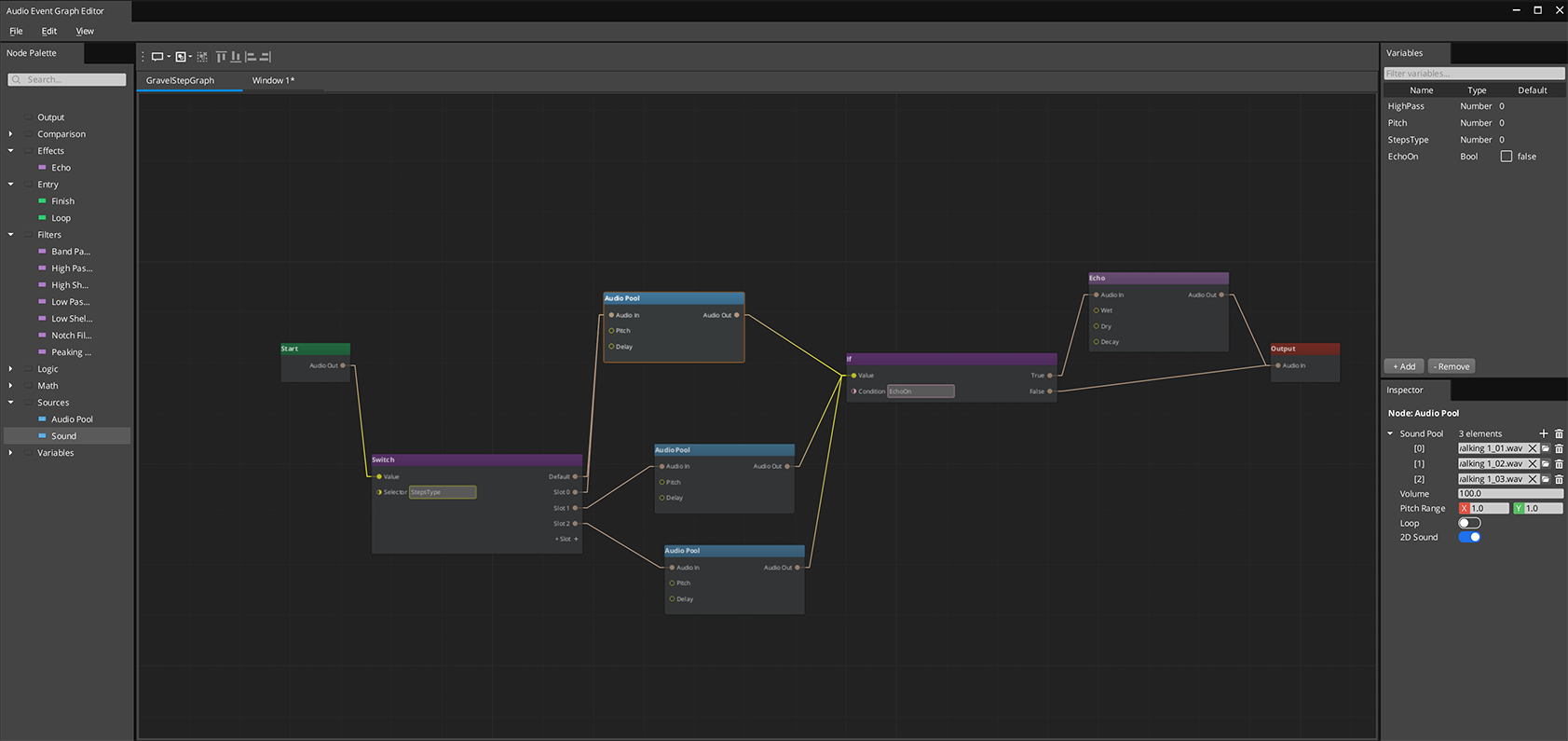
The Audio Event Graph is an FMOD-style visual editor for authoring complex sound events. Each .audiograph file defines one sound event as a node graph — sources, filters, effects, and routing all connected visually. At runtime, the graph maps directly to a miniaudio processing pipeline.
The Audio Event Graph uses the gs_graphcanvas framework with a DataFlowGraph topology. Nodes evaluate in topological order with dirty-propagation — only nodes affected by a change are re-evaluated.
Contents
Opening the Editor
Open the Audio Event Graph editor from the O3DE Editor menu: GS Tools > Audio Event Graph Editor.
Each graph is a standalone .audiograph file — use File > New to create one, or File > Open to load an existing graph. Multiple graphs can be open simultaneously in separate tabs.
How It Works
Audio Event Graphs use a data-flow model. Connections carry AudioRoute values — handles that represent a point in the miniaudio processing chain. The signal flows left to right:
- Entry nodes gate which phase is active (Start, Loop, or Finish)
- Source nodes create sound instances and output an AudioRoute
- Filter and effect nodes process the audio and pass it along
- Routing nodes (If/Switch) direct the signal based on conditions or variables
- The Output node wires the final AudioRoute to a mixing bus
Variables can be set from gameplay code at any time, causing affected nodes to re-evaluate without restarting the entire graph.
Node Catalog
Entry Nodes (Phase Gates)
| Node | Purpose |
|---|
| Aud_StartNode | Active during the Start phase |
| Aud_LoopNode | Active during the Loop phase |
| Aud_FinishNode | Active during the Finish phase |
Entry nodes output a gate signal. Downstream nodes only produce audio when their entry gate is active.
Source Nodes
| Node | Purpose | Key Properties |
|---|
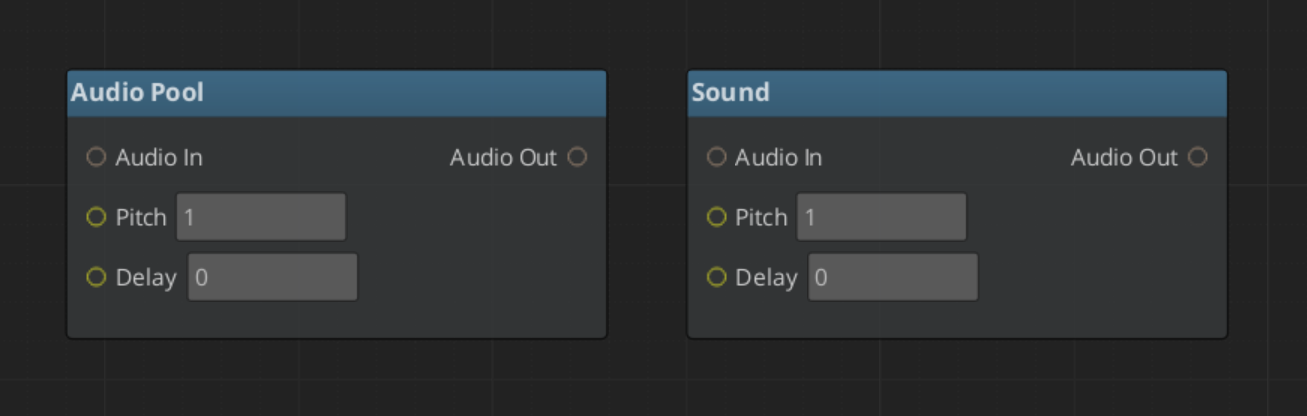
| Aud_SoundNode | Single audio asset playback | Volume, pitch, delay, looping, 3D spatialization |
| Aud_AudioPoolNode | Random selection from a pool of audio assets | Same as SoundNode, plus asset pool list |
| Aud_NoiseNode | Procedural noise generation | Noise colour, duration |
| Aud_SfxrNode | Procedural chiptone from a pool of SFXR profiles | Profile pool, picked at random per fire |
Filter Nodes
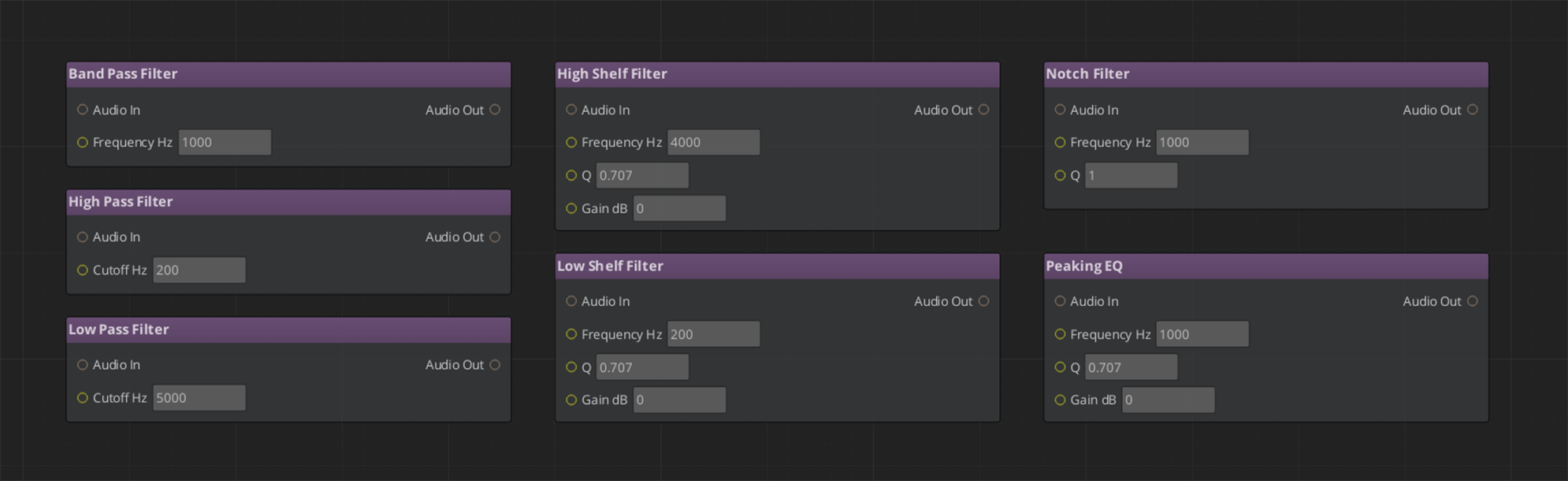
| Node | Filter Type |
|---|
| Aud_LowPassFilterNode | Low-pass filter |
| Aud_HighPassFilterNode | High-pass filter |
| Aud_BandPassFilterNode | Band-pass filter |
| Aud_NotchFilterNode | Notch (band-reject) filter |
| Aud_PeakingEQNode | Peaking EQ |
| Aud_LowShelfFilterNode | Low shelf filter |
| Aud_HighShelfFilterNode | High shelf filter |
All filter nodes take an audio_in input and produce an audio_out output. Filter parameters (cutoff frequency, Q factor, gain) are configurable per-node or bindable to variables.
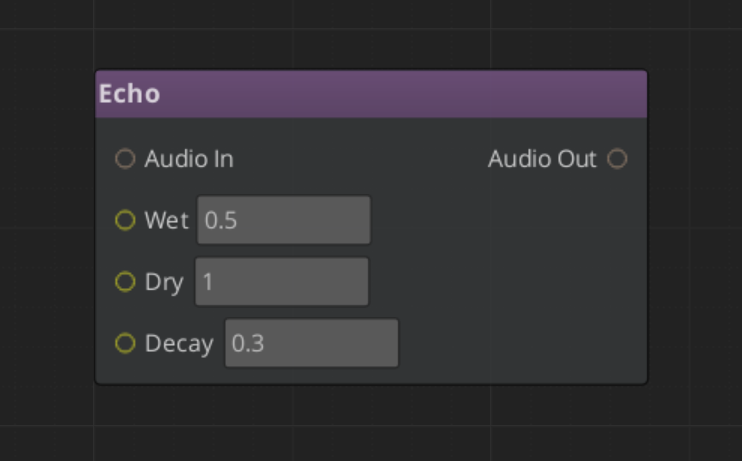
Time & Space Nodes
| Node | Purpose |
|---|
| Aud_EchoNode | Feedback delay — repeats that decay over time |
| Aud_ReverbNode | Simulated room ambience |
Character & Modulation Nodes
| Node | Purpose |
|---|
| Aud_WaveShaperNode | Non-linear distortion and saturation |
| Aud_LofiNode | Bit depth and sample rate reduction |
| Aud_RobotizeNode | Vocoder-style robotic character |
| Aud_FlangerNode | Sweeping comb filtering from a modulated short delay |
| Aud_ChorusNode | Thickening from multiple detuned delayed copies |
| Aud_RingModNode | Ring modulation — metallic, inharmonic tones |
| Aud_TremoloNode | Rhythmic amplitude modulation |
Utility Nodes
| Node | Purpose |
|---|
| Aud_PannerNode | Stereo placement |
| Aud_CompressorNode | Dynamic range compression |
| Aud_DCRemovalNode | Removes DC offset from a signal |
| Aud_AmplifyNode | Straight gain |
These are the same processors the base gem exposes as mix effects — one DSP, two authoring surfaces. Two mix effects have no node form: Binaural, because spatialization is automatic and per-source, and Pitch.
Structure Nodes
| Node | Purpose |
|---|
| Aud_MixNode | Sums several audio routes into one |
| Aud_SplitNode | Fans one audio route out to several destinations |
Routing Nodes
The built-in gs_graphcanvas IfNode and SwitchNode work with AudioRoute values. Use them for conditional audio paths based on game state variables (e.g., play different sounds based on surface type or weather).
Terminal Node
| Node | Purpose |
|---|
| Aud_OutputNode | Wires the final audio chain to the mixing bus |
Every graph needs exactly one Output node.
Adding your own node types
Graph nodes self-register through file-static registrars, which a unity build’s linker can drop if nothing references them — the graph then fails to deserialize with an unregistered class id. The framework pins them with an explicit link anchor in its system components. If you extend the node set, your nodes must be added to that anchor, and reflected in both the client and editor modules.
Phase Lifecycle
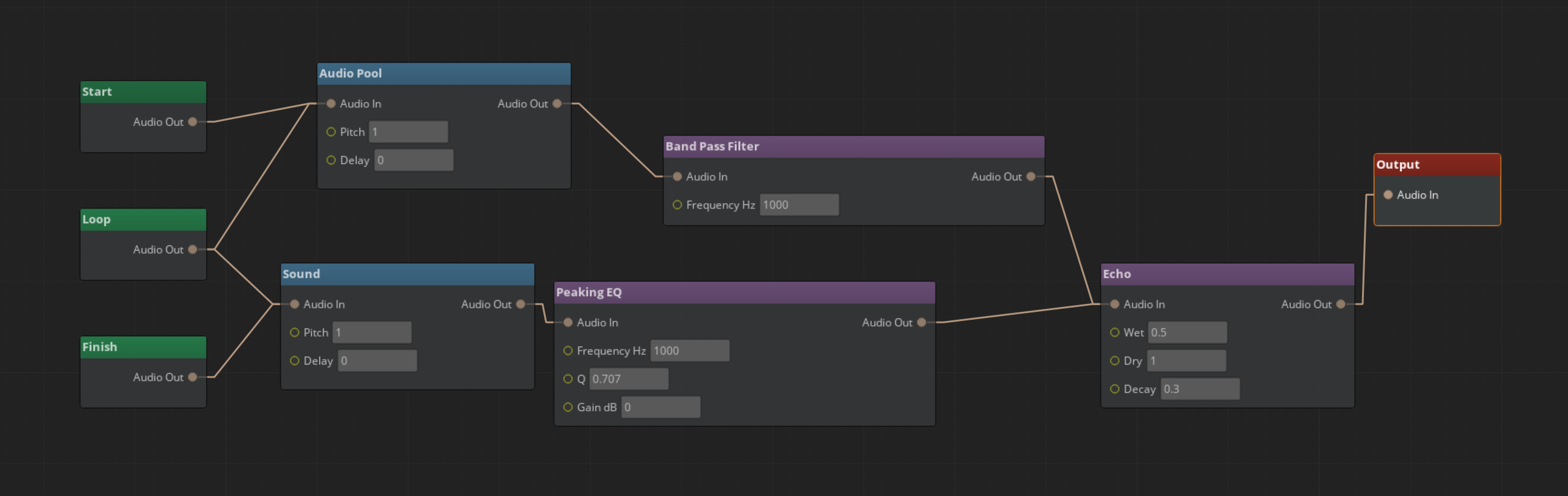
Audio Event Graphs support a three-phase lifecycle for structured sound playback:
- Start — Initial playback. The Aud_StartNode gate is active. One-shot intro sounds play here.
- Loop — Repeating section. The Aud_LoopNode gate is active. Ambient loops and sustained sounds live here.
- Finish — Outro/tail. The Aud_FinishNode gate is active. Fade-outs and release tails play here.
Phases transition automatically: Start plays once, then Loop repeats (if looping is enabled), then Finish plays when FinishAudioGraph() is called. Not all phases are required — a simple one-shot sound only needs a Start node.
Notice that the Entry nodes share routing. The system determines the final sound stemming from the specific entry with no limits to crossover.
Using Variables
Variables let gameplay code control sound behavior at runtime. Common uses:
- Filter parameters — Bind a filter’s cutoff frequency to a variable, then adjust it from code (e.g., underwater muffling)
- Routing conditions — Use a variable as the condition for an If/Switch node to select different sound paths
- Source selection — Gate different source nodes based on game state
Declare variables in the Variable Panel, then either bind them to input slots (right-click > Convert to Reference) or use Get/Set variable nodes.
At runtime, set variables via the Audio Manager API:
AudioManagerRequestBus::Broadcast(&AudioManagerRequests::SetAudioGraphVariable, instanceId, "underwater", 0.8f);
Setting a variable marks dependent nodes dirty and re-evaluates only the affected portion of the graph.
Extending with Custom Nodes
To add a custom audio node:
- Create a class inheriting from
BaseNode and IDataFlowNode - Register it with
GS_AUTO_REGISTER_NODE_FOR(MyAudioNode, "audiograph") - Implement
Process(GraphExecutionContext& context) - Follow the empty any pattern for inactive outputs:
void MyAudioNode::Process(GraphExecutionContext& context)
{
    auto inputAny = context.GetInputValueAny(this, "audio_in");
    if (inputAny.empty())
    {
        context.SetOutputValueAny(this, "audio_out", AZStd::any{});  // CRITICAL: truly empty
        return;
    }
    // Process audio...
    context.SetOutputValue(this, "audio_out", outputRoute);
}
The empty any pattern ensures that inactive paths don’t mask valid audio from other connections in multi-input slots.
For full details on node creation, see gs_graphcanvas Nodes.
Playing a Graph
There are three ways to reach a graph. They form an escalation ladder — most projects should use the last one.
| Approach | Surface | Use when |
|---|
| Player component | AudioGraphPlayerComponent on an entity | Almost always. No handles to manage. |
| Library | PlayGraph(name) / AcquireGraph(name) | You want named access across a project. |
| Raw path | PlayAudioGraph(assetPath) | Low-level. You manage the path yourself. |
AudioGraphPlayerComponent
The recommended surface. Drop it on an entity, point it at a graph, and it handles the rest.
| Authored field | Meaning |
|---|
| Graph | The .audiograph to play. |
| Auto Play | Start on activation. |
| Spatialize | Track this entity’s own transform. |
| Looping | Run the Loop phase. |
It acquires lazily on the first Play or variable set, applies spatialization and looping, and holds its own handle — there is no acquire/release to write. Its per-entity bus offers Play, Finish, Stop, and SetVariable in float, int, bool and string forms.
With no Pro manager present it is inert and warns rather than failing.
Graph libraries
An AudioGraphLibrary (.agl) maps names to graphs, so gameplay code refers to "door_creak" rather than a path. Libraries are assigned to the Pro manager and can be added or removed at runtime.
Because .audiograph is a source-only file — no builder, no product asset — the library uses a custom picker that browses source files directly rather than the product catalog. This is the same approach ScriptCanvas uses for .scriptcanvas, and it is worth copying if you build an asset that references source files.
Current limitation: the picker stores an absolute source path.
Instance Lifecycle
This is the behaviour most likely to surprise you, so it is worth stating plainly.
There are two kinds of instance:
- Fire-and-forget — created by
PlayGraph / PlayAudioGraph, destroyed when it stops. - Owned — created by
AcquireGraph / AcquireAudioGraph, and kept until you explicitly release it.
For an owned instance, Stop, Finish, a fade-out or a natural end all quiesce it to idle rather than destroying it. Sounds stop, pooled resources return, entry gates deactivate and the phase resets — but the instance, its variables and its spatial and loop configuration are all retained. Only ReleaseAudioGraph or manager shutdown actually destroys it.
The reason: a play → loop → end → replay cycle should keep its variables across calls. What you hear is identical to destruction; the difference is that replaying does not mean reconfiguring.
GetGraph(name) returns the live instance for a name, acquiring on first call. Repeat calls return the same id, and because owned instances persist, a handle normally stays valid for the lifetime of whatever is holding it.
All instance ids are 64-bit unsigned integers, and 0 means failure.
Runtime API
Everything below is on AudioGraphRequestBus — a GS_AudioPro bus, not the Audio Manager’s.
Named access: AddGraphLibrary, RemoveGraphLibrary, PlayGraph(name), AcquireGraph(name), GetGraph(name)
Raw path: PlayAudioGraph(assetPath), AcquireAudioGraph(assetPath)
Transport: FireAudioGraph(id), StopAudioGraph(id), StopAllAudioGraphs(), FinishAudioGraph(id), StopAudioGraphFade(id, fadeTime), ReleaseAudioGraph(id)
Variables: SetAudioGraphVariable (float), SetAudioGraphVariableInt, SetAudioGraphVariableBool, SetAudioGraphVariableString — each taking (instanceId, name, value)
Spatialization: SetAudioGraphEntity(id, entity), SetAudioGraphPosition(id, position), ClearAudioGraphSpatialization(id)
State: SetAudioGraphLooping(id, bool), IsAudioGraphActive(id)
Per-entity playback goes through AudioGraphPlayerRequestBus instead, addressed by entity id.
See Also
7.2 - Score Arrangement
Multi-layer musical score system for dynamic music – tempo, time signatures, fade control, and layer selection.
GS_AudioPro - premium tier
This feature ships in
GS_AudioPro, the premium audio gem. It requires the free
GS_Audio gem and extends it. See
what lives where.
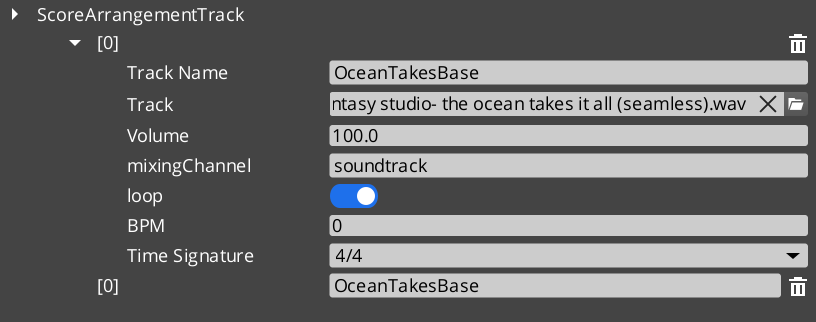
The Score Arrangement system provides multi-layer dynamic music for GS_Play projects. A ScoreArrangementTrack asset defines a musical score with configurable tempo, time signature, fade behavior, and multiple layers that can be enabled or disabled at runtime. This allows game music to adapt to gameplay state – adding or removing instrumental layers, changing intensity, or crossfading between sections.
Score tracks are assigned to the Pro Audio Manager and controlled through AudioScoreRequestBus. They are not on the base audio manager’s bus.
For usage guides and setup examples, see The Basics: GS_Audio.
Contents
Data Model
ScoreArrangementTrack
A multi-layer musical score asset. Each track defines the musical structure and contains one or more layers that play simultaneously.
| Field | Value |
|---|
| TypeId | {DBB48082-1834-4DFF-BAD2-6EA8D83F1AD0} |
| Extends | AZ::Data::AssetData |
| Reflection | Requires GS_AssetReflectionIncludes.h — see Serialization Helpers |
| Field | Type | Description |
|---|
| Track Name | AZStd::string | Identifier for this score track. |
| Time Signature | TimeSignatures | The time signature for this score (e.g. 4/4, 3/4, 6/8). |
| BPM | float | Tempo in beats per minute. |
| Fade In Time | float | Duration in seconds for the score to fade in when playback begins. |
| Fade Out Time | float | Duration in seconds for the score to fade out when playback stops. |
| Loop | bool | Whether the score loops back to the beginning when it reaches the end. |
| Layers | AZStd::vector<ScoreLayer> | The musical layers that compose this score. |
| Active Layers | AZStd::vector<int> | Indices of layers that are active (audible) at the start of playback. |
ScoreLayer
A single musical layer within a score arrangement. Each layer represents one track of audio (e.g. drums, bass, melody) that can be independently enabled or disabled.
| Field | Value |
|---|
| TypeId | {C8B2669A-FAEA-4910-9218-6FE50D2E588E} |
| Field | Type | Description |
|---|
| Layer Name | AZStd::string | Identifier for this layer within the score. |
| Audio Asset | AZ::Data::Asset<AudioClipAsset> | The audio clip for this layer. |
| Volume | float | Base volume level for this layer (0.0 to 1.0). |
| Fade Time | float | Duration in seconds for this layer to fade in or out when toggled. |
TimeSignatures (Enum)
Supported musical time signatures for score arrangement tracks.
| Field | Value |
|---|
| TypeId | {6D6B5657-746C-4FCA-A0AC-671C0F064570} |
| Value | Beats per Measure | Beat Unit | Description |
|---|
FourFour | 4 | Quarter note | 4/4 – Common time. The most widely used time signature. |
FourTwo | 4 | Half note | 4/2 – Four half-note beats per measure. |
TwelveEight | 12 | Eighth note | 12/8 – Compound quadruple meter. Four groups of three eighth notes. |
TwoTwo | 2 | Half note | 2/2 – Cut time (alla breve). Two half-note beats per measure. |
TwoFour | 2 | Quarter note | 2/4 – Two quarter-note beats per measure. March time. |
SixEight | 6 | Eighth note | 6/8 – Compound duple meter. Two groups of three eighth notes. |
ThreeFour | 3 | Quarter note | 3/4 – Waltz time. Three quarter-note beats per measure. |
ThreeTwo | 3 | Half note | 3/2 – Three half-note beats per measure. |
NineEight | 9 | Eighth note | 9/8 – Compound triple meter. Three groups of three eighth notes. |
API Reference
Request Bus: AudioScoreRequestBus
Singleton bus – single address, single handler. Implemented by the Pro Audio Manager.
| Method | Parameters | Description |
|---|
AddScoreArrangementTrack | AZ::Data::Asset<ScoreArrangementTrack> | Register a score track. |
RemoveScoreArrangementTrack | const AZStd::string& scoreName | Unregister a score track. |
PlayScore | scoreName, fadeTime = 0 | Start a score with its authored active layers. |
PlayScoreAndTracks | scoreName, vector<trackName>, fadeTime = 0 | Start a score with a specific layer set. |
PlayTrack | trackName, fadeTime = 0 | Bring one layer in. |
StopTrack | trackName, fadeTime = 0 | Take one layer out. |
StopScore | fadeTime = 0 | Stop the whole score. |
The adaptive-music loop is PlayScore once, then PlayTrack and StopTrack as game state changes. Layers stay in time with each other because they share the arrangement’s tempo and time signature – bringing a percussion layer in mid-bar does not knock it out of sync.
See Also
For conceptual overviews and usage guides:
For component references:
Get GS_Audio
GS_Audio — Explore this gem on the product page and add it to your project.
7.3 - Geometric Acoustics
Occlusion and reflections derived from world geometry — acoustic volumes and shapes, 15 material presets, listener-centric reverb, and an honest account of what is and is not simulated.
GS_AudioPro - premium tier
This feature ships in
GS_AudioPro, the premium audio gem. It requires the free
GS_Audio gem and extends it. See
what lives where.
The base gem places sounds by direction and distance. Geometric acoustics adds the room: sound muffled by the geometry between it and the listener, and reverb derived from the space the listener is actually standing in rather than an effect an author dialled in.
Geometry is authored, not inferred. You mark up the acoustically significant parts of a level with volumes and shapes carrying material presets — you do not hand the simulation your render meshes.
Contents
Turning It On
Geometric acoustics is off by default. It is enabled on the Pro manager’s settings, which are additive to the base project settings.
| Setting | Default | Meaning |
|---|
| Geometry Enabled | false | Master switch for the whole system. |
| Occlusion Enabled | true | Muffle sounds behind geometry. |
| Occlusion Type | — | Raycast or Volumetric. |
| Occlusion Radius | 1.0 | Source sphere radius for volumetric occlusion, in metres. |
| Max Occlusion Samples | 16 | Rays used when sampling an occlusion volume. |
| Reflections Enabled | true | Derive reverb from geometry. |
| Reflection Mode | Listener | See reflections. |
| Reflection Wet | 1.0 | How much reverb is added to the dry signal. |
| Reflection Smooth Time | 0.75 | Seconds to ease toward a new room. 0 snaps. |
| Reflection Order | 1 | Recursion depth, 0–4. |
| Simulation Update Rate | 30.0 Hz | How often the simulator recomputes. |
Authoring Geometry
Two components mark up a level. Both carry a material preset, plus a custom material for the Custom case.
| Component | What it contributes |
|---|
| Audio Geometry | An authored box volume. |
| Audio Shape Geometry | Reads an existing O3DE Shape component. A Quad becomes a single-layer plane, a Box becomes a box, and anything else falls back to its bounding box. |
The Shape variant is usually the faster path — a wall you have already blocked out with a Shape becomes acoustically real by adding one component.
Registration goes through a request bus that takes raw vertices rather than entities. That is deliberate: it is what will let streaming systems fold geometry in and out of the simulation without the acoustics layer knowing anything about entity lifetimes.
Acoustic Materials
Fifteen presets, plus Custom.
| Group | Presets | Character |
|---|
| Hard / reflective | Generic, Brick, Concrete, Ceramic, Glass, Plaster, Wood, Metal, Rock | Bounce sound. Long, bright reverb. |
| Absorptive | Gravel, Carpet | Soak sound up. Short, dull reverb. |
| Soft barriers | Curtain, Blanket, Door, Drape | Transmit meaningfully — they muffle rather than silence. |
| Custom | — | Dial all seven coefficients by hand: absorption low/mid/high, scattering, and transmission low/mid/high. |
The soft-barrier group is the interesting one for designers. A curtain over a doorway does not block the sound behind it, it dulls it — which is the effect people usually reach for a low-pass filter to fake.
Occlusion
Each voice is simulated against the geometry between it and the listener, and muffled accordingly.
| Mode | Behaviour | Cost |
|---|
| Raycast | A single ray. A source is occluded or it is not. | Cheap. |
| Volumetric | Samples a sphere of the configured radius. | Higher, scaling with sample count. |
Volumetric is what gives partial occlusion at edges — a sound leaking around a doorframe rather than switching off as it passes behind the jamb. If occlusion feels binary and abrupt, this is the setting to change.
Occlusion ducks the direct signal.
Reflections
Reverb is derived from the geometry around the listener — one shared room, recomputed as the listener moves through the level. Reflection Mode has a PerSource value reserved for future work; it currently falls back to Listener.
Two behaviours are worth understanding because they are deliberate design choices, not side effects:
Reverb eases between rooms. Crossing a geometry boundary blends the reverb toward the new room over the Reflection Smooth Time rather than snapping. Set it to 0 if you want an instant change.
Reverb does not fade with distance. Each voice taps its raw source into a wet-only reverb, so the room stays constant across its whole volume while only the dry signal falls off with distance. This is what makes a large room sound like the same room from either end of it. The reverb send does taper at the far edge of a sound’s range — flat until three quarters of max distance, then eased to zero — so an event’s distance settings still bound how far it feeds the room.
Do not stack manual reverb on top of this
The
Reverb mix effect and influence-driven reverb
fake a room. Geometric reflections derive a real one. They occupy the same layer of the
signal chain, and using both puts two rooms on one sound.
How It Stays Safe
Worth knowing if you are budgeting for this system.
Reflections use a parametric reverb model — a handful of decay-time floats — rather than convolution. No impulse response ever crosses to the audio thread, and there is no ambisonic decode in the path.
The reflection simulation runs on a worker thread at up to 15 Hz, committing its results under a mutex. Occlusion and direct-path values are lock-free single-writer floats. Everything else stays on the main thread.
The practical consequence: enabling geometric acoustics adds a bounded, predictable cost rather than a per-sound one that scales alarmingly.
What This Does Not Do
State these to yourself before evaluating the result — each is a deliberate v1 boundary, not a defect.
- Reverb cannot tell your room from the one next door. It is listener-centric, so a source sealed in an adjacent room still contributes to the same shared reverb. Distinguishing them is what per-source reflections would do, and that is not built.
- An occluded source still feeds the room. Occlusion ducks the direct signal only. Within max distance, a muffled source still excites the reverb.
- Geometry is what you author. Render meshes and PhysX colliders are not consulted — v1 is authored volumes and O3DE Shapes.
- No offline baking. There are no precomputed reverb probes.
- Reverb is the tail, not early reflections. The parametric model gives you the decay, not discrete early reflections.
- CPU only. There is no GPU acceleration path.
See Also
For related systems:
For conceptual overviews and usage guides:
Get GS_Audio
GS_Audio — Explore this gem on the product page and add it to your project.
7.4 - Klatt Voice Synthesis
Custom text-to-speech via Klatt formant synthesis with 3D spatial audio, phoneme mapping, and voice profiling.
GS_AudioPro - premium tier
This feature ships in
GS_AudioPro, the premium audio gem. It requires the free
GS_Audio gem and extends it. See
what lives where.
The Klatt Voice Synthesis system provides custom text-to-speech using Klatt formant synthesis with full 3D spatial audio. Speech is generated by SoLoud and relayed into the miniaudio graph through a custom node, so it travels the same signal chain as every other sound – see the Audio Signal Model.
All types on this page are in the GS_AudioPro namespace.
The system has two layers:
- KlattVoiceSystemComponent – A singleton that manages the shared SoLoud engine instance and tracks the 3D audio listener position.
- KlattVoiceComponent – A per-entity component that generates speech, queues segments, applies voice profiles, and emits spatialized audio from the entity’s position.
Voice characteristics are defined through KlattVoiceProfile assets containing frequency, speed, waveform, formant, and phoneme mapping configuration. Phoneme maps convert input text to ARPABET phonemes for the Klatt synthesizer, with support for custom pronunciation overrides.
For usage guides and setup examples, see The Basics: GS_Audio.
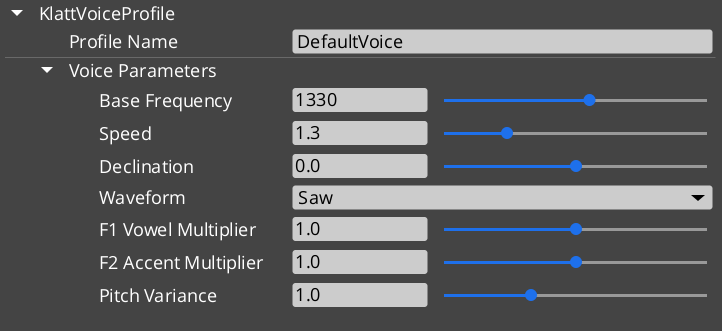
Contents
Components
KlattVoiceSystemComponent
Singleton component that manages the shared SoLoud engine and 3D listener tracking.
| Field | Value |
|---|
| TypeId | {F4A5D6E7-8B9C-4D5E-A1F2-3B4C5D6E7F8A} |
| Extends | AZ::Component, AZ::TickBus::Handler |
| Bus | KlattVoiceSystemRequestBus (Single/Single) |
KlattVoiceComponent
Per-entity voice component with spatial audio, phoneme mapping, and segment queue.
| Field | Value |
|---|
| TypeId | {4A8B9C7D-6E5F-4D3C-2B1A-0F9E8D7C6B5A} |
| Extends | AZ::Component, AZ::TickBus::Handler |
| Request Bus | KlattVoiceRequestBus (Single/ById, entity-addressed) |
| Notification Bus | KlattVoiceNotificationBus (Multiple/Multiple) |
API Reference
Request Bus: KlattVoiceSystemRequestBus
System-level voice management. Singleton bus – Single address, single handler.
| Method | Parameters | Returns | Description |
|---|
GetSoLoudEngine | – | SoLoud::Soloud* | Returns a pointer to the shared SoLoud engine instance. |
SetListenerPosition | const AZ::Vector3& position | void | Updates the 3D audio listener position for spatial voice playback. |
SetListenerOrientation | const AZ::Vector3& forward, const AZ::Vector3& up | void | Updates the 3D audio listener orientation. |
GetListenerPosition | – | AZ::Vector3 | Returns the current listener position. |
IsEngineReady | – | bool | Returns whether the SoLoud engine has been initialized and is ready. |
Request Bus: KlattVoiceRequestBus
Per-entity voice synthesis controls. Entity-addressed bus – Single handler per entity ID.
| Method | Parameters | Returns | Description |
|---|
Speak | const AZStd::string& text | void | Converts text to speech and plays it. Uses the component’s configured voice profile. |
SpeakWithParams | const AZStd::string& text, const KlattVoiceParams& params | void | Converts text to speech using the specified voice parameters instead of the profile defaults. |
StopSpeaking | – | void | Immediately stops any speech in progress and clears the segment queue. |
IsSpeaking | – | bool | Returns whether this entity’s voice is currently producing speech. |
QueueSegment | const AZStd::string& text | void | Adds a speech segment to the queue. Queued segments play in order after the current segment finishes. |
ClearQueue | – | void | Clears all queued speech segments without stopping current playback. |
SetVoiceProfile | const AZ::Data::Asset<KlattVoiceProfile>& profile | void | Changes the voice profile used by this component. |
GetVoiceProfile | – | AZ::Data::Asset<KlattVoiceProfile> | Returns the currently assigned voice profile asset. |
SetSpatialConfig | const KlattSpatialConfig& config | void | Updates the 3D spatial audio configuration for this voice. |
GetSpatialConfig | – | KlattSpatialConfig | Returns the current spatial audio configuration. |
SetVolume | float volume | void | Sets the output volume for this voice (0.0 to 1.0). |
GetVolume | – | float | Returns the current output volume. |
Notification Bus: KlattVoiceNotificationBus
Events broadcast by voice components. Multiple handler bus – any number of components can subscribe.
| Event | Parameters | Description |
|---|
OnSpeechStarted | const AZ::EntityId& entityId | Fired when an entity begins speaking. |
OnSpeechFinished | const AZ::EntityId& entityId | Fired when an entity finishes speaking (including all queued segments). |
OnSegmentStarted | const AZ::EntityId& entityId, int segmentIndex | Fired when a new speech segment begins playing. |
OnSegmentFinished | const AZ::EntityId& entityId, int segmentIndex | Fired when a speech segment finishes playing. |
Data Types
KlattVoiceParams
Core voice synthesis parameters controlling the Klatt formant synthesizer output.
| Field | Value |
|---|
| TypeId | {8A9C7F3B-4E2D-4C1A-9B5E-6D8F9A2C1B4E} |
| Field | Type | Description |
|---|
| Base Frequency | float | Fundamental frequency (F0) in Hz. Controls the base pitch of the voice. |
| Speed | float | Speech rate multiplier. 1.0 is normal speed. |
| Declination | float | Pitch declination rate. Controls how pitch drops over the course of an utterance. |
| Waveform | KlattWaveform | Glottal waveform type used by the synthesizer. |
| Formant Shift | float | Shifts all formant frequencies up or down. Positive values raise pitch character, negative values lower it. |
| Pitch Variance | float | Amount of random pitch variation applied during speech for natural-sounding intonation. |
KlattVoiceProfile
A voice profile asset combining synthesis parameters with a phoneme mapping.
| Field | Value |
|---|
| TypeId | {2CEB777E-DAA7-40B1-BFF4-0F772ADE86CF} |
| Reflection | Requires GS_AssetReflectionIncludes.h — see Serialization Helpers |
| Field | Type | Description |
|---|
| Voice Params | KlattVoiceParams | The synthesis parameters for this voice profile. |
| Phoneme Map | AZ::Data::Asset<KlattPhonemeMap> | The phoneme mapping asset used for text-to-phoneme conversion. |
KlattVoicePreset
A preset configuration for quick voice setup.
| Field | Value |
|---|
| TypeId | {2B8D9E4F-7C6A-4D3B-8E9F-1A2B3C4D5E6F} |
| Field | Type | Description |
|---|
| Preset Name | AZStd::string | Display name for this preset. |
| Profile | KlattVoiceProfile | The voice profile configuration stored in this preset. |
KlattSpatialConfig
3D spatial audio configuration for voice positioning.
| Field | Value |
|---|
| TypeId | {7C9F8E2D-3A4B-5F6C-1E0D-9A8B7C6D5E4F} |
| Field | Type | Description |
|---|
| Enable 3D | bool | Whether this voice uses 3D spatialization. When false, audio plays as 2D. |
| Min Distance | float | Distance at which attenuation begins. Below this distance the voice plays at full volume. |
| Max Distance | float | Distance at which the voice reaches minimum volume. |
| Attenuation Model | int | The distance attenuation curve type (linear, inverse, exponential). |
| Doppler Factor | float | Intensity of the Doppler effect applied to this voice. 0.0 disables Doppler. |
KlattPhonemeMap
Phoneme mapping asset for text-to-ARPABET conversion with custom overrides.
| Field | Value |
|---|
| TypeId | {F3E9D7C1-2A4B-5E8F-9C3D-6A1B4E7F2D5C} |
| Reflection | Requires GS_AssetReflectionIncludes.h — see Serialization Helpers |
| Field | Type | Description |
|---|
| Base Map | BasePhonemeMap | The base phoneme dictionary to use as the foundation for conversion. |
| Overrides | AZStd::vector<PhonemeOverride> | Custom pronunciation overrides for specific words or patterns. |
PhonemeOverride
A custom pronunciation rule that overrides the base phoneme map for a specific word or pattern.
| Field | Value |
|---|
| TypeId | {A2B5C8D1-4E7F-3A9C-6B2D-1F5E8A3C7D9B} |
| Field | Type | Description |
|---|
| Word | AZStd::string | The word or pattern to match. |
| Phonemes | AZStd::string | The ARPABET phoneme sequence to use for this word. |
Enumerations
Glottal waveform types available for the Klatt synthesizer.
| Field | Value |
|---|
| TypeId | {8ED1DABE-3347-44A5-B43A-C171D36AE780} |
| Value | Description |
|---|
Saw | Sawtooth waveform. Bright, buzzy character. |
Triangle | Triangle waveform. Softer than sawtooth, slightly hollow. |
Sin | Sine waveform. Pure tone, smooth and clean. |
Square | Square waveform. Hollow, reed-like character. |
Pulse | Pulse waveform. Variable duty cycle for varied timbres. |
Noise | Noise waveform. Breathy, whisper-like quality. |
Warble | Warble waveform. Modulated tone with vibrato-like character. |
BasePhonemeMap
Available base phoneme dictionaries for text-to-ARPABET conversion.
| Field | Value |
|---|
| TypeId | {D8F2A3C5-1B4E-7A9F-6D2C-5E8A1B3F4C7D} |
| Value | Description |
|---|
SoLoud_Default | The default letter-to-phoneme mapping built into SoLoud. Covers standard English pronunciation. |
CMU_Full | The full CMU Pronouncing Dictionary — over 130,000 entries. Not yet functional. |
CMU_Full is not working yet
Dictionary-backed conversion is not operational. Selecting CMU_Full does not currently give you CMU pronunciations — voice falls through to SoLoud’s built-in letter-to-phoneme conversion either way.
This matters for authoring: if a word is mispronounced, the fix today is a phoneme override on your phoneme map, not a change of base dictionary.
KTT (Klatt Text Tags) are inline commands embedded in strings passed to KlattVoiceComponent::SpeakText. They are parsed by KlattCommandParser::Parse and stripped from the spoken text before synthesis begins — they are never heard.
Format: <ktt attr1=value1 attr2=value2>
Multiple attributes can be combined in a single tag. Attribute names are case-insensitive. String values may optionally be wrapped in quotes. An empty value (e.g. speed=) resets that parameter to the voice profile default.
speed=X
Override the speech speed multiplier from this point forward.
| |
|---|
| Range | 0.1 – 5.0 |
| Default reset | speed= (restores profile default) |
| 1.0 | Normal speed |
Normal speech <ktt speed=2.0> fast bit <ktt speed=> back to default.
decl=X / declination=X
Pitch declination — how much pitch falls over the course of the utterance. Both decl and declination are accepted.
| |
|---|
| Range | 0.0 – 1.0 |
| 0.0 | Steady pitch (no fall) |
| 0.8 | Strong downward drift |
Rising <ktt decl=0.0> steady <ktt decl=0.8> falling voice.
Change the glottal waveform used by the synthesizer, setting the overall character of the voice.
| Value | Character |
|---|
saw | Default, neutral voice |
triangle | Softer, smoother |
sin / sine | Pure tone, robotic |
square | Harsh, mechanical |
pulse | Raspy, textured |
noise | Whispered, breathy |
warble | Wobbly, character voice |
<ktt waveform="noise"> whispered section <ktt waveform="saw"> normal voice.
vowel=X
First formant (F1) frequency multiplier. Shifts the quality of synthesised vowel sounds.
| |
|---|
| 1.0 | Normal |
| > 1.0 | More open vowel quality |
| < 1.0 | More closed vowel quality |
<ktt vowel=1.4> different vowel colour here.
accent=X
Second formant (F2) frequency multiplier. Shifts accent or dialect colouration.
| |
|---|
| 1.0 | Normal |
| < 1.0 | Shifted accent colouring |
<ktt accent=0.8> shifted accent here.
pitch=X
F0 pitch variance amount. Controls how much pitch varies during synthesis.
| |
|---|
| 1.0 | Normal variance |
| > 1.0 | More expressive intonation |
| < 1.0 | Flatter, more monotone |
<ktt pitch=2.0> very expressive speech <ktt pitch=0.1> flat monotone.
pause=X
Insert a pause of X seconds at this position in the voice playback. Value is required — there is no default.
Hello.<ktt pause=0.8> How are you?
Combined Example
Dialogue string using typewriter text commands and KTT voice tags together:
[b]Warning:[/b] [color=#FF0000]do not[/color] proceed.[pause=1]
<ktt waveform="square" pitch=1.8>This is a mechanical override.<ktt pause=0.5><ktt waveform="saw" pitch=1.0>
[speed=3]Resuming normal protocol.[/speed]
See Also
For conceptual overviews and usage guides:
For component references:
- Audio Manager – Manager lifecycle that the voice system participates in
Get GS_Audio
GS_Audio — Explore this gem on the product page and add it to your project.
8 - Third Party Implementations
Integration guides for third-party audio systems with GS_Audio.
This section will contain integration guides for connecting third-party audio middleware and tools with the GS_Audio system.
For usage guides and setup examples, see The Basics: GS_Audio.
Get GS_Audio
GS_Audio — Explore this gem on the product page and add it to your project.