GS_Audio
Audio management, event-based sound playback, multi-layer music scoring, mixing buses with effects, and Klatt formant voice synthesis with 3D spatial audio.
GS_Audio provides a complete audio solution for GS_Play projects. It includes an event-based sound playback system, multi-layer music scoring, named mixing buses with configurable effects chains, and a built-in Klatt formant voice synthesizer with 3D spatial audio. All features integrate with the GS_Play manager lifecycle and respond to standby mode automatically.
For usage guides and setup examples, see The Basics: GS_Audio.
Contents
Audio Management
The Audio Manager singleton initializes the MiniAudio engine, manages mixing buses, loads audio event libraries, and coordinates score track playback. It extends GS_ManagerComponent and participates in the standard two-stage initialization.
| Component | Purpose |
|---|
| Audio Manager | Master audio controller – engine lifecycle, bus routing, event library loading, score management. |
Audio Manager API
Audio Events
Event-based sound playback. Events define clip pools with selection rules, spatialization mode, concurrent limits, and repeat-hold behavior. Events are grouped into library assets.
Audio Events API
Mixing & Effects
Named audio buses with configurable effects chains and environmental influence. Includes 9 built-in audio filter types.
Mixing & Effects API
Score Arrangement
Multi-layer music scoring with configurable time signatures, tempo, and layer control.
Score Arrangement API
Klatt Voice Synthesis
Built-in text-to-speech using Klatt formant synthesis with 3D spatial audio.
Klatt Voice API
Dependencies
- GS_Core (required)
- MiniAudio (third-party audio library)
- SoLoud (embedded, for voice synthesis)
Installation
- Enable the GS_Audio gem in your project configuration.
- Ensure GS_Core and MiniAudio are also enabled.
- Create an Audio Manager prefab and add it to the Game Manager’s Startup Managers list.
- Create Audio Event Library assets for your sound effects.
- Add
GS_AudioEventComponent to entities that need to play sounds.
See Also
For conceptual overviews and usage guides:
For related resources:
Get GS_Audio
GS_Audio — Explore this gem on the product page and add it to your project.
1 - Audio Manager
Master audio controller – engine initialization, mixing bus routing, event library loading, and score playback coordination.
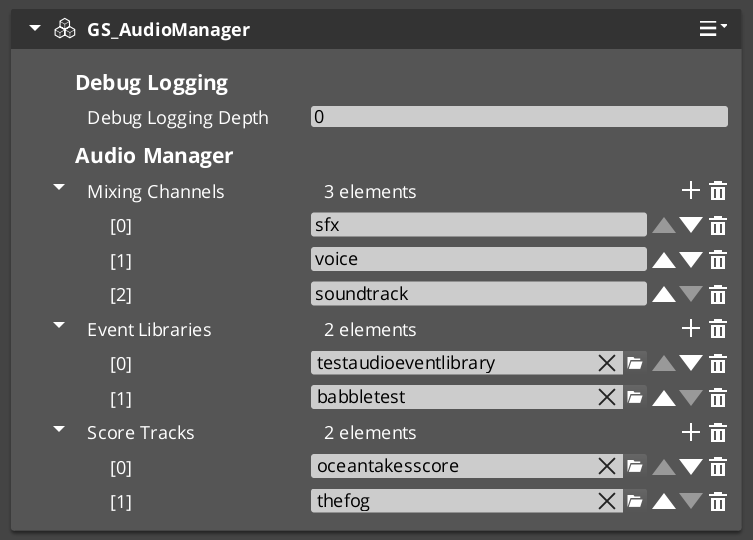
The Audio Manager is the master audio controller for every GS_Play project. It extends GS_ManagerComponent and participates in the standard two-stage initialization managed by the Game Manager. On startup it initializes the MiniAudio engine, creates the named mixing bus graph, loads audio event libraries, and coordinates score track playback.
Like all GS_Play managers, the Audio Manager responds to standby mode automatically – muting or pausing audio output when the game enters a blocking operation such as a stage change.
For usage guides and setup examples, see The Basics: GS_Audio.
Contents
How It Works
Engine Lifecycle
When the Audio Manager activates, it initializes a MiniAudio engine instance and builds the mixing bus graph from its configured bus list. During Stage 2 startup it loads all referenced Audio Event Library assets so that events can be triggered immediately once startup completes.
Mixing Bus Routing
All audio output flows through named mixing buses. Each bus is a GS_MixingBus node in the MiniAudio graph with its own volume level and optional effects chain. The Audio Manager owns the top-level routing and exposes volume control per bus through the request bus.
Score Playback
The Audio Manager coordinates playback of ScoreArrangementTrack assets – multi-layer musical scores with configurable tempo, time signature, and layer selection. Score tracks are loaded and managed through the request bus.
Inspector Properties
| Property | Type | Description |
|---|
| Mixing Buses | AZStd::vector<BusEffectsPair> | Named mixing buses with optional effects chains. Each entry maps a bus name to an effects configuration. |
| Startup Libraries | AZStd::vector<AZ::Data::Asset<AudioEventLibrary>> | Audio event library assets to load during startup. Events in these libraries are available immediately after initialization. |
| Default Master Volume | float | Initial master volume level (0.0 to 1.0). |
API Reference
GS_AudioManagerComponent
| Field | Value |
|---|
| TypeId | {F28721FD-B9FD-4C04-8CD1-6344BD8A3B78} |
| Extends | GS_Core::GS_ManagerComponent |
| Header | GS_Audio/GS_AudioManagerBus.h |
Request Bus: AudioManagerRequestBus
Commands sent to the Audio Manager. Singleton bus – Single address, single handler.
| Method | Parameters | Returns | Description |
|---|
PlayAudioEvent | const AZStd::string& eventName | void | Plays the named audio event from the loaded event libraries. |
PlayAudioEvent | const AZStd::string& eventName, const AZ::EntityId& entityId | void | Plays the named audio event positioned at the specified entity for 3D spatialization. |
StopAudioEvent | const AZStd::string& eventName | void | Stops playback of the named audio event. |
StopAllAudioEvents | – | void | Stops all currently playing audio events. |
SetMixerVolume | const AZStd::string& busName, float volume | void | Sets the volume of a named mixing bus (0.0 to 1.0). |
GetMixerVolume | const AZStd::string& busName | float | Returns the current volume of a named mixing bus. |
SetMasterVolume | float volume | void | Sets the master output volume (0.0 to 1.0). |
GetMasterVolume | – | float | Returns the current master output volume. |
LoadEventLibrary | const AZ::Data::Asset<AudioEventLibrary>& library | void | Loads an audio event library at runtime, making its events available for playback. |
UnloadEventLibrary | const AZ::Data::Asset<AudioEventLibrary>& library | void | Unloads a previously loaded audio event library. |
PlayScoreTrack | const AZ::Data::Asset<ScoreArrangementTrack>& track | void | Begins playback of a score arrangement track. |
StopScoreTrack | – | void | Stops the currently playing score arrangement track. |
Notification Bus: AudioManagerNotificationBus
Events broadcast by the Audio Manager. Multiple handler bus – any number of components can subscribe.
| Event | Parameters | Description |
|---|
OnAudioEventStarted | const AZStd::string& eventName | Fired when an audio event begins playback. |
OnAudioEventStopped | const AZStd::string& eventName | Fired when an audio event stops playback. |
OnScoreTrackStarted | – | Fired when a score arrangement track begins playback. |
OnScoreTrackStopped | – | Fired when a score arrangement track stops playback. |
OnMixerVolumeChanged | const AZStd::string& busName, float volume | Fired when a mixing bus volume changes. |
See Also
For conceptual overviews and usage guides:
For component references:
For related resources:
Get GS_Audio
GS_Audio — Explore this gem on the product page and add it to your project.
2 - Audio Events
Event-based sound playback – audio event definitions, clip pool selection, spatialization, and event library assets.
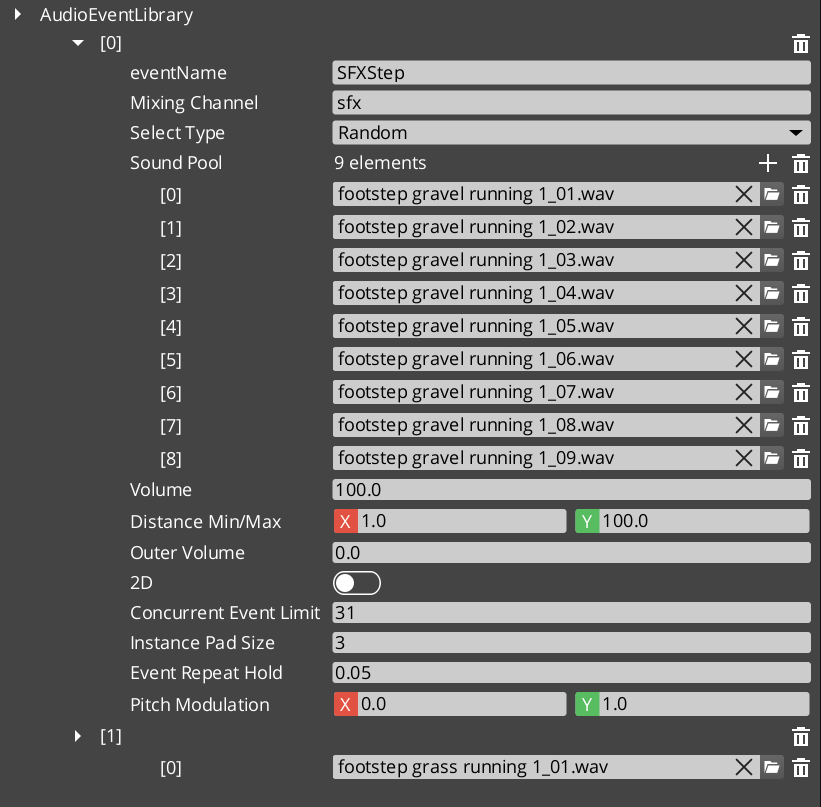
Audio Events are the primary mechanism for playing sounds in GS_Play. A GS_AudioEvent defines a single sound event with a pool of audio clips, selection rules (random or sequential), 2D/3D spatialization mode, concurrent playback limits, and repeat-hold behavior. Events are grouped into AudioEventLibrary assets that the Audio Manager loads at startup or on demand.
When an event is triggered, the system selects a clip from the pool according to the configured selection type, checks concurrent limits, and routes the output through the appropriate mixing bus.
For usage guides and setup examples, see The Basics: GS_Audio.
Contents
Data Model
GS_AudioEvent
A single audio event definition containing all playback configuration.
| Field | Value |
|---|
| TypeId | {2A6E337B-2B9A-4CB2-8760-BF3A12C50CA0} |
| Field | Type | Description |
|---|
| Event Name | AZStd::string | Unique identifier for this event within its library. Used by PlayAudioEvent calls. |
| Audio Clips | AZStd::vector<AudioClipAsset> | Pool of audio clip assets available for this event. |
| Pool Selection Type | PoolSelectionType | How clips are chosen from the pool: Random or Increment (sequential). |
| Is 3D | bool | When true, audio is spatialized in 3D space relative to the emitting entity. When false, audio plays as 2D (non-positional). |
| Max Concurrent | int | Maximum number of simultaneous instances of this event. Additional triggers are ignored until a slot opens. 0 means unlimited. |
| Repeat Hold Time | float | Minimum time in seconds before this event can be retriggered. Prevents rapid-fire repetition of the same sound. |
| Mixing Bus | AZStd::string | Name of the mixing bus to route this event’s output through. |
| Volume | float | Base volume level for this event (0.0 to 1.0). |
| Pitch Variance | float | Random pitch variation range applied each time the event plays. 0.0 means no variation. |
AudioEventLibrary
An asset containing a collection of GS_AudioEvent definitions. Libraries are loaded by the Audio Manager at startup or at runtime via LoadEventLibrary.
| Field | Value |
|---|
| TypeId | {04218A1E-4399-4A7F-9649-ED468B5EF76B} |
| Extends | AZ::Data::AssetData |
| Reflection | Requires GS_AssetReflectionIncludes.h — see Serialization Helpers |
| Field | Type | Description |
|---|
| Events | AZStd::vector<GS_AudioEvent> | The collection of audio events defined in this library. |
PoolSelectionType (Enum)
Determines how audio clips are selected from an event’s clip pool.
| Field | Value |
|---|
| TypeId | {AF10C5C8-E54E-41DA-917A-6DF12CA89CE3} |
| Value | Description |
|---|
Random | A random clip is chosen from the pool each time the event plays. |
Increment | Clips are played sequentially, advancing to the next clip in the pool on each trigger. Wraps around at the end. |
GS_AudioEventComponent
Per-entity component that provides audio event playback with optional 3D positioning. Attach this component to any entity that needs to emit sounds.
| Field | Type | Description |
|---|
| Audio Events | AZStd::vector<AZStd::string> | List of event names this component can play. Events must exist in a loaded library. |
| Auto Play | bool | When true, the first event in the list plays automatically on activation. |
See Also
For conceptual overviews and usage guides:
For component references:
For related resources:
Get GS_Audio
GS_Audio — Explore this gem on the product page and add it to your project.
3 - Mixing & Effects
Named audio mixing buses with configurable effects chains, environmental influence, and 9 built-in audio filter types.
GS_Audio provides a named mixing bus system built on custom MiniAudio nodes. Each GS_MixingBus is a node in the audio graph with its own volume level and an optional chain of audio filters. Buses are configured in the Audio Manager Inspector and can be controlled at runtime through the mixing request bus.
The effects system includes 9 built-in filter types covering frequency shaping, equalization, delay, and reverb. Environmental influence effects allow game world volumes (rooms, weather zones) to push effects onto buses with priority-based stacking.
For usage guides and setup examples, see The Basics: GS_Audio.
GS_Audio is in Early Development. Full support planned soon: 2026.
Contents
GS_MixingBus
Custom MiniAudio node for mixing and effects processing.
| Field | Value |
|---|
| TypeId | {26E5BA8D-33E0-42E4-BBC0-6A3B2C46F52E} |
API Reference
Request Bus: GS_MixingRequestBus
Mixer control commands. Singleton bus – Single address, single handler.
| Method | Parameters | Returns | Description |
|---|
SetBusVolume | const AZStd::string& busName, float volume | void | Sets the volume of a named mixing bus (0.0 to 1.0). |
GetBusVolume | const AZStd::string& busName | float | Returns the current volume of a named mixing bus. |
MuteBus | const AZStd::string& busName, bool mute | void | Mutes or unmutes a named mixing bus. |
IsBusMuted | const AZStd::string& busName | bool | Returns whether a named mixing bus is currently muted. |
ApplyBusEffects | const AZStd::string& busName, const AudioBusEffects& effects | void | Applies an effects chain to a named mixing bus, replacing any existing effects. |
ClearBusEffects | const AZStd::string& busName | void | Removes all effects from a named mixing bus. |
PushInfluenceEffects | const AZStd::string& busName, const AudioBusInfluenceEffects& effects | void | Pushes environmental influence effects onto a bus with priority stacking. |
PopInfluenceEffects | const AZStd::string& busName, int priority | void | Removes influence effects at the specified priority level from a bus. |
Audio Filters
All 9 built-in filter types. Each filter is configured as part of an effects chain applied to a mixing bus.
| Filter | Type | Description |
|---|
| GS_LowPassFilter | Frequency cutoff | Attenuates frequencies above the cutoff point. Used for muffling, distance simulation, and underwater effects. |
| GS_HighPassFilter | Frequency cutoff | Attenuates frequencies below the cutoff point. Used for thinning audio, radio/telephone effects. |
| GS_BandPassFilter | Band isolation | Passes only frequencies within a specified band, attenuating everything outside. Combines low-pass and high-pass behavior. |
| GS_NotchFilter | Band removal | Attenuates frequencies within a narrow band while passing everything outside. The inverse of band-pass. |
| GS_PeakingEQFilter | Band boost/cut | Boosts or cuts frequencies around a center frequency with configurable bandwidth. Used for tonal shaping. |
| GS_LowShelfFilter | Low frequency shelf | Boosts or cuts all frequencies below a threshold by a fixed amount. Used for bass adjustment. |
| GS_HighShelfFilter | High frequency shelf | Boosts or cuts all frequencies above a threshold by a fixed amount. Used for treble adjustment. |
| GS_DelayFilter | Echo/delay | Produces delayed repetitions of the input signal. Configurable delay time and feedback amount. |
| GS_ReverbFilter | Room reverb | Simulates room acoustics by adding dense reflections. Configurable room size and damping. |
Data Structures
BusEffectsPair
Maps a bus name to an effects chain configuration. Used in the Audio Manager’s Inspector to define per-bus effects at design time.
| Field | Value |
|---|
| TypeId | {AD9E26C9-C172-42BF-B38C-BB06FC704E36} |
| Field | Type | Description |
|---|
| Bus Name | AZStd::string | The name of the mixing bus this effects chain applies to. |
| Effects | AudioBusEffects | The effects chain configuration for this bus. |
AudioBusEffects
A collection of audio filter configurations that form an effects chain on a mixing bus.
| Field | Value |
|---|
| TypeId | {15EC6932-1F88-4EC0-9683-6D80AE982820} |
| Field | Type | Description |
|---|
| Filters | AZStd::vector<AudioFilter> | Ordered list of audio filters applied in sequence. |
AudioBusInfluenceEffects
Environmental effects with priority-based stacking. Game world volumes (rooms, weather zones, underwater areas) push influence effects onto mixing buses. Higher priority influences override lower ones.
| Field | Value |
|---|
| TypeId | {75D039EC-7EE2-4988-A2ED-86689449B575} |
| Field | Type | Description |
|---|
| Priority | int | Stacking priority. Higher values override lower values when multiple influences target the same bus. |
| Effects | AudioBusEffects | The effects chain to apply as an environmental influence. |
See Also
For conceptual overviews and usage guides:
For component references:
For related resources:
- Audio Events – Events route their output through mixing buses
Get GS_Audio
GS_Audio — Explore this gem on the product page and add it to your project.
4 - Score Arrangement
Multi-layer musical score system for dynamic music – tempo, time signatures, fade control, and layer selection.
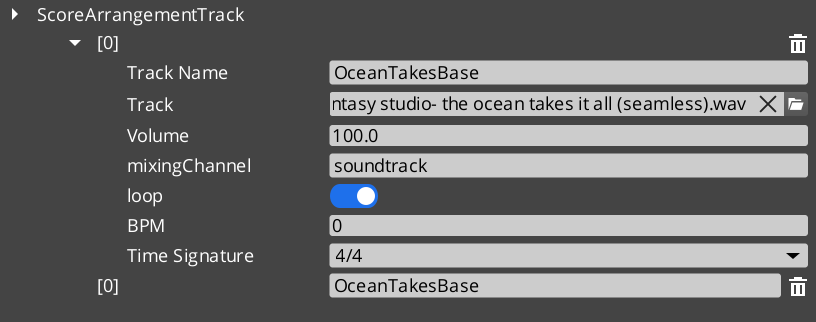
The Score Arrangement system provides multi-layer dynamic music for GS_Play projects. A ScoreArrangementTrack asset defines a musical score with configurable tempo, time signature, fade behavior, and multiple layers that can be enabled or disabled at runtime. This allows game music to adapt to gameplay state – adding or removing instrumental layers, changing intensity, or crossfading between sections.
Score tracks are loaded and controlled through the Audio Manager request bus.
For usage guides and setup examples, see The Basics: GS_Audio.
GS_Audio is in Early Development. Full support planned soon: 2026.
Contents
Data Model
ScoreArrangementTrack
A multi-layer musical score asset. Each track defines the musical structure and contains one or more layers that play simultaneously.
| Field | Value |
|---|
| TypeId | {DBB48082-1834-4DFF-BAD2-6EA8D83F1AD0} |
| Extends | AZ::Data::AssetData |
| Reflection | Requires GS_AssetReflectionIncludes.h — see Serialization Helpers |
| Field | Type | Description |
|---|
| Track Name | AZStd::string | Identifier for this score track. |
| Time Signature | TimeSignatures | The time signature for this score (e.g. 4/4, 3/4, 6/8). |
| BPM | float | Tempo in beats per minute. |
| Fade In Time | float | Duration in seconds for the score to fade in when playback begins. |
| Fade Out Time | float | Duration in seconds for the score to fade out when playback stops. |
| Loop | bool | Whether the score loops back to the beginning when it reaches the end. |
| Layers | AZStd::vector<ScoreLayer> | The musical layers that compose this score. |
| Active Layers | AZStd::vector<int> | Indices of layers that are active (audible) at the start of playback. |
ScoreLayer
A single musical layer within a score arrangement. Each layer represents one track of audio (e.g. drums, bass, melody) that can be independently enabled or disabled.
| Field | Value |
|---|
| TypeId | {C8B2669A-FAEA-4910-9218-6FE50D2E588E} |
| Field | Type | Description |
|---|
| Layer Name | AZStd::string | Identifier for this layer within the score. |
| Audio Asset | AZ::Data::Asset<AudioClipAsset> | The audio clip for this layer. |
| Volume | float | Base volume level for this layer (0.0 to 1.0). |
| Fade Time | float | Duration in seconds for this layer to fade in or out when toggled. |
TimeSignatures (Enum)
Supported musical time signatures for score arrangement tracks.
| Field | Value |
|---|
| TypeId | {6D6B5657-746C-4FCA-A0AC-671C0F064570} |
| Value | Beats per Measure | Beat Unit | Description |
|---|
FourFour | 4 | Quarter note | 4/4 – Common time. The most widely used time signature. |
FourTwo | 4 | Half note | 4/2 – Four half-note beats per measure. |
TwelveEight | 12 | Eighth note | 12/8 – Compound quadruple meter. Four groups of three eighth notes. |
TwoTwo | 2 | Half note | 2/2 – Cut time (alla breve). Two half-note beats per measure. |
TwoFour | 2 | Quarter note | 2/4 – Two quarter-note beats per measure. March time. |
SixEight | 6 | Eighth note | 6/8 – Compound duple meter. Two groups of three eighth notes. |
ThreeFour | 3 | Quarter note | 3/4 – Waltz time. Three quarter-note beats per measure. |
ThreeTwo | 3 | Half note | 3/2 – Three half-note beats per measure. |
NineEight | 9 | Eighth note | 9/8 – Compound triple meter. Three groups of three eighth notes. |
See Also
For conceptual overviews and usage guides:
For component references:
Get GS_Audio
GS_Audio — Explore this gem on the product page and add it to your project.
5 - Klatt Voice Synthesis
Custom text-to-speech via Klatt formant synthesis with 3D spatial audio, phoneme mapping, and voice profiling.
The Klatt Voice Synthesis system provides custom text-to-speech for GS_Play projects using Klatt formant synthesis with full 3D spatial audio. It uses SoLoud internally for speech generation and MiniAudio for spatial positioning.
The system has two layers:
- KlattVoiceSystemComponent – A singleton that manages the shared SoLoud engine instance and tracks the 3D audio listener position.
- KlattVoiceComponent – A per-entity component that generates speech, queues segments, applies voice profiles, and emits spatialized audio from the entity’s position.
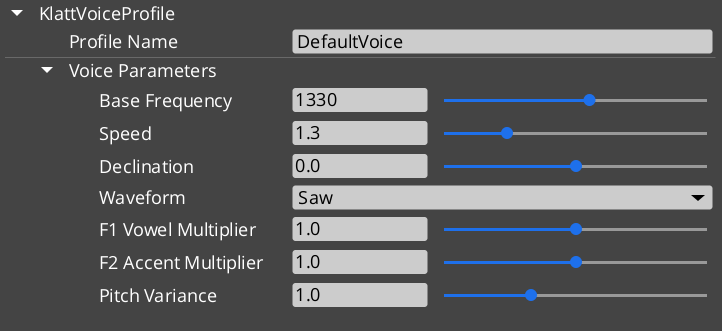
Voice characteristics are defined through KlattVoiceProfile assets containing frequency, speed, waveform, formant, and phoneme mapping configuration. Phoneme maps convert input text to ARPABET phonemes for the Klatt synthesizer, with support for custom pronunciation overrides.
For usage guides and setup examples, see The Basics: GS_Audio.
Contents
Components
KlattVoiceSystemComponent
Singleton component that manages the shared SoLoud engine and 3D listener tracking.
| Field | Value |
|---|
| TypeId | {F4A5D6E7-8B9C-4D5E-A1F2-3B4C5D6E7F8A} |
| Extends | AZ::Component, AZ::TickBus::Handler |
| Bus | KlattVoiceSystemRequestBus (Single/Single) |
KlattVoiceComponent
Per-entity voice component with spatial audio, phoneme mapping, and segment queue.
| Field | Value |
|---|
| TypeId | {4A8B9C7D-6E5F-4D3C-2B1A-0F9E8D7C6B5A} |
| Extends | AZ::Component, AZ::TickBus::Handler |
| Request Bus | KlattVoiceRequestBus (Single/ById, entity-addressed) |
| Notification Bus | KlattVoiceNotificationBus (Multiple/Multiple) |
API Reference
Request Bus: KlattVoiceSystemRequestBus
System-level voice management. Singleton bus – Single address, single handler.
| Method | Parameters | Returns | Description |
|---|
GetSoLoudEngine | – | SoLoud::Soloud* | Returns a pointer to the shared SoLoud engine instance. |
SetListenerPosition | const AZ::Vector3& position | void | Updates the 3D audio listener position for spatial voice playback. |
SetListenerOrientation | const AZ::Vector3& forward, const AZ::Vector3& up | void | Updates the 3D audio listener orientation. |
GetListenerPosition | – | AZ::Vector3 | Returns the current listener position. |
IsEngineReady | – | bool | Returns whether the SoLoud engine has been initialized and is ready. |
Request Bus: KlattVoiceRequestBus
Per-entity voice synthesis controls. Entity-addressed bus – Single handler per entity ID.
| Method | Parameters | Returns | Description |
|---|
Speak | const AZStd::string& text | void | Converts text to speech and plays it. Uses the component’s configured voice profile. |
SpeakWithParams | const AZStd::string& text, const KlattVoiceParams& params | void | Converts text to speech using the specified voice parameters instead of the profile defaults. |
StopSpeaking | – | void | Immediately stops any speech in progress and clears the segment queue. |
IsSpeaking | – | bool | Returns whether this entity’s voice is currently producing speech. |
QueueSegment | const AZStd::string& text | void | Adds a speech segment to the queue. Queued segments play in order after the current segment finishes. |
ClearQueue | – | void | Clears all queued speech segments without stopping current playback. |
SetVoiceProfile | const AZ::Data::Asset<KlattVoiceProfile>& profile | void | Changes the voice profile used by this component. |
GetVoiceProfile | – | AZ::Data::Asset<KlattVoiceProfile> | Returns the currently assigned voice profile asset. |
SetSpatialConfig | const KlattSpatialConfig& config | void | Updates the 3D spatial audio configuration for this voice. |
GetSpatialConfig | – | KlattSpatialConfig | Returns the current spatial audio configuration. |
SetVolume | float volume | void | Sets the output volume for this voice (0.0 to 1.0). |
GetVolume | – | float | Returns the current output volume. |
Notification Bus: KlattVoiceNotificationBus
Events broadcast by voice components. Multiple handler bus – any number of components can subscribe.
| Event | Parameters | Description |
|---|
OnSpeechStarted | const AZ::EntityId& entityId | Fired when an entity begins speaking. |
OnSpeechFinished | const AZ::EntityId& entityId | Fired when an entity finishes speaking (including all queued segments). |
OnSegmentStarted | const AZ::EntityId& entityId, int segmentIndex | Fired when a new speech segment begins playing. |
OnSegmentFinished | const AZ::EntityId& entityId, int segmentIndex | Fired when a speech segment finishes playing. |
Data Types
KlattVoiceParams
Core voice synthesis parameters controlling the Klatt formant synthesizer output.
| Field | Value |
|---|
| TypeId | {8A9C7F3B-4E2D-4C1A-9B5E-6D8F9A2C1B4E} |
| Field | Type | Description |
|---|
| Base Frequency | float | Fundamental frequency (F0) in Hz. Controls the base pitch of the voice. |
| Speed | float | Speech rate multiplier. 1.0 is normal speed. |
| Declination | float | Pitch declination rate. Controls how pitch drops over the course of an utterance. |
| Waveform | KlattWaveform | Glottal waveform type used by the synthesizer. |
| Formant Shift | float | Shifts all formant frequencies up or down. Positive values raise pitch character, negative values lower it. |
| Pitch Variance | float | Amount of random pitch variation applied during speech for natural-sounding intonation. |
KlattVoiceProfile
A voice profile asset combining synthesis parameters with a phoneme mapping.
| Field | Value |
|---|
| TypeId | {2CEB777E-DAA7-40B1-BFF4-0F772ADE86CF} |
| Reflection | Requires GS_AssetReflectionIncludes.h — see Serialization Helpers |
| Field | Type | Description |
|---|
| Voice Params | KlattVoiceParams | The synthesis parameters for this voice profile. |
| Phoneme Map | AZ::Data::Asset<KlattPhonemeMap> | The phoneme mapping asset used for text-to-phoneme conversion. |
KlattVoicePreset
A preset configuration for quick voice setup.
| Field | Value |
|---|
| TypeId | {2B8D9E4F-7C6A-4D3B-8E9F-1A2B3C4D5E6F} |
| Field | Type | Description |
|---|
| Preset Name | AZStd::string | Display name for this preset. |
| Profile | KlattVoiceProfile | The voice profile configuration stored in this preset. |
KlattSpatialConfig
3D spatial audio configuration for voice positioning.
| Field | Value |
|---|
| TypeId | {7C9F8E2D-3A4B-5F6C-1E0D-9A8B7C6D5E4F} |
| Field | Type | Description |
|---|
| Enable 3D | bool | Whether this voice uses 3D spatialization. When false, audio plays as 2D. |
| Min Distance | float | Distance at which attenuation begins. Below this distance the voice plays at full volume. |
| Max Distance | float | Distance at which the voice reaches minimum volume. |
| Attenuation Model | int | The distance attenuation curve type (linear, inverse, exponential). |
| Doppler Factor | float | Intensity of the Doppler effect applied to this voice. 0.0 disables Doppler. |
KlattPhonemeMap
Phoneme mapping asset for text-to-ARPABET conversion with custom overrides.
| Field | Value |
|---|
| TypeId | {F3E9D7C1-2A4B-5E8F-9C3D-6A1B4E7F2D5C} |
| Reflection | Requires GS_AssetReflectionIncludes.h — see Serialization Helpers |
| Field | Type | Description |
|---|
| Base Map | BasePhonemeMap | The base phoneme dictionary to use as the foundation for conversion. |
| Overrides | AZStd::vector<PhonemeOverride> | Custom pronunciation overrides for specific words or patterns. |
PhonemeOverride
A custom pronunciation rule that overrides the base phoneme map for a specific word or pattern.
| Field | Value |
|---|
| TypeId | {A2B5C8D1-4E7F-3A9C-6B2D-1F5E8A3C7D9B} |
| Field | Type | Description |
|---|
| Word | AZStd::string | The word or pattern to match. |
| Phonemes | AZStd::string | The ARPABET phoneme sequence to use for this word. |
Enumerations
Glottal waveform types available for the Klatt synthesizer.
| Field | Value |
|---|
| TypeId | {8ED1DABE-3347-44A5-B43A-C171D36AE780} |
| Value | Description |
|---|
Saw | Sawtooth waveform. Bright, buzzy character. |
Triangle | Triangle waveform. Softer than sawtooth, slightly hollow. |
Sin | Sine waveform. Pure tone, smooth and clean. |
Square | Square waveform. Hollow, reed-like character. |
Pulse | Pulse waveform. Variable duty cycle for varied timbres. |
Noise | Noise waveform. Breathy, whisper-like quality. |
Warble | Warble waveform. Modulated tone with vibrato-like character. |
BasePhonemeMap
Available base phoneme dictionaries for text-to-ARPABET conversion.
| Field | Value |
|---|
| TypeId | {D8F2A3C5-1B4E-7A9F-6D2C-5E8A1B3F4C7D} |
| Value | Description |
|---|
SoLoud_Default | The default phoneme mapping built into SoLoud. Covers standard English pronunciation. |
CMU_Full | The full CMU Pronouncing Dictionary. Comprehensive English phoneme coverage with over 130,000 entries. |
KTT (Klatt Text Tags) are inline commands embedded in strings passed to KlattVoiceComponent::SpeakText. They are parsed by KlattCommandParser::Parse and stripped from the spoken text before synthesis begins — they are never heard.
Format: <ktt attr1=value1 attr2=value2>
Multiple attributes can be combined in a single tag. Attribute names are case-insensitive. String values may optionally be wrapped in quotes. An empty value (e.g. speed=) resets that parameter to the voice profile default.
speed=X
Override the speech speed multiplier from this point forward.
| |
|---|
| Range | 0.1 – 5.0 |
| Default reset | speed= (restores profile default) |
| 1.0 | Normal speed |
Normal speech <ktt speed=2.0> fast bit <ktt speed=> back to default.
decl=X / declination=X
Pitch declination — how much pitch falls over the course of the utterance. Both decl and declination are accepted.
| |
|---|
| Range | 0.0 – 1.0 |
| 0.0 | Steady pitch (no fall) |
| 0.8 | Strong downward drift |
Rising <ktt decl=0.0> steady <ktt decl=0.8> falling voice.
Change the glottal waveform used by the synthesizer, setting the overall character of the voice.
| Value | Character |
|---|
saw | Default, neutral voice |
triangle | Softer, smoother |
sin / sine | Pure tone, robotic |
square | Harsh, mechanical |
pulse | Raspy, textured |
noise | Whispered, breathy |
warble | Wobbly, character voice |
<ktt waveform="noise"> whispered section <ktt waveform="saw"> normal voice.
vowel=X
First formant (F1) frequency multiplier. Shifts the quality of synthesised vowel sounds.
| |
|---|
| 1.0 | Normal |
| > 1.0 | More open vowel quality |
| < 1.0 | More closed vowel quality |
<ktt vowel=1.4> different vowel colour here.
accent=X
Second formant (F2) frequency multiplier. Shifts accent or dialect colouration.
| |
|---|
| 1.0 | Normal |
| < 1.0 | Shifted accent colouring |
<ktt accent=0.8> shifted accent here.
pitch=X
F0 pitch variance amount. Controls how much pitch varies during synthesis.
| |
|---|
| 1.0 | Normal variance |
| > 1.0 | More expressive intonation |
| < 1.0 | Flatter, more monotone |
<ktt pitch=2.0> very expressive speech <ktt pitch=0.1> flat monotone.
pause=X
Insert a pause of X seconds at this position in the voice playback. Value is required — there is no default.
Hello.<ktt pause=0.8> How are you?
Combined Example
Dialogue string using typewriter text commands and KTT voice tags together:
[b]Warning:[/b] [color=#FF0000]do not[/color] proceed.[pause=1]
<ktt waveform="square" pitch=1.8>This is a mechanical override.<ktt pause=0.5><ktt waveform="saw" pitch=1.0>
[speed=3]Resuming normal protocol.[/speed]
See Also
For conceptual overviews and usage guides:
For component references:
- Audio Manager – Manager lifecycle that the voice system participates in
Get GS_Audio
GS_Audio — Explore this gem on the product page and add it to your project.
6 - Third Party Implementations
Integration guides for third-party audio systems with GS_Audio.
This section will contain integration guides for connecting third-party audio middleware and tools with the GS_Audio system.
For usage guides and setup examples, see The Basics: GS_Audio.
Get GS_Audio
GS_Audio — Explore this gem on the product page and add it to your project.